AI agent for primary school teachers
Missed Reading Intervention Rotation Agent
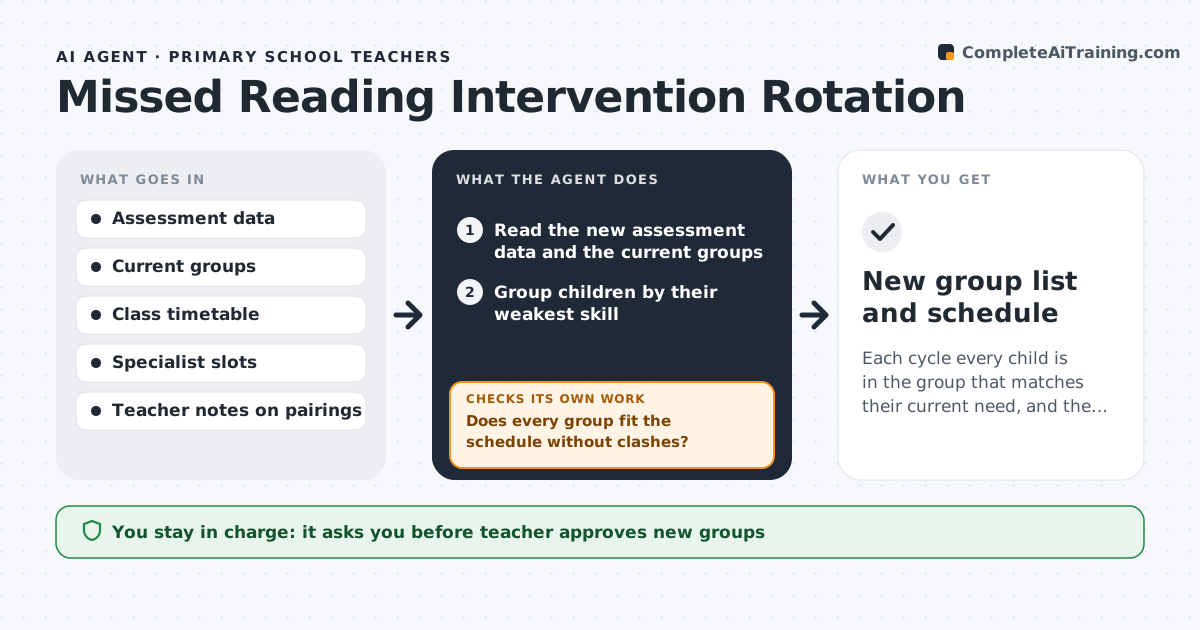
Each cycle every child is in the group that matches their current need, and the schedule works.
What it does
Small reading groups are set in September and rarely change, even when children have moved on. At the end of each cycle the agent reads the new assessment data, such as running records or fluency scores, and regroups children by their current skill need. It checks that group sizes stay within the limit and that each group fits the teacher's weekly timetable and the specialist's slots. It flags children who have made little progress over two cycles so the teacher can consider other support. It then rechecks the new schedule for clashes with other lessons and fixes them. The teacher approves the new groups before children are told. Edge case: two children who work badly together are kept apart if the teacher has noted it.
How it works
Follow the arrows from top to bottom. The orange dashed arrow is the loop: when a check fails, the agent goes back and tries again.
Read the steps as a list
- Intervention cycle ends
- Read the new assessment data and the current groups
- Group children by their weakest skill
- Apply size limits and pairing notes
- Fit groups into the timetable and specialist slots
- Does every group fit the schedule without clashes?If not: Move a group to another slot or split it, then recheck the timetable. Back to step 4.
- List children with no progress over two cycles
- Teacher approves the new groups and the flag listThe agent waits here for your OK.
- Publish the groups and update the plan
- Does every child appear in exactly one group?If not: Fix the missing or duplicate assignments and rerun the grouping. Back to step 3.
- New group list and schedule
How it decides
It groups by the weakest skill first, keeps size limits, and flags a lack of progress after two cycles.
- Group size 3 to 6 children
- Group by weakest skill, then by level
- No progress after 2 cycles gets flagged
- Pairing notes override the grouping
Make it yours
Every agent is a starting point. You choose these settings for your own situation.
- Group size range
- Skills used for grouping
- Cycle length in weeks
- Slot rules
- Flag threshold in cycles
What keeps you in control
It always asks you first
- Teacher approves new groups
- Teacher approves any referral flag
Hard limits
- Never share a child's scores with other families
- Never place children without teacher approval
- Never replace the teacher's pairing notes
It stops when
- Done: all children are placed and the schedule is clash free
- Stop: assessment data is incomplete for more than 3 children
Set it up
We guide you through the set-up, step by step
Members get the full set-up guide for this agent. No technical skills needed: you copy, paste and upload.
- One set of instructions to paste into your AI, with the clicks for ChatGPT, Claude, Microsoft 365 Copilot, Gemini and Grok
- The agent then walks you through connecting your own data, one source at a time
- A downloadable copy with the flow chart, the rules and the full guide