AI agent for help desk technicians
Mobile Device Enrollment Troubleshooting Agent
The phone enrolled with the right profile, or a clear diagnosis of why it cannot be
What it does
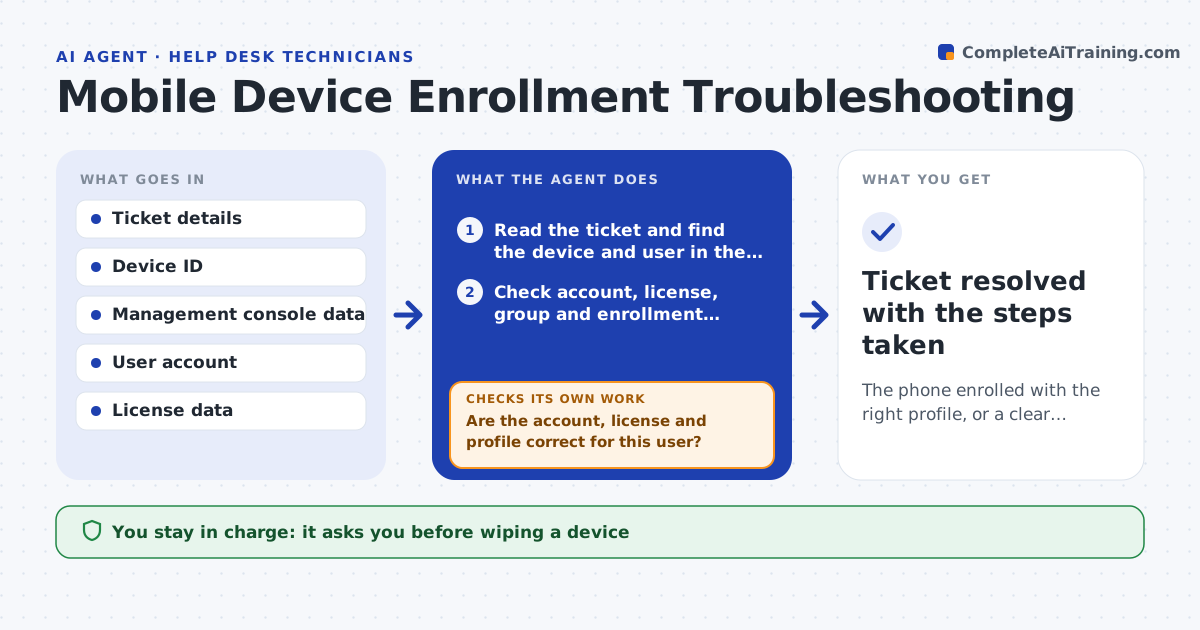
A new phone refuses to enroll and the technician spends forty minutes checking accounts and settings. This agent reads the ticket and then looks at the device in the management console: its state, last check-in, operating system version and whether it is already registered under another user. It checks the user's account, license and group, and whether the enrollment profile applies. It tries the likely fix steps in order, such as assigning a missing license, clearing a stale device record or resending the enrollment link, and checks the enrollment status after each step. If one fails, it moves to the next. It stops and asks the technician before any wipe. Edge case: a phone that is already enrolled under a former employee is flagged for release first.
How it works
Follow the arrows from top to bottom. The orange dashed arrow is the loop: when a check fails, the agent goes back and tries again.
Read the steps as a list
- Enrollment ticket opened
- Read the ticket and find the device and user in the console
- Check account, license, group and enrollment profile
- Are the account, license and profile correct for this user?If not: fix the missing license or group and recheck. Back to step 3.
- Check for a stale or duplicate device record
- Try the next fix, such as clearing the stale record or resending the link
- Is the device now enrolled and checking in?If not: try the next fix in the list. Back to step 6.
- Technician approves a wipe if all other fixes failThe agent waits here for your OK.
- Record the cause and fix in the ticket
- Ticket resolved with the steps taken
How it decides
Fixes are tried from least to most disruptive. A wipe is proposed only after account and license fixes fail.
- Try license and account fixes before device actions
- Release a device registered to a former user before enrolling
- Wait 10 minutes after each step for status to update
- Propose a wipe only after 3 fixes fail
Make it yours
Every agent is a starting point. You choose these settings for your own situation.
- Fix order for your environment
- Wait time between steps (default 10 minutes)
- License pools it may draw from
- Escalation group
What keeps you in control
It always asks you first
- Wiping a device
- Releasing a device owned by another user
Hard limits
- Never wipes a device without approval
- Never changes another user's device
It stops when
- Done: device enrolled and checking in
- Stop: all fixes fail and a wipe is declined
Set it up
We guide you through the set-up, step by step
Members get the full set-up guide for this agent. No technical skills needed: you copy, paste and upload.
- One set of instructions to paste into your AI, with the clicks for ChatGPT, Claude, Microsoft 365 Copilot, Gemini and Grok
- The agent then walks you through connecting your own data, one source at a time
- A downloadable copy with the flow chart, the rules and the full guide