AI agent for economists
Model Robustness Check Agent
Show how stable the key result is across reasonable specifications and document it
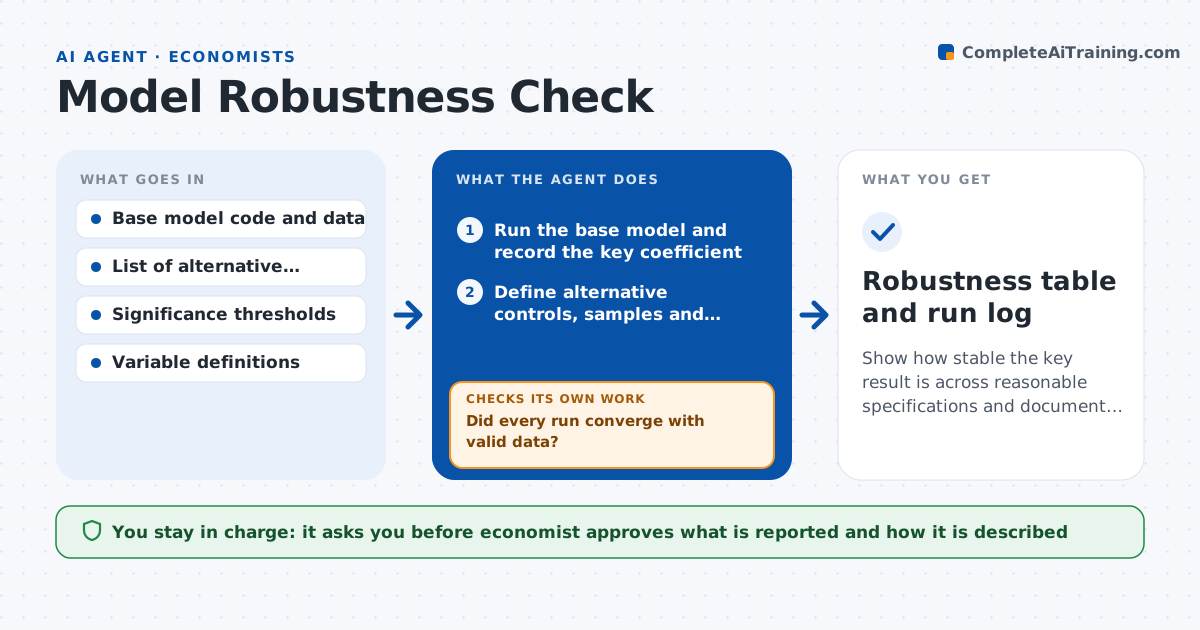
What it does
An economist estimates a policy effect and a referee asks whether it survives other controls. This agent takes the base model and reruns it with alternative controls, samples and estimators, such as dropping outliers, adding fixed effects or using a different standard error. It compares the key coefficient across runs and flags results that change sign, lose significance or move a lot. It logs each run with the code, data version and settings, so results can be repeated. If a run fails to converge or shows data issues, it fixes the setup and reruns. It summarizes which findings are robust and which are fragile. The economist approves what is reported. Edge case: a specification that uses a bad control is marked as invalid and left out.
How it works
Follow the arrows from top to bottom. The orange dashed arrow is the loop: when a check fails, the agent goes back and tries again.
Read the steps as a list
- Base model is ready
- Run the base model and record the key coefficient
- Define alternative controls, samples and estimators
- Run each alternative and log settings
- Did every run converge with valid data?If not: Fix the setup or drop the invalid specification and rerun. Back to step 3.
- Compare coefficient, error and sample across runs
- Is the key result stable across valid runs?If not: Add diagnostics to find the source of the change and rerun. Back to step 3.
- Draft the robustness table and notes
- Economist approves what is reportedThe agent waits here for your OK.
- Robustness table and run log
How it decides
It marks a result fragile when the key coefficient changes sign or moves more than 25 percent in any valid specification.
- Mark a result fragile if the sign changes in any valid run
- Mark it fragile if the coefficient moves more than 25 percent
- Exclude specifications with invalid controls
- Log code version and data version for every run
Make it yours
Every agent is a starting point. You choose these settings for your own situation.
- Stability tolerance (default 25 percent)
- Specifications list (default controls, samples, estimators)
- Significance level (default 5 percent)
- Log format (default a run table)
What keeps you in control
It always asks you first
- Economist approves what is reported and how it is described
Hard limits
- Never change the data or the base model
- Report every specification that was run
- Never describe a fragile result as robust
It stops when
- Done: Robustness table approved
- Stop: Data problems cannot be fixed, so hand to the economist
Set it up
We guide you through the set-up, step by step
Members get the full set-up guide for this agent. No technical skills needed: you copy, paste and upload.
- One set of instructions to paste into your AI, with the clicks for ChatGPT, Claude, Microsoft 365 Copilot, Gemini and Grok
- The agent then walks you through connecting your own data, one source at a time
- A downloadable copy with the flow chart, the rules and the full guide