AI agent for prompt engineers
Model Upgrade Prompt Migration Agent
Produce a tested migration plan that tells which prompts can move to the new model and which need work
What it does
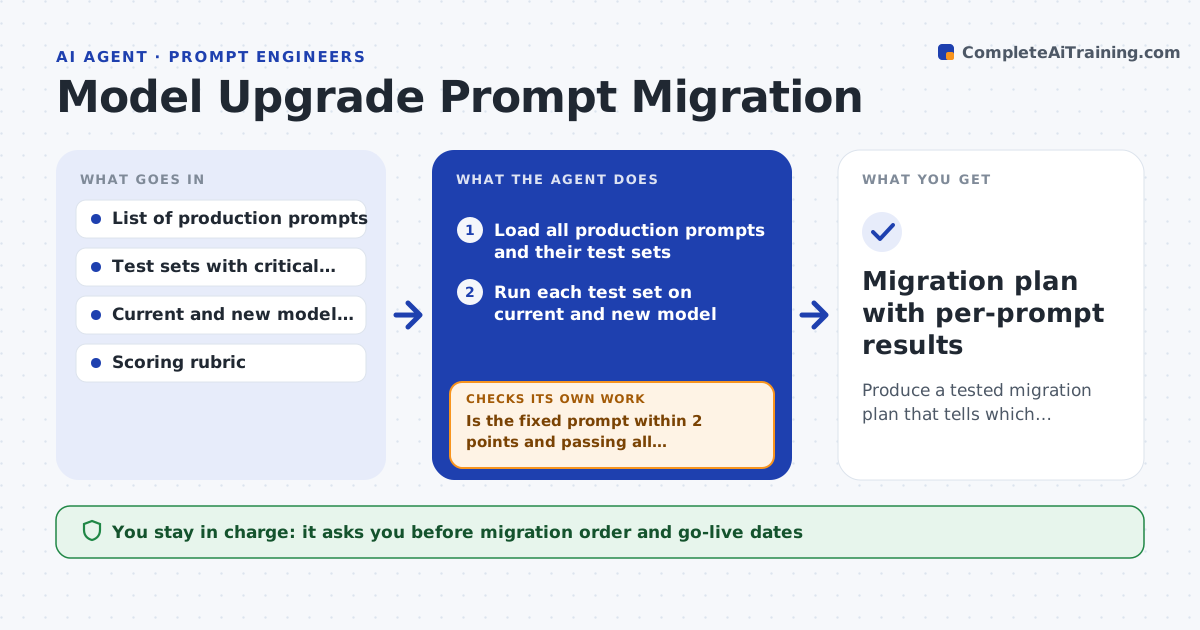
When a new model version arrives, the team wants its speed or price, but each prompt may react differently. Testing all of them by hand is slow, and some breakages only show in rare inputs. This agent runs every production prompt's test set on both the current and the new model and compares scores side by side. It sorts prompts into three groups: ready as is, needs small changes, and needs rework. For the middle group it tries targeted fixes, such as restating the format or adding an example, and retests. If a fix does not bring the prompt within the allowed gap, it moves the prompt to the rework list with notes on what failed. The prompt lead approves the migration plan and the order of switching. Edge case: a prompt that improves on average but fails a critical test still counts as not ready.
How it works
Follow the arrows from top to bottom. The orange dashed arrow is the loop: when a check fails, the agent goes back and tries again.
Read the steps as a list
- New model approved for evaluation
- Load all production prompts and their test sets
- Run each test set on current and new model
- Compare scores and critical test results per prompt
- Sort prompts into ready, small fix and rework
- Apply a targeted fix to each small-fix prompt and retest
- Is the fixed prompt within 2 points and passing all critical tests?If not: try one other fix; if still failing, move it to rework with notes. Back to step 6.
- Have all critical tests been run on the new model for every prompt?If not: run the missing tests before planning. Back to step 3.
- Prompt lead approves the migration order and rework listThe agent waits here for your OK.
- Migration plan with per-prompt results
How it decides
A prompt is ready when its new-model score is within 2 points of the old one and it passes every critical test; otherwise it gets one round of fixes before going to rework.
- Any failed critical test makes a prompt not ready, whatever its average
- Allow two fix attempts per prompt before rework
- Order switching by risk: lowest-traffic ready prompts first
- Report cost and latency change per prompt next to quality
Make it yours
Every agent is a starting point. You choose these settings for your own situation.
- Allowed score gap (default 2 points)
- Fix attempts per prompt (default 2)
- Which tests count as critical (default those tagged critical)
- Rollout batch size (default 5 prompts per week)
What keeps you in control
It always asks you first
- Migration order and go-live dates
- Each prompt switch in production
Hard limits
- Never switches a production prompt to the new model
- Uses only test data cleared for model testing
It stops when
- Done: plan approved
- Stop: new model fails critical tests on most prompts; recommend waiting
Set it up
We guide you through the set-up, step by step
Members get the full set-up guide for this agent. No technical skills needed: you copy, paste and upload.
- One set of instructions to paste into your AI, with the clicks for ChatGPT, Claude, Microsoft 365 Copilot, Gemini and Grok
- The agent then walks you through connecting your own data, one source at a time
- A downloadable copy with the flow chart, the rules and the full guide