AI agent for sustainability managers
Monthly Utility and Carbon Data Agent
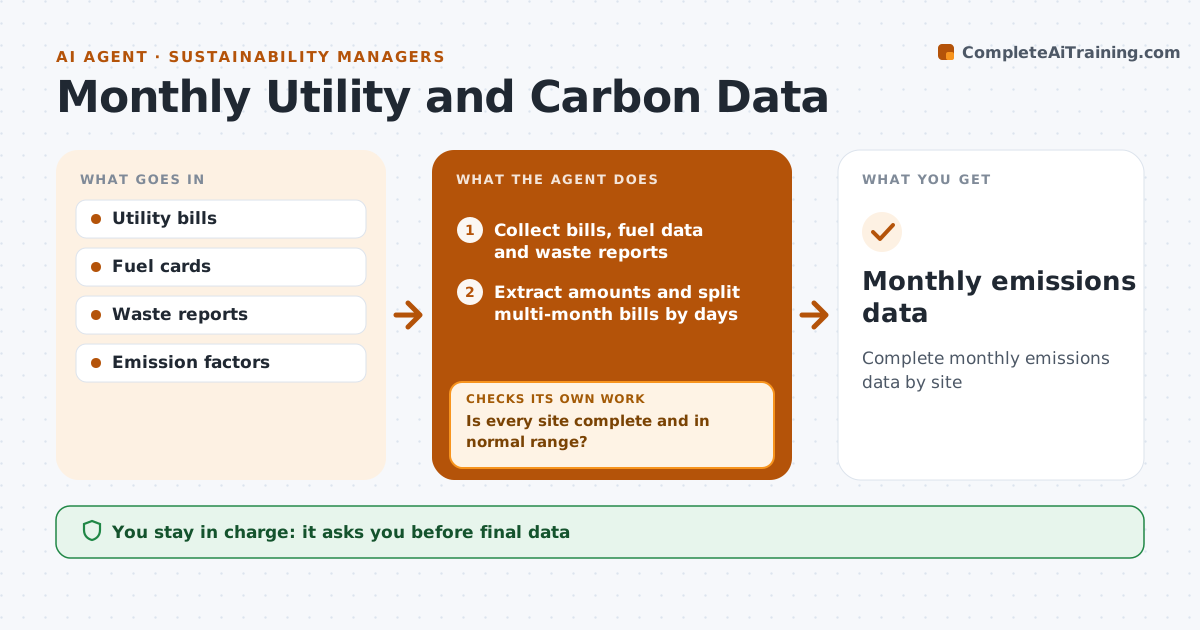
Complete monthly emissions data by site
What it does
A good carbon footprint needs monthly energy, fuel, water and waste data for every site, but it is often collected once a year with gaps. Each month this agent collects utility bills, fuel card data and waste reports, and extracts amounts and units. A bill covering two months is split by days. It checks each site has every bill and that amounts are within a normal range compared with the same month last year. If a bill is missing or a number looks wrong, it asks the site contact, and estimates only when no data arrives, marking the estimate. It then converts amounts into emissions using the factors you choose. It drafts a dashboard by site and scope. The sustainability manager approves before numbers enter official reports.
How it works
Follow the arrows from top to bottom. The orange dashed arrow is the loop: when a check fails, the agent goes back and tries again.
Read the steps as a list
- Month closes
- Collect bills, fuel data and waste reports
- Extract amounts and split multi-month bills by days
- Is every site complete and in normal range?If not: ask site contacts for missing or corrected data. Back to step 2.
- Estimate and mark any data that never arrived
- Convert units and calculate emissions
- Draft dashboard by site and scope
- Manager approves dataThe agent waits here for your OK.
- Monthly emissions data
How it decides
It flags missing bills and values more than the set percent away from the same month last year.
- Split bills by days
- Flag 25% change from last year
- Factors fixed for the year
Make it yours
Every agent is a starting point. You choose these settings for your own situation.
- Emission factors
- Sites
- Range threshold
- Dashboard format
What keeps you in control
It always asks you first
- Final data
Hard limits
- Never publishes numbers
It stops when
- Done: data approved
- Stop: site cannot supply data; estimate and mark
Set it up
We guide you through the set-up, step by step
Members get the full set-up guide for this agent. No technical skills needed: you copy, paste and upload.
- One set of instructions to paste into your AI, with the clicks for ChatGPT, Claude, Microsoft 365 Copilot, Gemini and Grok
- The agent then walks you through connecting your own data, one source at a time
- A downloadable copy with the flow chart, the rules and the full guide