AI agent for real estate developers
Neighborhood Opposition Monitoring Agent
A running map of public concerns with checked answers ready before the hearing
What it does
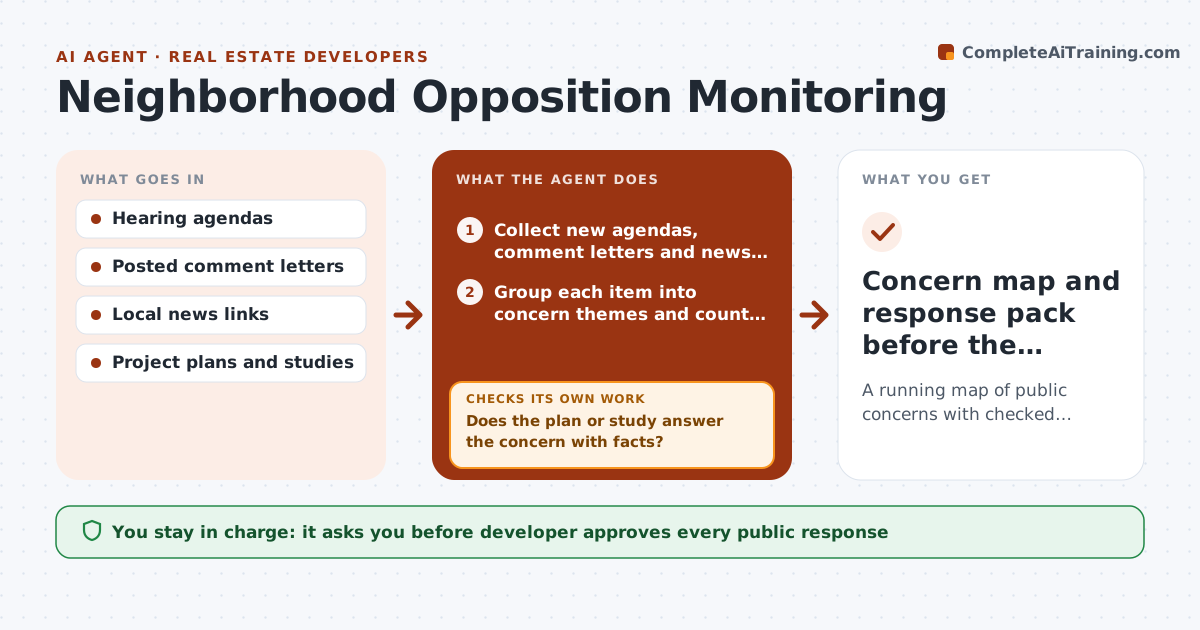
Public opposition to a project often shows up only at the hearing, when it is too late to answer it. This agent watches hearing agendas, posted comment letters and local news for the project, once a week. It groups concerns into themes such as traffic, height, parking, schools and noise. It checks each theme against the plan to see whether the plan already addresses it, then drafts a response and suggests a change if the concern is fair and cheap to fix. It rechecks sources every week and updates the themes as new items appear, noting which ones grew. The developer approves any public response. Edge case: a letter claims the building is taller than the plan, so the agent checks the drawings and drafts a factual correction.
How it works
Follow the arrows from top to bottom. The orange dashed arrow is the loop: when a check fails, the agent goes back and tries again.
Read the steps as a list
- Weekly watch begins
- Collect new agendas, comment letters and news about the project
- Group each item into concern themes and count them
- Look up the plan, traffic study or drawing that relates to each theme
- Does the plan or study answer the concern with facts?If not: mark it as a gap and propose a possible design or mitigation change. Back to step 4.
- Draft a response for each theme with the source fact
- Developer approves public responses and any plan changeThe agent waits here for your OK.
- Log what was published and watch for replies
- Did new comments on the theme drop or change?If not: update the theme and revise the response. Back to step 2.
- Concern map and response pack before the hearing
How it decides
A concern is escalated when it appears in three or more letters or in news coverage. A response is drafted only after the plan or study has been checked.
- Treat a theme as major when it appears in three or more separate letters
- Answer with facts from the plan only, never opinion
- Flag claims that conflict with the drawings and draft a correction
- Suggest a mitigation only when it fits within the budget limit the developer set
Make it yours
Every agent is a starting point. You choose these settings for your own situation.
- Sources to watch
- Number of letters that make a theme major (default 3)
- Check frequency
- Style of responses
What keeps you in control
It always asks you first
- Developer approves every public response
- Developer approves any change to the plan
Hard limits
- Never publish a response without approval
- Do not name or profile private individuals
- Use public sources only
It stops when
- Done: hearing held and the final concern map is saved
- Stop: legal counsel is needed on a threatened appeal
Set it up
We guide you through the set-up, step by step
Members get the full set-up guide for this agent. No technical skills needed: you copy, paste and upload.
- One set of instructions to paste into your AI, with the clicks for ChatGPT, Claude, Microsoft 365 Copilot, Gemini and Grok
- The agent then walks you through connecting your own data, one source at a time
- A downloadable copy with the flow chart, the rules and the full guide