AI agent for network administrators
Network Fault Triage Agent
Faster diagnosis of network problems with a clear likely cause and safe next step
What it does
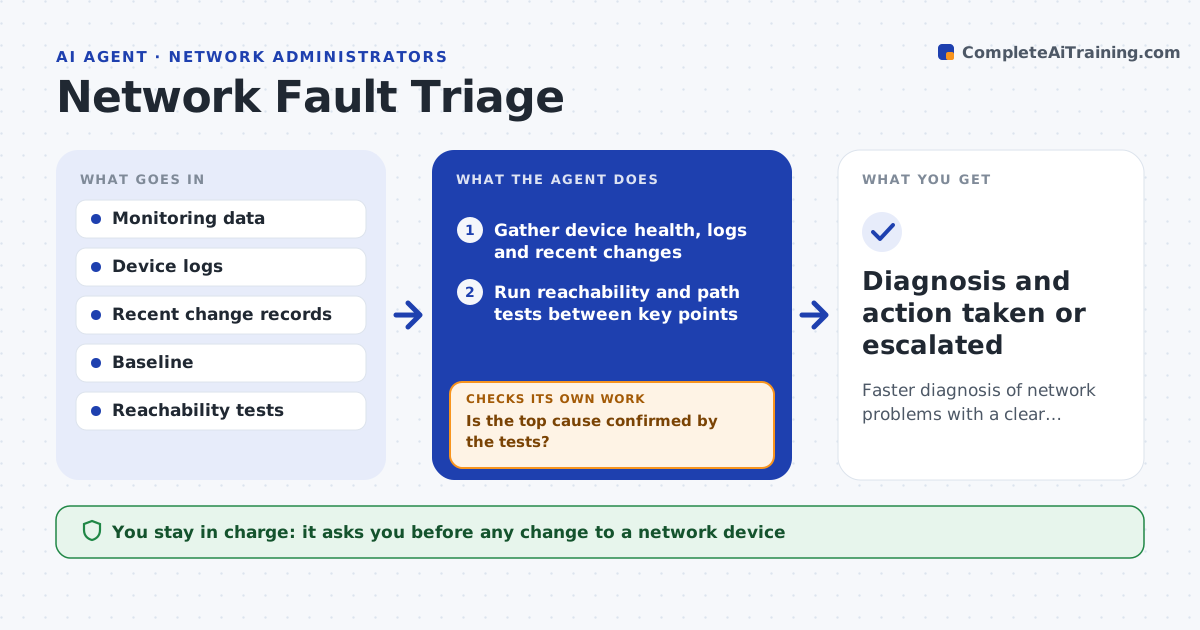
During a network problem, time is lost jumping between devices, logs and monitoring tools while users wait. When an alert or report comes in, this agent gathers the current state: interface errors, device health, recent changes, routing and reachability between key points. It compares that with the healthy baseline and forms a ranked list of likely causes. It runs safe read-only tests, such as tracing the path to the affected site, to confirm or rule out each cause. If the first cause is ruled out, it moves to the next. For known issues with a runbook fix, like failing over to a backup link, it proposes the action and checks the result afterward. You approve any change to devices. Edge case: an internet provider outage is identified and routed to the provider, not chased internally.
How it works
Follow the arrows from top to bottom. The orange dashed arrow is the loop: when a check fails, the agent goes back and tries again.
Read the steps as a list
- Network alert or outage reported
- Gather device health, logs and recent changes
- Run reachability and path tests between key points
- Rank likely causes against the baseline
- Is the top cause confirmed by the tests?If not: rule it out and test the next likely cause. Back to step 3.
- Propose a runbook fix or route to the provider
- Engineer approves any device changeThe agent waits here for your OK.
- Diagnosis and action taken or escalated
How it decides
It ranks causes by the evidence, runs read-only tests to confirm, and proposes only runbook actions, escalating provider issues outward.
- Rank causes by evidence, not habit
- Use only read-only tests before approval
- Route confirmed provider outages outward
Make it yours
Every agent is a starting point. You choose these settings for your own situation.
- Baseline and key test points
- Runbook actions allowed
- Which alerts trigger it
- Escalation contacts
What keeps you in control
It always asks you first
- Any change to a network device
- Failover actions
Hard limits
- No device changes without approval
- Read-only during diagnosis
It stops when
- Done: cause found and action taken or escalated
- Stop: monitoring and device access are down
Set it up
We guide you through the set-up, step by step
Members get the full set-up guide for this agent. No technical skills needed: you copy, paste and upload.
- One set of instructions to paste into your AI, with the clicks for ChatGPT, Claude, Microsoft 365 Copilot, Gemini and Grok
- The agent then walks you through connecting your own data, one source at a time
- A downloadable copy with the flow chart, the rules and the full guide