AI agent for home inspectors
New Construction Phase Inspection Agent
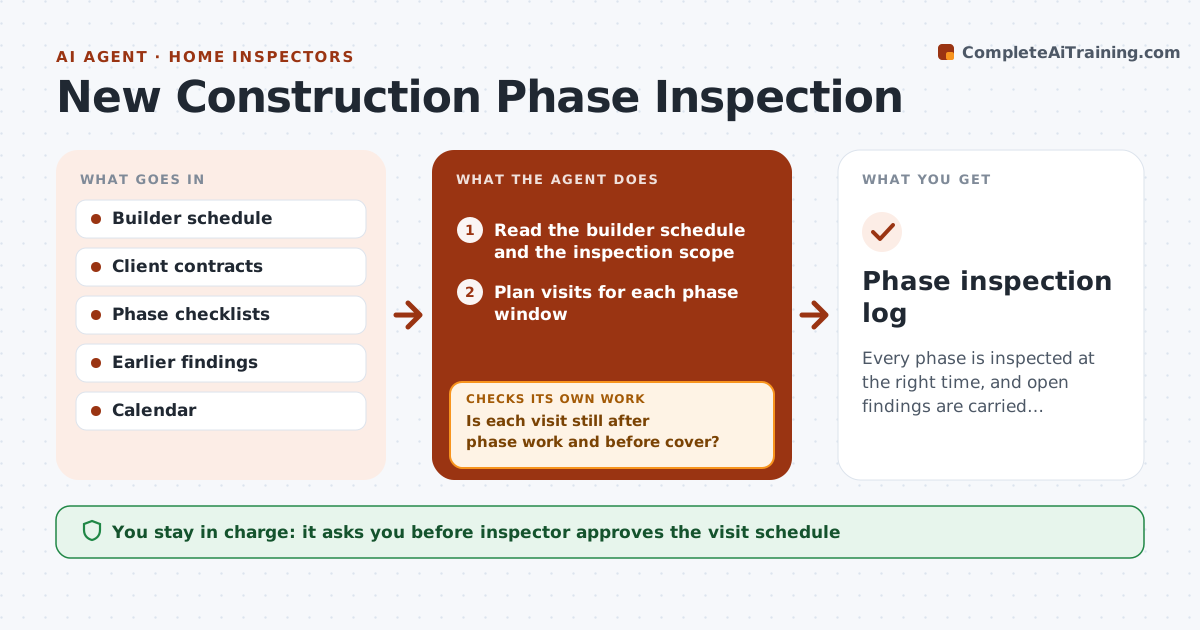
Every phase is inspected at the right time, and open findings are carried forward.
What it does
A buyer wants a phase inspection at pre-drywall, and the builder covers the walls before you can come. This agent tracks the builder's schedule for each new-build client, books the right visit at each phase, such as before the pour, framing and pre-drywall, and supplies a checklist for each. After each visit, it compares findings with the earlier phase and flags items that were not fixed by the next one. It drafts the phase report. If the builder schedule moves, it replans the visits. You approve each phase report. Edge case: a builder who has already hung drywall triggers an immediate alert to the client and a request for photos instead.
How it works
Follow the arrows from top to bottom. The orange dashed arrow is the loop: when a check fails, the agent goes back and tries again.
Read the steps as a list
- New-build client signed
- Read the builder schedule and the inspection scope
- Plan visits for each phase window
- Inspector approves the visit scheduleThe agent waits here for your OK.
- Track schedule updates from the builder
- Is each visit still after phase work and before cover?If not: Rebook the visit and alert the client and the builder contact. Back to step 2.
- After each visit, load findings and compare with earlier phases
- Are all earlier findings fixed or listed as open?If not: Flag the unresolved items in the new report. Back to step 7.
- Draft the phase report
- Inspector approves each phase reportThe agent waits here for your OK.
- Phase inspection log
How it decides
It books each visit after the phase work is complete and before the next phase covers it, and carries forward unresolved findings.
- Book the visit at least 2 days before the next phase covers work
- Use a checklist for each phase
- Carry forward unfixed items to the next report
- Alert the client if work is covered early
Make it yours
Every agent is a starting point. You choose these settings for your own situation.
- Phases covered
- Lead time (default 2 days)
- Checklists
- Report format
What keeps you in control
It always asks you first
- Inspector approves the visit schedule
- Inspector approves each phase report
Hard limits
- Never contact the builder without approval
- Never assume work is complete without confirmation
It stops when
- Done: all phases inspected
- Stop: builder will not allow phase visits
Set it up
We guide you through the set-up, step by step
Members get the full set-up guide for this agent. No technical skills needed: you copy, paste and upload.
- One set of instructions to paste into your AI, with the clicks for ChatGPT, Claude, Microsoft 365 Copilot, Gemini and Grok
- The agent then walks you through connecting your own data, one source at a time
- A downloadable copy with the flow chart, the rules and the full guide