AI agent for customer onboarding specialists
New Customer Early Issue Triage Agent
No early issue left waiting or unresolved
What it does
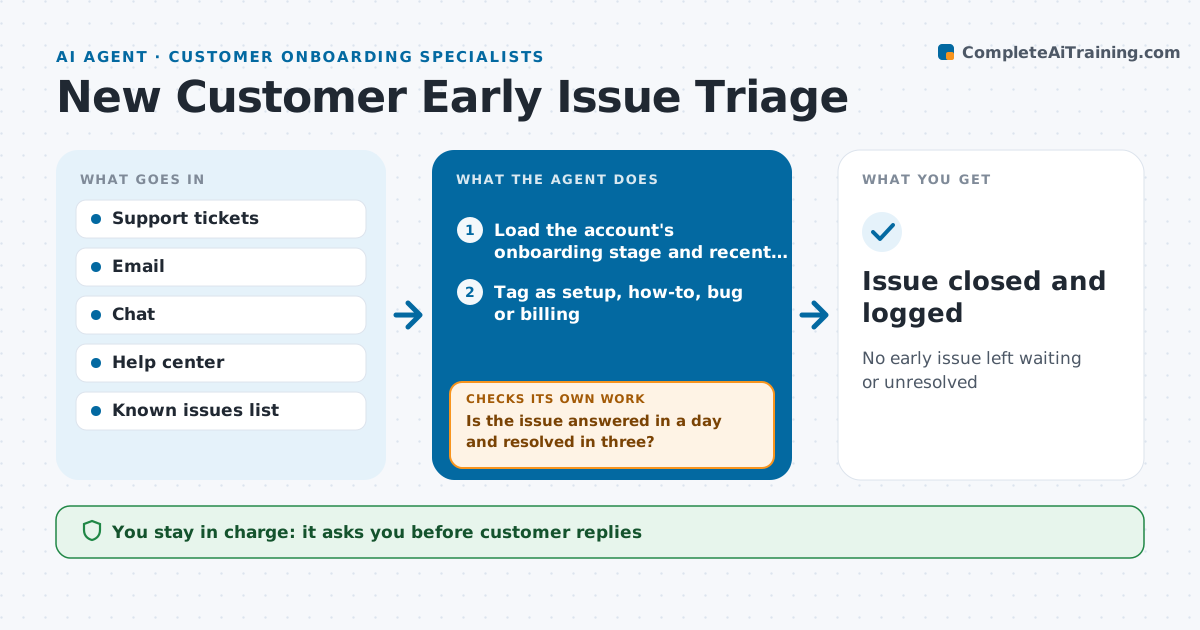
Problems in a customer's first 90 days shape how they feel about the whole relationship, yet early tickets get handled like any other. This agent watches support tickets, emails and chat from new accounts. It tags each issue as setup, how-to, bug or billing. How-to questions get a draft answer from the help center. Setup and bug issues are matched to known issues and routed with context. The specialist approves every reply to the customer. The agent then checks after one day whether each issue got a response, and after three days whether it is resolved. Stuck issues are escalated to the specialist with a short summary. It also counts issues per account to spot patterns. Edge case: three issues in one week from the same account trigger a check-in call suggestion.
How it works
Follow the arrows from top to bottom. The orange dashed arrow is the loop: when a check fails, the agent goes back and tries again.
Read the steps as a list
- New issue from a new account
- Load the account's onboarding stage and recent tickets
- Tag as setup, how-to, bug or billing
- Draft help-center answers or match to known issues
- Specialist approves repliesThe agent waits here for your OK.
- Is the issue answered in a day and resolved in three?If not: escalate to the specialist with a summary and chase the owner. Back to step 4.
- Count issues per account for patterns
- Does the account have fewer than three issues this week?If not: suggest a check-in call to the specialist. Back to step 7.
- Issue closed and logged
How it decides
It routes by issue type and escalates when response or resolution time passes the limit.
- Three issues in a week suggests a check-in call
- Bugs are linked to known issues when possible
- Billing issues go to finance with the contract
Make it yours
Every agent is a starting point. You choose these settings for your own situation.
- New account window (default 90 days)
- Response and resolution limits
- Issue types
- Pattern threshold
What keeps you in control
It always asks you first
- Customer replies
- Check-in calls
Hard limits
- Never promises fix dates
- Never issues credits
It stops when
- Done: issue resolved
- Stop: account passes 90 days
Set it up
We guide you through the set-up, step by step
Members get the full set-up guide for this agent. No technical skills needed: you copy, paste and upload.
- One set of instructions to paste into your AI, with the clicks for ChatGPT, Claude, Microsoft 365 Copilot, Gemini and Grok
- The agent then walks you through connecting your own data, one source at a time
- A downloadable copy with the flow chart, the rules and the full guide