AI agent for community managers
New Member Activation Agent
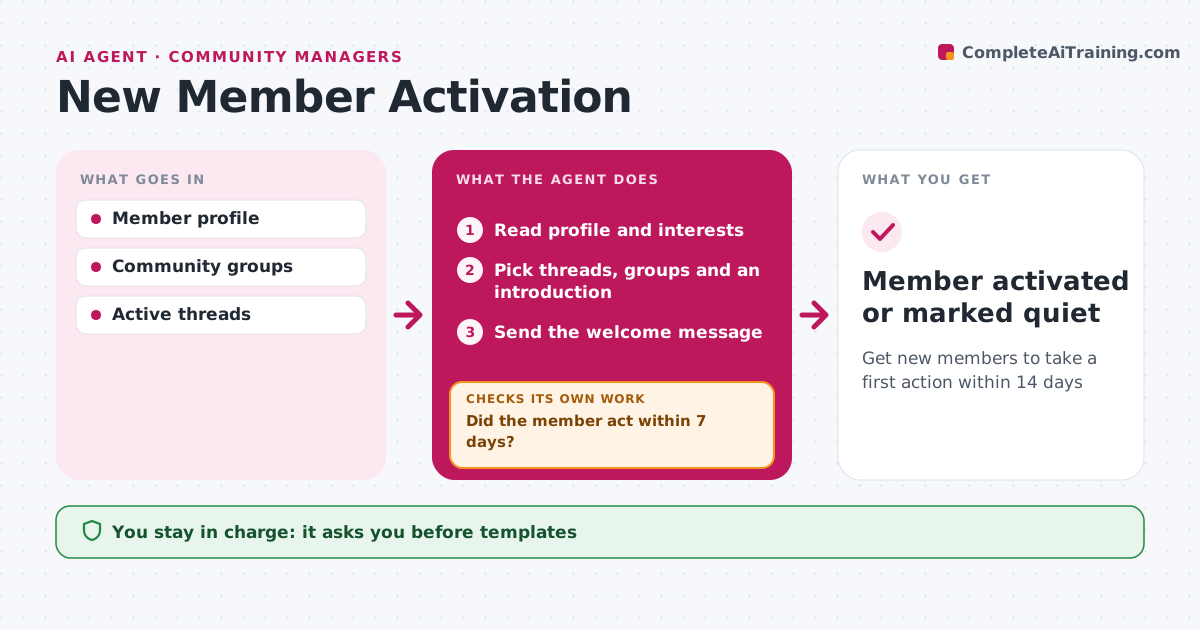
Get new members to take a first action within 14 days
What it does
New members decide in their first weeks whether a community is worth their time. When someone joins, this agent reads their profile and interests and picks three threads or groups that fit, plus another member with similar interests for an introduction. Introductions only happen with consent. It sends a welcome message tailored to what the member cares about, using templates the community manager approved. It then watches whether the member posts, reacts or attends anything in the first seven days. If not, it sends one nudge with a simple first step, such as answering an open question, and checks again by day 14. After that, the member is marked activated or quiet, with no further nudges. The community manager approves templates and introductions. Edge case: members who join through a company program get that program's welcome instead of the general one.
How it works
Follow the arrows from top to bottom. The orange dashed arrow is the loop: when a check fails, the agent goes back and tries again.
Read the steps as a list
- New member joins
- Read profile and interests
- Pick threads, groups and an introduction
- Send the welcome message
- Did the member act within 7 days?If not: send a nudge with a simple first step. Back to step 3.
- Community manager approves introductionsThe agent waits here for your OK.
- Member activated or marked quiet
How it decides
Suggestions match the profile's interests. No action in 7 days triggers a nudge.
- Company program members get program welcome
- One nudge after 7 days
- Introductions only with consent
Make it yours
Every agent is a starting point. You choose these settings for your own situation.
- Nudge timing
- Suggestion count
- Message tone
What keeps you in control
It always asks you first
- Templates
- Introductions
Hard limits
- Never shares member data without consent
- Never sends more than two messages
It stops when
- Done: member acted
- Stop: member leaves
Set it up
We guide you through the set-up, step by step
Members get the full set-up guide for this agent. No technical skills needed: you copy, paste and upload.
- One set of instructions to paste into your AI, with the clicks for ChatGPT, Claude, Microsoft 365 Copilot, Gemini and Grok
- The agent then walks you through connecting your own data, one source at a time
- A downloadable copy with the flow chart, the rules and the full guide