AI agent for help desk technicians
New Starter Device Setup Agent
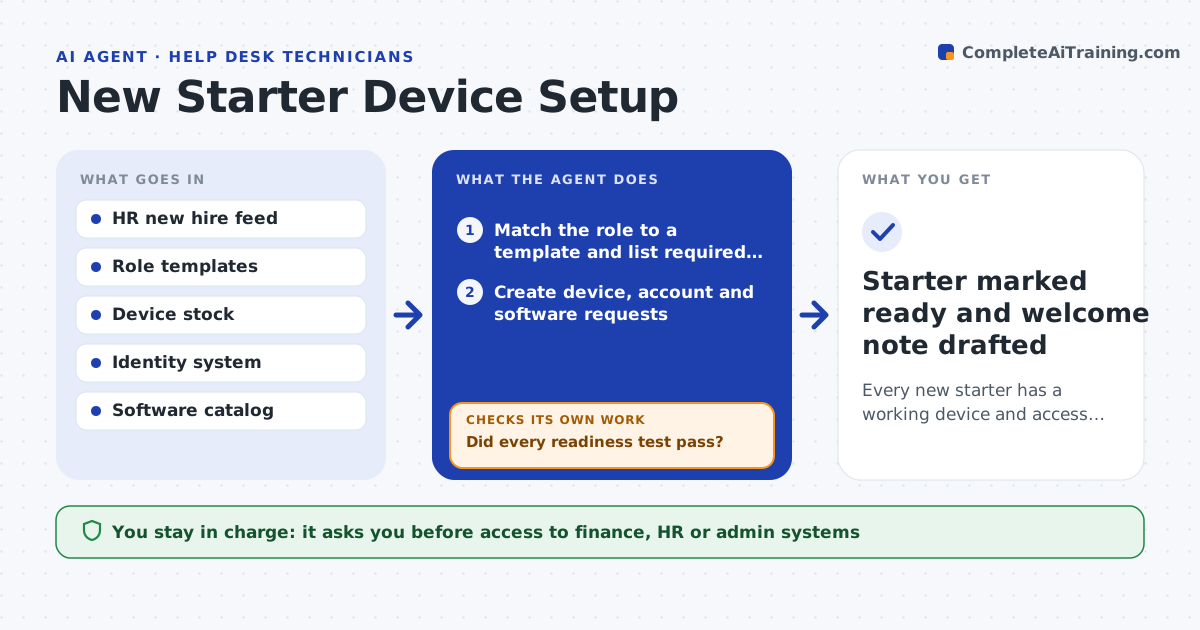
Every new starter has a working device and access on day one
What it does
New hires often arrive to a missing laptop, a broken login or software that was never assigned, and they lose their first days. This agent reads new hire records from HR, works out what the role needs from your role templates, and creates draft requests for the device, accounts, groups and software. It tracks each item as it moves. Two days before the start date it runs a readiness test: login, email, VPN and the key apps for that role. If any test fails, it reopens that specific task, alerts the technician and retests once the fix is in. You approve access to sensitive systems such as finance or HR data. Edge case: a role not in the templates gets the closest match plus a question to the hiring manager before anything is ordered.
How it works
Follow the arrows from top to bottom. The orange dashed arrow is the loop: when a check fails, the agent goes back and tries again.
Read the steps as a list
- HR records a new hire
- Match the role to a template and list required items
- Create device, account and software requests
- Manager or system owner approves sensitive accessThe agent waits here for your OK.
- Track each request to completion
- Run readiness tests for login, email, VPN and key apps
- Did every readiness test pass?If not: reopen the failing task and alert the technician. Back to step 5.
- Starter marked ready and welcome note drafted
How it decides
It matches the job title and department to a role template and only adds access outside the template when a manager requests it.
- Use the closest template when the role is new and ask the manager
- Escalate when a device is not shipped five days before start
- Grant only template access unless an approval exists
Make it yours
Every agent is a starting point. You choose these settings for your own situation.
- Role templates
- Days before start for the readiness check (default 2)
- Which systems need approval
- Welcome note wording
What keeps you in control
It always asks you first
- Access to finance, HR or admin systems
- Sending the welcome note
Hard limits
- Never grants access beyond the template without approval
- Does not share passwords by email
It stops when
- Done: all readiness tests pass
- Stop: start date cancelled in HR
Set it up
We guide you through the set-up, step by step
Members get the full set-up guide for this agent. No technical skills needed: you copy, paste and upload.
- One set of instructions to paste into your AI, with the clicks for ChatGPT, Claude, Microsoft 365 Copilot, Gemini and Grok
- The agent then walks you through connecting your own data, one source at a time
- A downloadable copy with the flow chart, the rules and the full guide