AI agent for vacation rental hosts
Nightly Rate Adjustment Agent
Higher occupancy and income through regular price updates
What it does
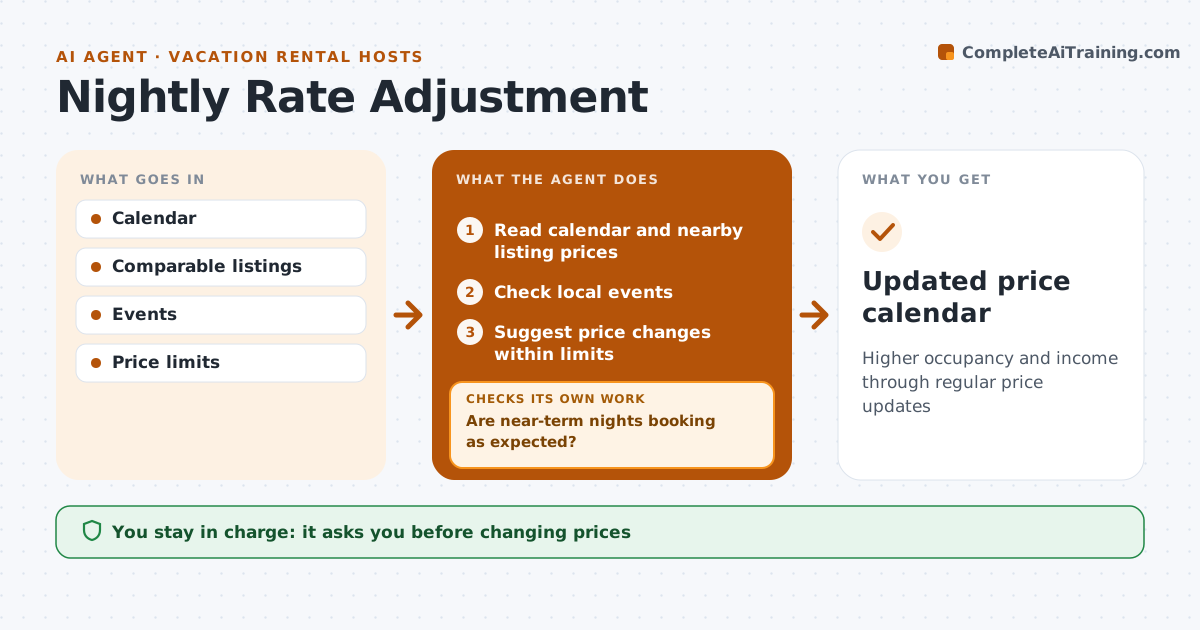
Rental income depends on charging the right price each night, but many hosts set prices once and leave them. Each day this agent reads your calendar, local events, nearby listing prices and how far out each night is. It suggests raising prices on high demand nights and lowering them on empty nights coming soon, always within your minimum and maximum. A holiday weekend books early, so it avoids early discounts on those dates. After changes go live, it watches bookings. If a night stays empty close to the date, it suggests a further drop or a shorter minimum stay. If a raised night books much faster than usual, it notes that the price may still be low. The host approves every price change.
How it works
Follow the arrows from top to bottom. The orange dashed arrow is the loop: when a check fails, the agent goes back and tries again.
Read the steps as a list
- Daily pricing check
- Read calendar and nearby listing prices
- Check local events
- Suggest price changes within limits
- Host approves changesThe agent waits here for your OK.
- Watch bookings after changes
- Are near-term nights booking as expected?If not: suggest a further drop or shorter minimum stay. Back to step 4.
- Updated price calendar
How it decides
It compares occupancy pace with similar nights and nearby listings and adjusts within limits.
- Stay within minimum and maximum
- No early discounts on holidays
- Bigger drops within 7 days
Make it yours
Every agent is a starting point. You choose these settings for your own situation.
- Min and max prices
- Event sources
- Discount rules
What keeps you in control
It always asks you first
- Changing prices
Hard limits
- Never goes below minimum price
It stops when
- Done: prices updated
- Stop: platform access fails
Set it up
We guide you through the set-up, step by step
Members get the full set-up guide for this agent. No technical skills needed: you copy, paste and upload.
- One set of instructions to paste into your AI, with the clicks for ChatGPT, Claude, Microsoft 365 Copilot, Gemini and Grok
- The agent then walks you through connecting your own data, one source at a time
- A downloadable copy with the flow chart, the rules and the full guide