AI agent for quality control specialists
Nonconformance to Corrective Action Agent
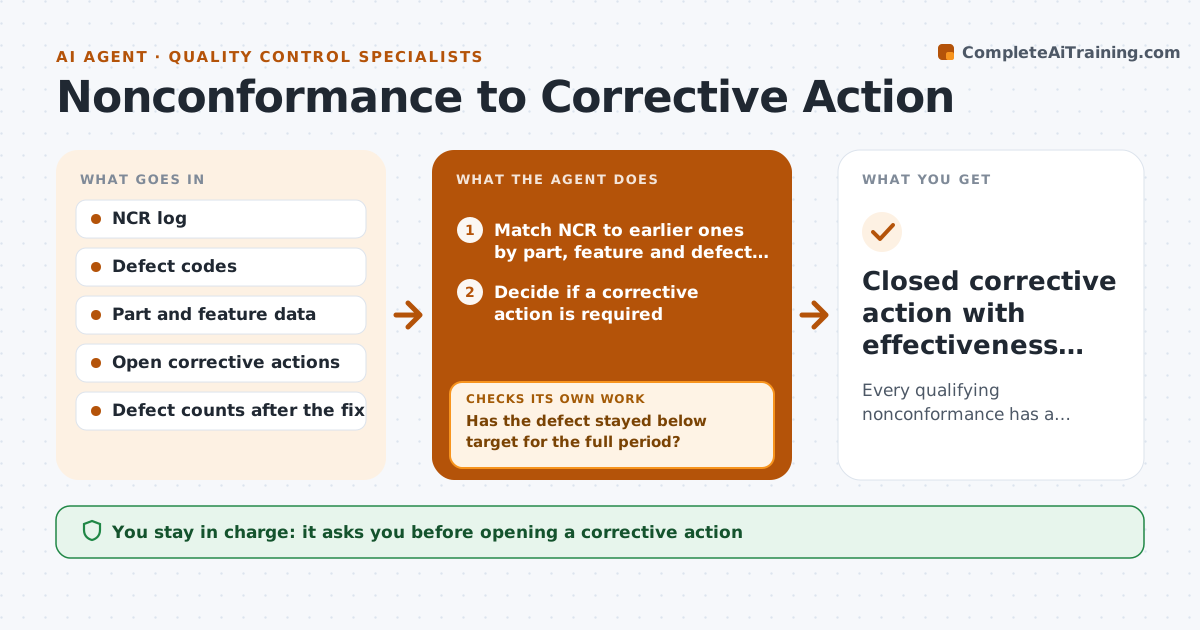
Every qualifying nonconformance has a corrective action that is verified effective before closure
What it does
Many plants log nonconformances but lose track of whether the fix actually worked, so the same defect returns months later. When a new NCR is logged, this agent matches it to earlier ones by part, feature and defect code, not by text alone, because people describe the same defect differently. It opens a corrective action for any safety or customer-facing defect, or when the same defect repeats three times in 30 days. It drafts a root cause worksheet, proposes containment and assigns owners and due dates. The quality lead approves opening the action. After the fix is in place, the agent tracks defect counts for the full verification period. If the defect comes back, it reopens the action and sends it back to root cause. The quality lead approves closure only after a clean period. Edge case: two NCRs worded differently for the same defect are still matched.
How it works
Follow the arrows from top to bottom. The orange dashed arrow is the loop: when a check fails, the agent goes back and tries again.
Read the steps as a list
- New NCR logged
- Match NCR to earlier ones by part, feature and defect code
- Decide if a corrective action is required
- Draft root cause worksheet, containment and owners
- Quality lead approves opening the actionThe agent waits here for your OK.
- Track defect counts after the fix is in place
- Has the defect stayed below target for the full period?If not: reopen the action and ask the owner to revisit root cause. Back to step 4.
- Quality lead approves closureThe agent waits here for your OK.
- Closed corrective action with effectiveness evidence
How it decides
It opens a corrective action when severity is high or the same defect repeats past the set count, and closes only when the defect stays below target for the full verification period.
- Open an action for any safety or customer-facing defect
- Open an action when the same defect repeats three times in 30 days
- Close only after the verification period with no repeat
Make it yours
Every agent is a starting point. You choose these settings for your own situation.
- Repeat count that triggers an action (default 3 in 30 days)
- Verification period length
- Severity levels that always need an action
- Reminder schedule for owners
What keeps you in control
It always asks you first
- Opening a corrective action
- Closing a corrective action
Hard limits
- Never closes an action without data after the fix
- Never edits the original NCR text
It stops when
- Done: action closed with effectiveness evidence
- Stop: owner misses due date twice; escalate to quality manager
Set it up
We guide you through the set-up, step by step
Members get the full set-up guide for this agent. No technical skills needed: you copy, paste and upload.
- One set of instructions to paste into your AI, with the clicks for ChatGPT, Claude, Microsoft 365 Copilot, Gemini and Grok
- The agent then walks you through connecting your own data, one source at a time
- A downloadable copy with the flow chart, the rules and the full guide