AI agent for notaries
Notarial Act Legality Screening Agent
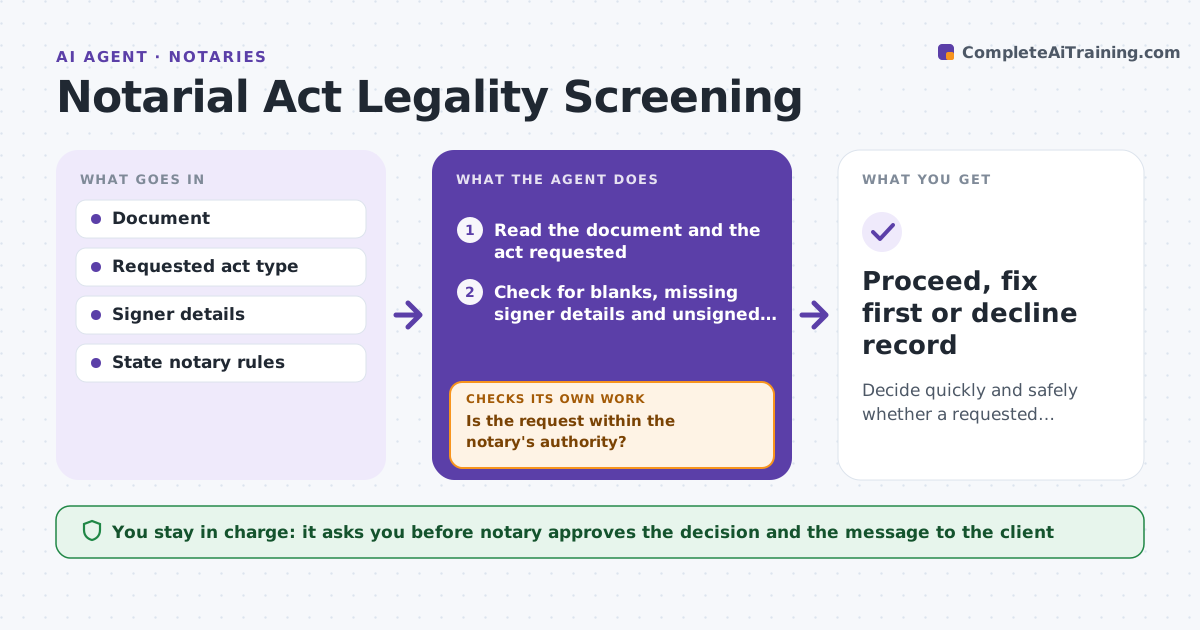
Decide quickly and safely whether a requested notarial act can proceed.
What it does
Notaries must decline acts outside their authority: giving legal advice, notarizing a document with blank sections, or acting without a present signer. When an unfamiliar document comes in, the agent reads the document type, checks for blanks, missing signer details or a request for advice, and compares the request with the notary's authority in the state. It marks the act as proceed, fix first or decline. It drafts a polite explanation for the client, with what to fix if the issue is fixable. When the signer fixes an issue, it re-checks. The notary approves the decision and the message. Edge case: a form has a blank date field, so the agent marks fix first and asks the client to fill it.
How it works
Follow the arrows from top to bottom. The orange dashed arrow is the loop: when a check fails, the agent goes back and tries again.
Read the steps as a list
- Client sends a document
- Read the document and the act requested
- Check for blanks, missing signer details and unsigned pages
- Check the act against the notary's authority and the state rules
- Is the request within the notary's authority?If not: Mark decline and draft a polite explanation. Back to step 3.
- Is the document complete and ready?If not: Mark fix first and list what the signer must complete. Back to step 3.
- Notary approves the decision and the client messageThe agent waits here for your OK.
- Send the approved message
- Re-check the document after the client revises it
- Proceed, fix first or decline record
How it decides
It checks completeness, signer presence and ID, and whether the request needs legal advice. Complete and within authority is proceed, fixable is fix first, and outside authority is decline.
- A request for advice on content is a decline
- A blank section or missing date is fix first
- An act on a document the signer cannot confirm is a decline
- Never accept an incomplete certificate wording
Make it yours
Every agent is a starting point. You choose these settings for your own situation.
- State rule set
- Acts the notary offers
- Decline message tone
- Documents requiring a second review
What keeps you in control
It always asks you first
- Notary approves the decision and the message to the client
Hard limits
- Never gives legal advice
- Never marks proceed on a document with blanks
It stops when
- Done: document proceeds to signing
- Stop: decline is sent and recorded
Set it up
We guide you through the set-up, step by step
Members get the full set-up guide for this agent. No technical skills needed: you copy, paste and upload.
- One set of instructions to paste into your AI, with the clicks for ChatGPT, Claude, Microsoft 365 Copilot, Gemini and Grok
- The agent then walks you through connecting your own data, one source at a time
- A downloadable copy with the flow chart, the rules and the full guide