AI agent for notaries
Notarial Certificate Wording Check Agent
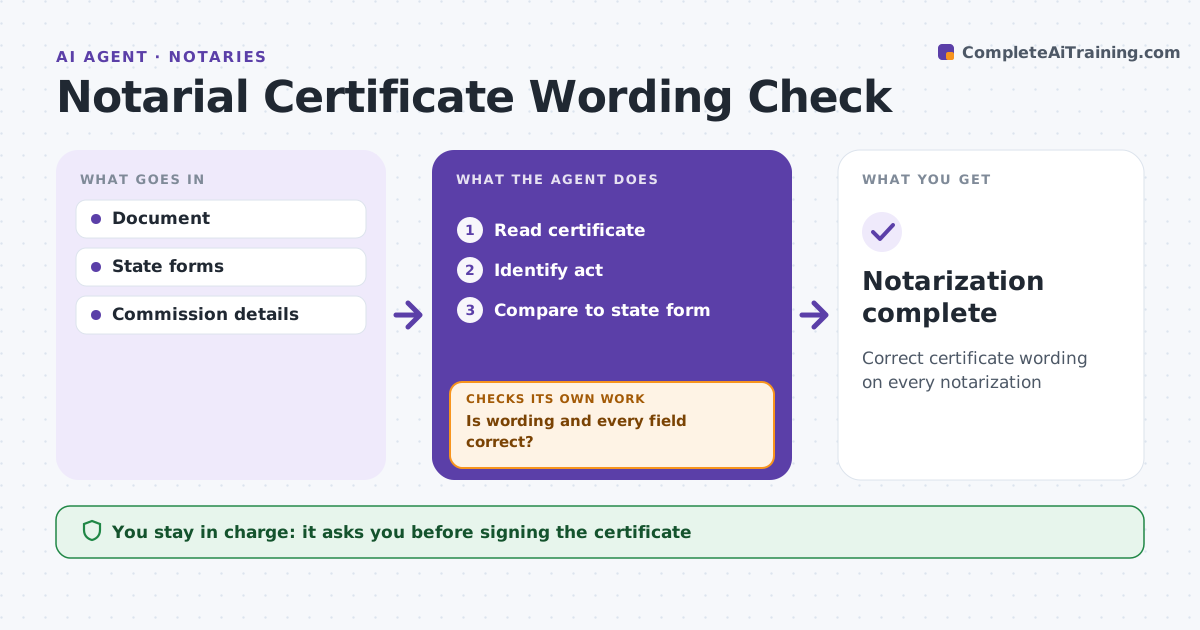
Correct certificate wording on every notarization
What it does
Wrong certificate wording is one of the most common notary errors, and it can get documents rejected by recorders or courts. Before the notary signs, this agent identifies the act, such as acknowledgment or jurat, and compares the wording with the state's required form. It checks venue, date, signer names, notary name, commission details and seal placement. If the certificate is missing or wrong, it proposes the correct loose certificate. After changes, it checks again until every field is right. The signer chooses the act, never the notary or the agent, and the notary decides whether to sign. Edge case: an out-of-state document uses wording not allowed in the notary's state, so the agent suggests a compliant loose certificate rather than signing the original.
How it works
Follow the arrows from top to bottom. The orange dashed arrow is the loop: when a check fails, the agent goes back and tries again.
Read the steps as a list
- Certificate ready
- Read certificate
- Identify act
- Compare to state form
- Is wording and every field correct?If not: propose corrected loose certificate. Back to step 3.
- Notary signs and sealsThe agent waits here for your OK.
- Notarization complete
How it decides
It compares certificate wording and fields to state forms.
- Act chosen by signer, not notary
- Wording not allowed: loose certificate
- Missing venue: add
Make it yours
Every agent is a starting point. You choose these settings for your own situation.
- State forms
- Field checks
- Loose certificate library
- Display
What keeps you in control
It always asks you first
- Signing the certificate
Hard limits
- Never chooses the act for the signer
- Never signs
It stops when
- Done: complete
- Stop: signer will not choose act
Set it up
We guide you through the set-up, step by step
Members get the full set-up guide for this agent. No technical skills needed: you copy, paste and upload.
- One set of instructions to paste into your AI, with the clicks for ChatGPT, Claude, Microsoft 365 Copilot, Gemini and Grok
- The agent then walks you through connecting your own data, one source at a time
- A downloadable copy with the flow chart, the rules and the full guide