AI agent for notaries
Notary Dispute and Complaint Response Agent
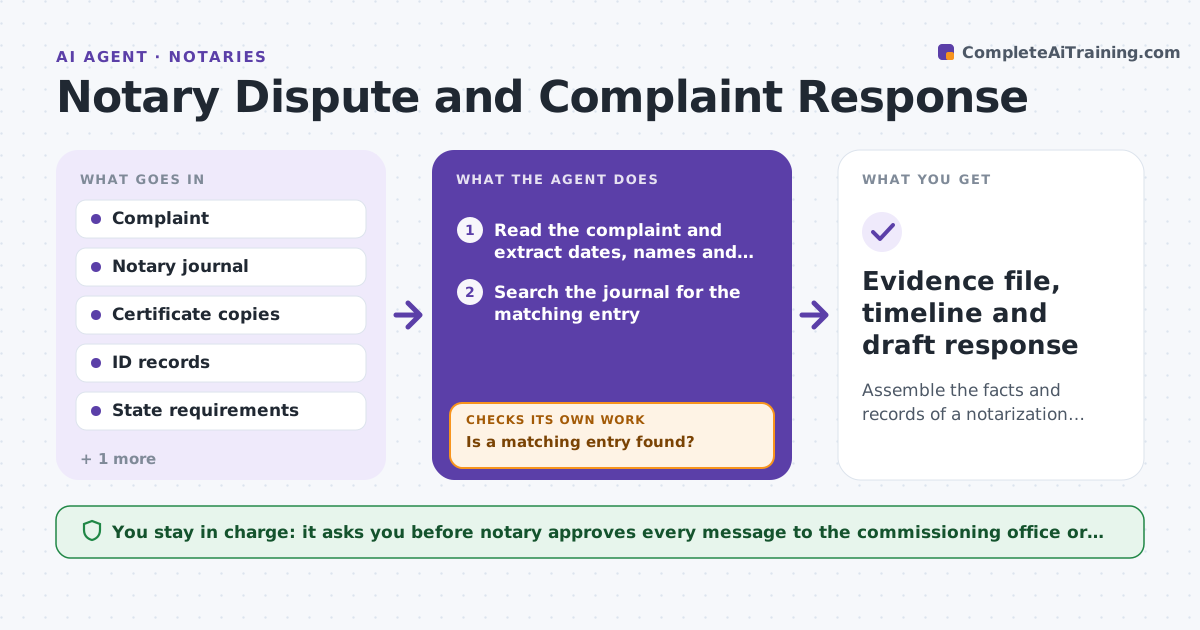
Assemble the facts and records of a notarization quickly, with gaps flagged, so the notary can respond accurately.
What it does
When a notary receives a complaint or a claim, the clock starts. The notary has to find the journal entry, the certificate copy and the ID record quickly, and reconstruct what was done. From the complaint, the agent finds the matching journal entry, retrieves the certificate copy and ID record, and builds a timeline of what happened. It checks each record for missing fields against the state requirements. If a record is missing, it searches again under other dates, names or document types. It drafts a factual response and flags insurance reporting deadlines. The notary approves everything sent to the commissioning office or insurer. Edge case: the journal lists the signer as Jon Alvarez but the complaint says John Alvarez, so the agent searches both spellings.
How it works
Follow the arrows from top to bottom. The orange dashed arrow is the loop: when a check fails, the agent goes back and tries again.
Read the steps as a list
- Complaint or claim received
- Read the complaint and extract dates, names and document type
- Search the journal for the matching entry
- Is a matching entry found?If not: Search again with variant spellings, nearby dates and other document types. Back to step 3.
- Retrieve the certificate copy and ID record
- Build a timeline of what was done
- Check each record for missing fields against state requirements
- Flag insurance and commissioning office deadlines
- Draft a factual response with attached records
- Notary approves everything sent to the commissioning office or insurerThe agent waits here for your OK.
- Evidence file, timeline and draft response
How it decides
It matches the complaint to a journal entry by date, signer and document type. A record is complete when every field the state requires is present. Missing items trigger another search before it is reported missing.
- Search variant names and dates within 7 days before declaring no match
- A record missing a required field is flagged, not completed
- Insurance notice deadlines are flagged on day one
- The response states facts only, with no admissions
Make it yours
Every agent is a starting point. You choose these settings for your own situation.
- State requirements used
- Days to search around the complaint date (default 7)
- Insurance notice period
- Record storage locations
What keeps you in control
It always asks you first
- Notary approves every message to the commissioning office or insurer
Hard limits
- Never admits fault or gives legal advice
- Never sends anything without the notary's approval
It stops when
- Done: response sent and file complete
- Stop: no matching record is found after widened search, so the notary is told
Set it up
We guide you through the set-up, step by step
Members get the full set-up guide for this agent. No technical skills needed: you copy, paste and upload.
- One set of instructions to paste into your AI, with the clicks for ChatGPT, Claude, Microsoft 365 Copilot, Gemini and Grok
- The agent then walks you through connecting your own data, one source at a time
- A downloadable copy with the flow chart, the rules and the full guide