AI agent for office managers
Office Budget Tracking Agent
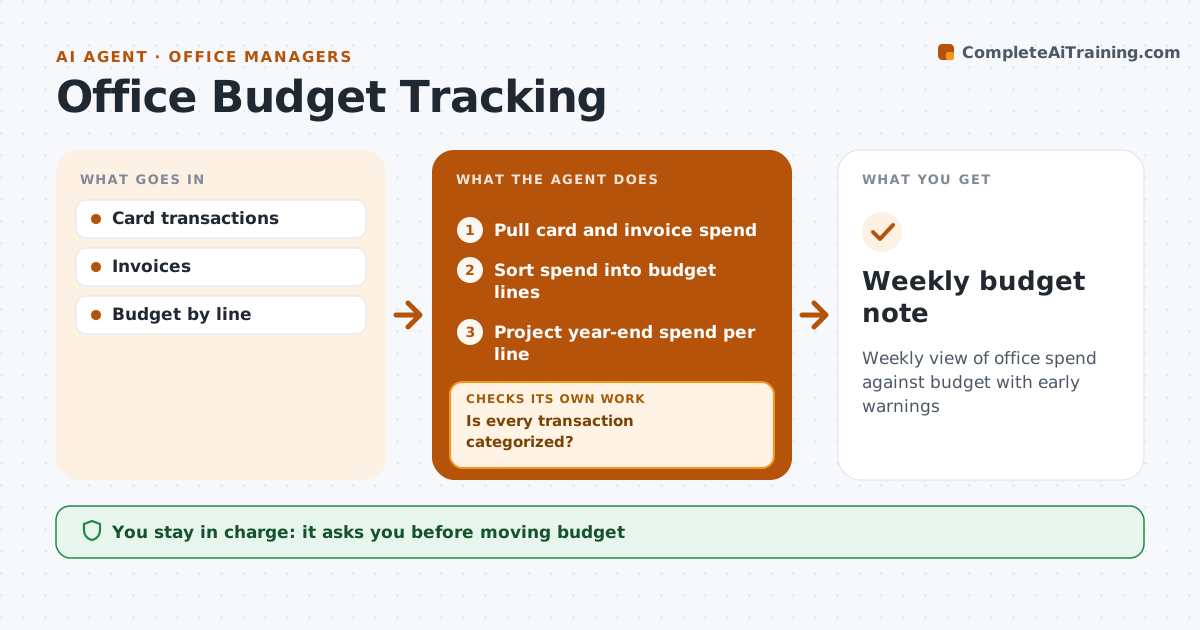
Weekly view of office spend against budget with early warnings
What it does
Office budgets cover supplies, cleaning, repairs, software and events, and overspending is often found a quarter too late. Each week this agent pulls card and invoice spend, sorts it into budget lines and compares year-to-date totals with the plan. It flags lines trending over and items it cannot categorize. When unclear, it asks the person who spent for a category, then updates. An annual subscription paid in one month looks like a spike, so it spreads it over the year in the projection. It projects year-end spend by line and checks the total still fits. It drafts a short note with what to watch and options. The manager approves any move between budget lines.
How it works
Follow the arrows from top to bottom. The orange dashed arrow is the loop: when a check fails, the agent goes back and tries again.
Read the steps as a list
- Weekly review
- Pull card and invoice spend
- Sort spend into budget lines
- Is every transaction categorized?If not: ask the spender for the category. Back to step 3.
- Project year-end spend per line
- Draft budget note
- Manager approves any budget movesThe agent waits here for your OK.
- Weekly budget note
How it decides
It flags a line when projected year-end spend is above budget by more than the set margin.
- Annual payments spread across the year
- Flag at 5% over projection
- Unknown spend needs a category
Make it yours
Every agent is a starting point. You choose these settings for your own situation.
- Budget lines
- Warning margin
- Report day
What keeps you in control
It always asks you first
- Moving budget
Hard limits
- Never moves money
It stops when
- Done: note sent
- Stop: accounting data missing
Set it up
We guide you through the set-up, step by step
Members get the full set-up guide for this agent. No technical skills needed: you copy, paste and upload.
- One set of instructions to paste into your AI, with the clicks for ChatGPT, Claude, Microsoft 365 Copilot, Gemini and Grok
- The agent then walks you through connecting your own data, one source at a time
- A downloadable copy with the flow chart, the rules and the full guide