AI agent for sustainability analysts
Offset and Credit Verification Agent
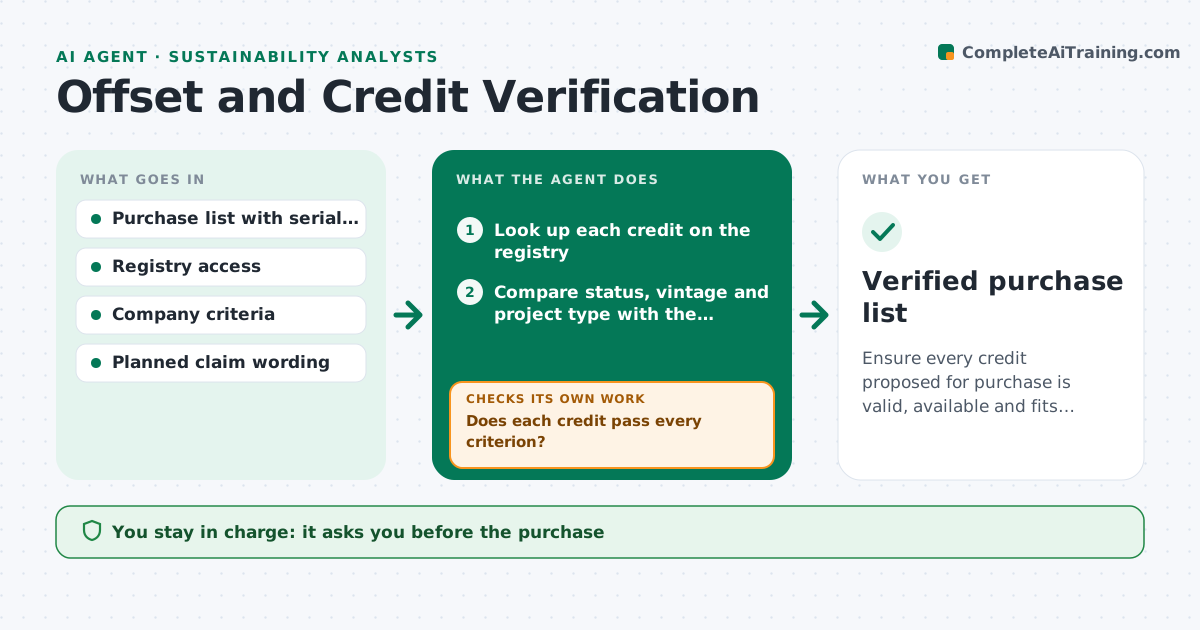
Ensure every credit proposed for purchase is valid, available and fits the planned claim.
What it does
A carbon credit purchase list can include credits that have already been retired, are from a vintage the company's rules do not accept, or come from projects with a suspended status. This agent takes the proposed purchase list, with serial numbers or project IDs, and checks each credit on the public registry: issuance, retirement status, vintage, project type and status, and the standard it was issued under. It compares each against the company's criteria. Credits that fail are listed with the reason, and the agent finds replacement candidates and checks them the same way. It also checks that the intended claim wording matches what the credits support. It never buys. The analyst approves purchases and any public claim. Edge case: a credit already retired for another beneficiary is rejected, not rechecked.
How it works
Follow the arrows from top to bottom. The orange dashed arrow is the loop: when a check fails, the agent goes back and tries again.
Read the steps as a list
- Purchase list proposed
- Look up each credit on the registry
- Compare status, vintage and project type with the criteria
- Does each credit pass every criterion?If not: list the failing credits with the reason. Back to step 3.
- Search for replacement credits that meet the criteria
- Do the replacements pass the same checks and volume needs?If not: drop the replacement and look at the next candidates. Back to step 5.
- Check the planned claim wording against what the credits support
- Write the verification report
- Analyst approves the purchase and any public claimThe agent waits here for your OK.
- Verified purchase list
How it decides
A credit passes only if it is issued, unretired, within the allowed vintage and project types, and its project status is active. Claims must not go beyond what the credits support.
- Reject any credit marked retired or cancelled
- Reject credits older than the vintage limit
- Reject projects with suspended or under-review status
- Do not allow claim wording stronger than the credit type supports
Make it yours
Every agent is a starting point. You choose these settings for your own situation.
- Allowed vintage (default 5 years)
- Project types accepted
- Registries checked
- Claim wording rules
- Volume tolerance
What keeps you in control
It always asks you first
- The purchase
- Any public claim or label
Hard limits
- Never purchase credits
- Never approve claim wording
It stops when
- Done: verified list approved
- Stop: not enough valid credits exist for the volume
Set it up
We guide you through the set-up, step by step
Members get the full set-up guide for this agent. No technical skills needed: you copy, paste and upload.
- One set of instructions to paste into your AI, with the clicks for ChatGPT, Claude, Microsoft 365 Copilot, Gemini and Grok
- The agent then walks you through connecting your own data, one source at a time
- A downloadable copy with the flow chart, the rules and the full guide