AI agent for human resources specialists
Open Enrollment Configuration Test Agent
Plan configuration proven correct against the rules for every scenario before employees see it
What it does
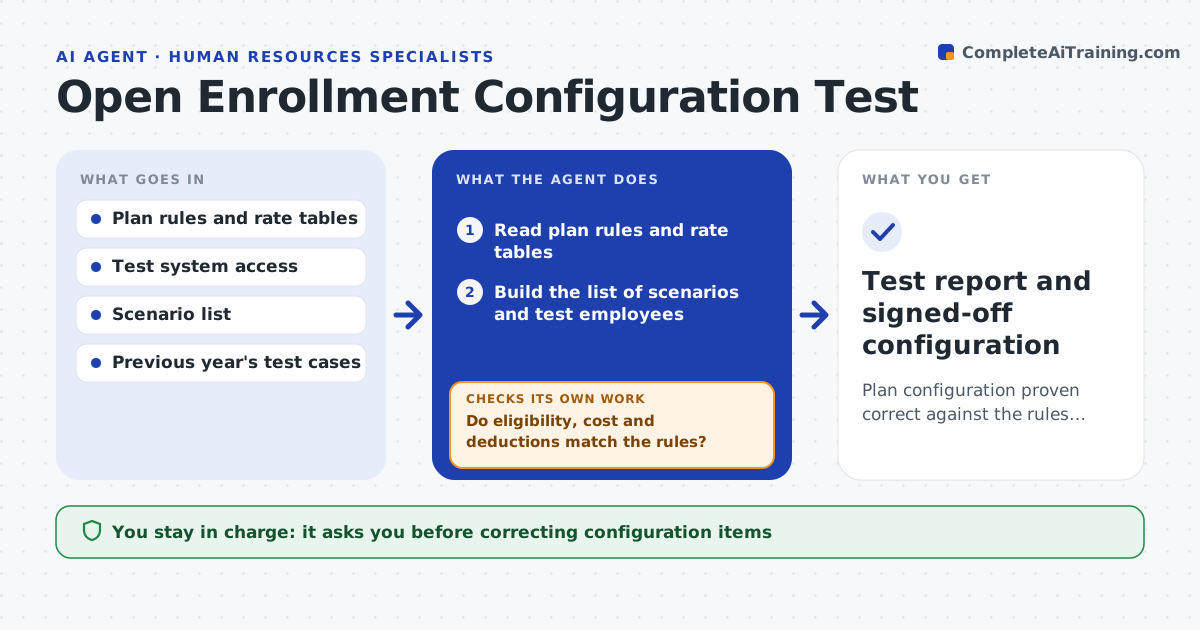
A wrong deduction or a missing eligibility rule shows up when the first employee enrolls, and by then hundreds are affected. This agent reads the plan rules for the coming year, such as eligibility, waiting periods, costs and coverage tiers. It then creates test employees for each scenario in a test system: new hire, part-time worker, family coverage, a person turning 26 and others. It runs enrollment for each one and compares the resulting plans, costs and deductions with the rules. Mismatches are listed with the test case and the expected and actual values. After the specialist fixes the configuration, the agent retests the failed cases and a set of earlier ones. The specialist approves go-live. Edge case: a rule that differs by state is tested once for each state with employees.
How it works
Follow the arrows from top to bottom. The orange dashed arrow is the loop: when a check fails, the agent goes back and tries again.
Read the steps as a list
- Plan year configuration finished
- Read plan rules and rate tables
- Build the list of scenarios and test employees
- Create the test employees in the test system
- Run enrollment for each scenario and record the results
- Do eligibility, cost and deductions match the rules?If not: list each mismatch with expected and actual values. Back to step 4.
- Specialist fixes or approves each correctionThe agent waits here for your OK.
- Retest the failed cases and a sample of earlier passes
- Do all cases pass, including earlier ones?If not: find the change that broke a case and rerun. Back to step 8.
- Specialist approves go-liveThe agent waits here for your OK.
- Test report and signed-off configuration
How it decides
A case passes only if eligibility, cost and deductions all match the rules for that employee profile.
- Test every plan and coverage tier at least once
- Test each state or country with its own rules
- Include age and date boundary cases
- Retest 20 percent of earlier passes after any fix
Make it yours
Every agent is a starting point. You choose these settings for your own situation.
- Scenarios and age boundaries
- States or countries
- Share of earlier cases to retest (default 20 percent)
- Test environment
What keeps you in control
It always asks you first
- Correcting configuration items
- Go-live of the enrollment setup
Hard limits
- Uses only test employees in a test system
- Never changes live configuration
It stops when
- Done: all scenarios pass and go-live is approved
- Stop: the test system does not match the live setup
Set it up
We guide you through the set-up, step by step
Members get the full set-up guide for this agent. No technical skills needed: you copy, paste and upload.
- One set of instructions to paste into your AI, with the clicks for ChatGPT, Claude, Microsoft 365 Copilot, Gemini and Grok
- The agent then walks you through connecting your own data, one source at a time
- A downloadable copy with the flow chart, the rules and the full guide