AI agent for benefits administrators
Open Enrollment Readiness Agent
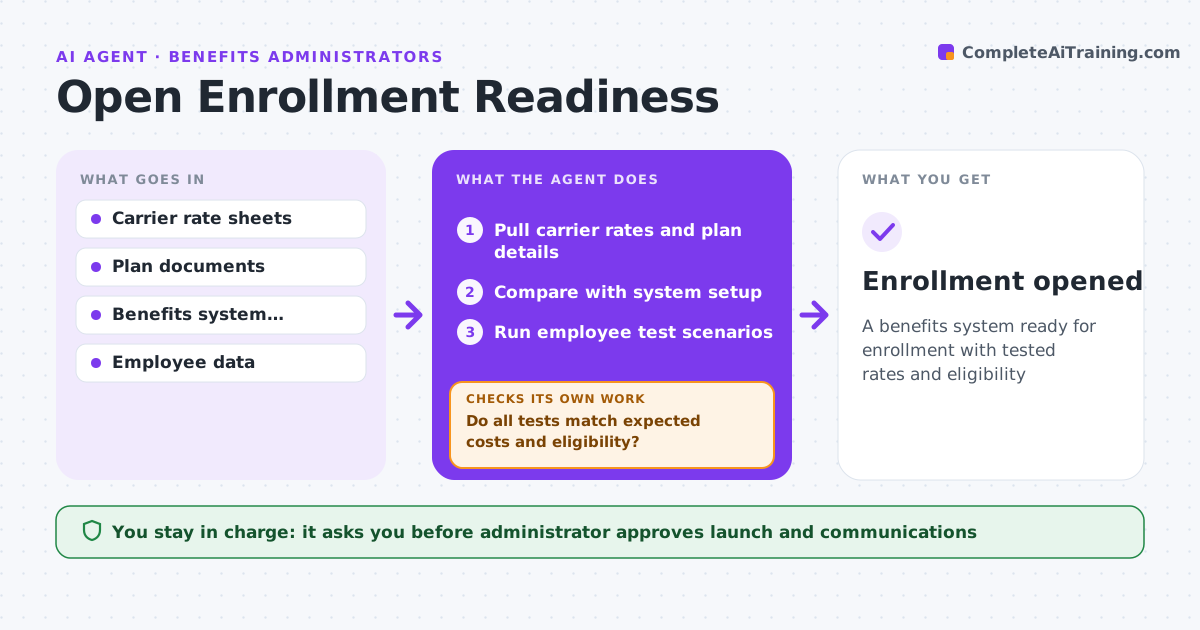
A benefits system ready for enrollment with tested rates and eligibility
What it does
Before open enrollment, plan options, rates, contributions and eligibility rules must be set up correctly in the benefits system, or thousands of employees see wrong prices. Six weeks out, this agent pulls carrier rates and plan details and compares them with the system setup; rates must match carrier sheets exactly. It runs test scenarios that cover each tier and region. If any test does not match the expected cost and eligibility, it lists setup fixes for the vendor or administrator and re-tests. It also checks each employee's eligibility data for gaps. It drafts employee communications from the confirmed setup. The administrator approves the launch. Edge case: employees on a pending leave of absence are checked against the plan's eligibility rules separately.
How it works
Follow the arrows from top to bottom. The orange dashed arrow is the loop: when a check fails, the agent goes back and tries again.
Read the steps as a list
- Six weeks before enrollment
- Pull carrier rates and plan details
- Compare with system setup
- Run employee test scenarios
- Do all tests match expected costs and eligibility?If not: list setup fixes for the vendor or admin and re-test. Back to step 3.
- Draft employee communications
- Administrator approves launchThe agent waits here for your OK.
- Enrollment opened
How it decides
Each plan and rate must match carrier documents, and test cases must produce the expected cost.
- Rates must match carrier sheets
- Test cases cover each tier and region
- Leave cases are checked separately
Make it yours
Every agent is a starting point. You choose these settings for your own situation.
- Test scenarios
- Weeks before launch
- Communication format
- Approval steps
What keeps you in control
It always asks you first
- Administrator approves launch and communications
Hard limits
- Never changes system settings
- Never sends communications
It stops when
- Done: launch approved
- Stop: carrier rates not final
Set it up
We guide you through the set-up, step by step
Members get the full set-up guide for this agent. No technical skills needed: you copy, paste and upload.
- One set of instructions to paste into your AI, with the clicks for ChatGPT, Claude, Microsoft 365 Copilot, Gemini and Grok
- The agent then walks you through connecting your own data, one source at a time
- A downloadable copy with the flow chart, the rules and the full guide