AI agent for hospital administrators
Operating Room Block Utilization Agent
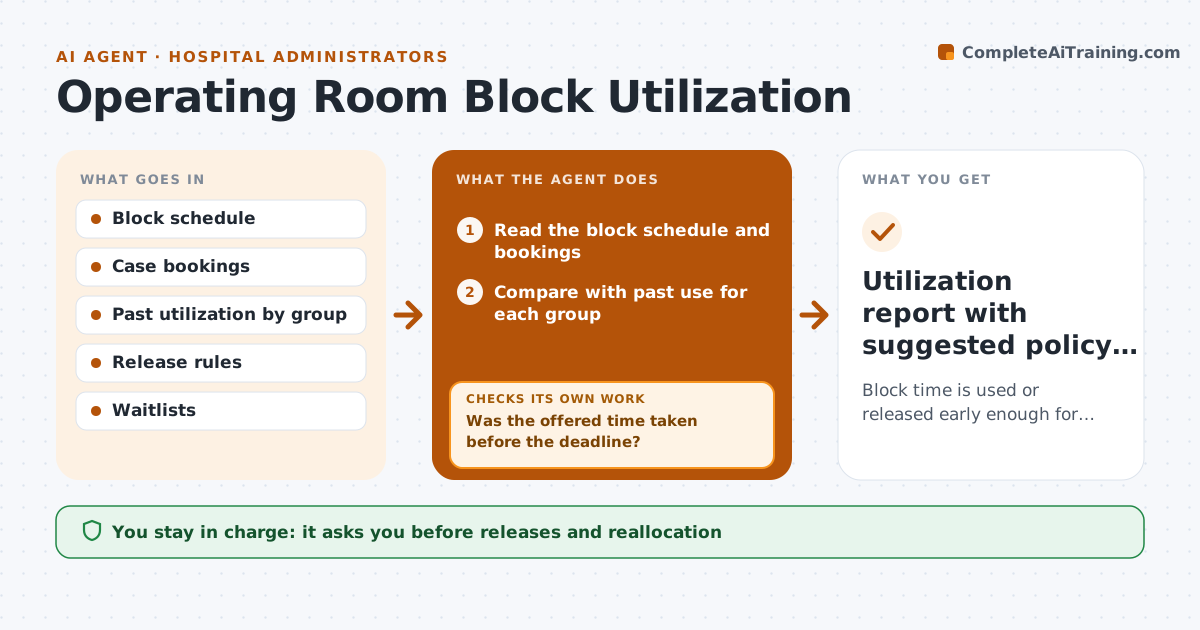
Block time is used or released early enough for another group to fill it
What it does
Surgical block time is valuable and often goes unused or is released too late for another group to use it. This agent compares each group's block schedule with actual use. It finds blocks likely to go unused, based on bookings and past patterns, and offers the time to other groups before the release deadline. After the offer it checks whether the time was taken. If not, it tries another group or a different release option. It reports utilization by group and suggests policy changes. The administrator approves reallocation and policy changes. Edge case: a block has no cases booked 7 days before, but the surgeon usually adds cases late, so the agent offers only part of the block.
How it works
Follow the arrows from top to bottom. The orange dashed arrow is the loop: when a check fails, the agent goes back and tries again.
Read the steps as a list
- Daily scan of upcoming blocks
- Read the block schedule and bookings
- Compare with past use for each group
- Find blocks likely to go unused
- Administrator approves the release offerThe agent waits here for your OK.
- Offer the time to other groups or the waitlist
- Was the offered time taken before the deadline?If not: offer to the next group or a smaller slice and recheck. Back to step 6.
- Update the schedule record
- Calculate utilization by group for the month
- Utilization report with suggested policy changes
How it decides
A block is offered for release when booked time falls below the set share at the release deadline, adjusted for the group's pattern of late adds.
- Offer a block when booked time is under 60 percent 7 days ahead
- Offer only part when the group often adds late
- Do not release a block twice
- Report utilization per group monthly
Make it yours
Every agent is a starting point. You choose these settings for your own situation.
- Release threshold (default 60 percent)
- Days ahead (default 7)
- Order of groups offered
- Report cadence
What keeps you in control
It always asks you first
- Releases and reallocation
- Policy changes
Hard limits
- Never reassign time without approval
- Never remove a booked case
It stops when
- Done: blocks used or released
- Stop: scheduling system unavailable
Set it up
We guide you through the set-up, step by step
Members get the full set-up guide for this agent. No technical skills needed: you copy, paste and upload.
- One set of instructions to paste into your AI, with the clicks for ChatGPT, Claude, Microsoft 365 Copilot, Gemini and Grok
- The agent then walks you through connecting your own data, one source at a time
- A downloadable copy with the flow chart, the rules and the full guide