AI agent for judges
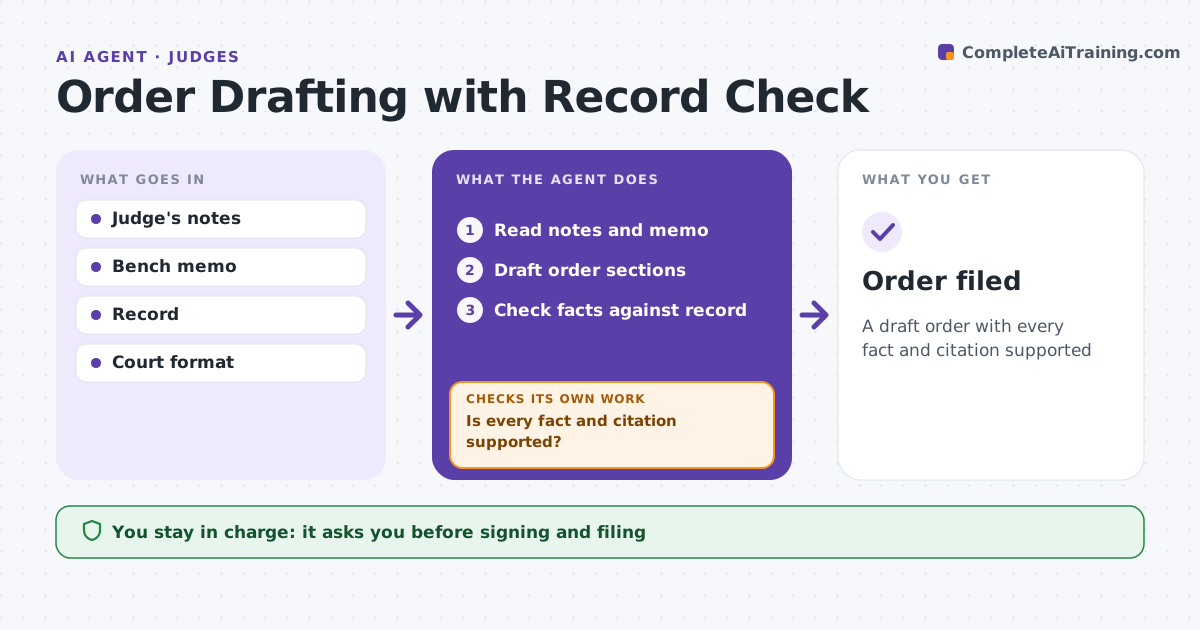
Order Drafting with Record Check Agent
A draft order with every fact and citation supported
What it does
Orders must rest on the record, and a fact taken from a brief rather than evidence can lead to reversal. After the judge decides, this agent drafts the order from the judge's notes and the bench memo. It writes the procedural history, facts, analysis and ruling in the court's format. It then checks every fact statement against the record with a page cite, checks legal citations, and compares the ruling language with the judge's decision. A fact without a record cite, an assertion found only in a brief, or ruling text that differs from the notes is marked for the clerk. After the clerk resolves the marks, it checks again. The judge edits, signs and directs filing; the agent never files. Edge case: a fact comes from a party's brief but not the record, so the agent marks it rather than citing the brief.
How it works
Follow the arrows from top to bottom. The orange dashed arrow is the loop: when a check fails, the agent goes back and tries again.
Read the steps as a list
- Judge decides
- Read notes and memo
- Draft order sections
- Check facts against record
- Is every fact and citation supported?If not: mark unsupported items for the clerk. Back to step 4.
- Judge edits and signsThe agent waits here for your OK.
- Order filed
How it decides
It requires a record cite for each fact and a verified source for each authority.
- Fact without record cite: mark
- Brief assertion only: mark
- Ruling text differs from notes: flag
Make it yours
Every agent is a starting point. You choose these settings for your own situation.
- Court format
- Citation style
- Marking style
- Section templates
What keeps you in control
It always asks you first
- Signing and filing
Hard limits
- Never decides outcomes
- Never files
It stops when
- Done: signed
- Stop: judge changes decision
Set it up
We guide you through the set-up, step by step
Members get the full set-up guide for this agent. No technical skills needed: you copy, paste and upload.
- One set of instructions to paste into your AI, with the clicks for ChatGPT, Claude, Microsoft 365 Copilot, Gemini and Grok
- The agent then walks you through connecting your own data, one source at a time
- A downloadable copy with the flow chart, the rules and the full guide