AI agent for manager of operations
Order Exception Resolution Agent
Stuck orders released or escalated quickly, with evidence.
What it does
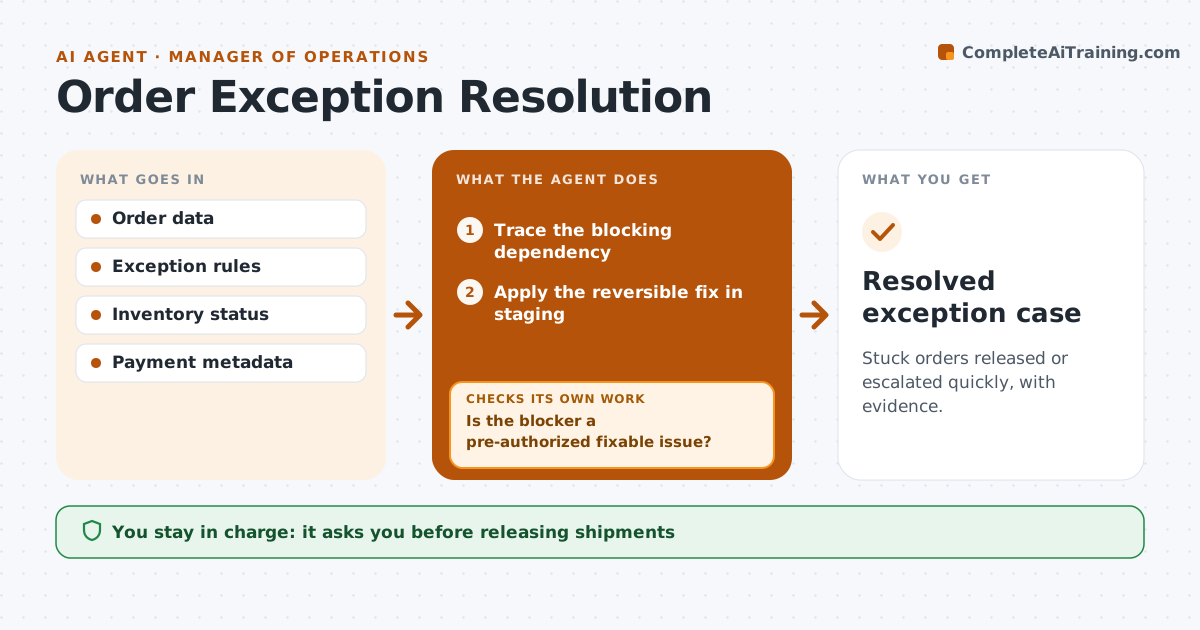
Online orders get stuck between payment, stock and address checks, and customers wait. When an order stays in an exception state for more than an hour, this agent traces which check is blocking it using read-only lookups. If the blocker is on the pre-approved list of safe, reversible fixes, such as address formatting, it applies the fix in staging. It then verifies every release requirement, including that payment is captured, not just authorized. Payment and stock problems are escalated with evidence instead of shipped. The fulfillment manager releases or refunds the order. Edge case: payment is authorized but not captured under a capture-required rule, so the agent escalates.
How it works
Follow the arrows from top to bottom. The orange dashed arrow is the loop: when a check fails, the agent goes back and tries again.
Read the steps as a list
- Order stuck
- Trace the blocking dependency
- Is the blocker a pre-authorized fixable issue?If not: escalate with evidence. Back to step 2.
- Apply the reversible fix in staging
- Are all release prerequisites met?If not: recheck the next blocker. Back to step 2.
- Fulfillment manager releases or refundsThe agent waits here for your OK.
- Resolved exception case
How it decides
It identifies which check blocks the order and fixes only what's pre-authorized.
- Fix only issues on the pre-authorized list; escalate the rest.
- Payment must be captured, not just authorized, before release.
- Never release a shipment or issue a refund without approval.
Make it yours
Every agent is a starting point. You choose these settings for your own situation.
- Time in exception before the agent starts (default 1 hour)
- List of pre-authorized reversible fixes
- Release requirements per payment method
- Escalation contacts for payment and stock
What keeps you in control
It always asks you first
- Releasing shipments
- Refunds
- Payment status changes
Hard limits
- Never ships or refunds.
It stops when
- Done: released or escalated.
Set it up
We guide you through the set-up, step by step
Members get the full set-up guide for this agent. No technical skills needed: you copy, paste and upload.
- One set of instructions to paste into your AI, with the clicks for ChatGPT, Claude, Microsoft 365 Copilot, Gemini and Grok
- The agent then walks you through connecting your own data, one source at a time
- A downloadable copy with the flow chart, the rules and the full guide