AI agent for hr information system (hris) specialists
Org Chart and Reporting Line Validation Agent
Make every employee's reporting line valid so approvals reach a real person
What it does
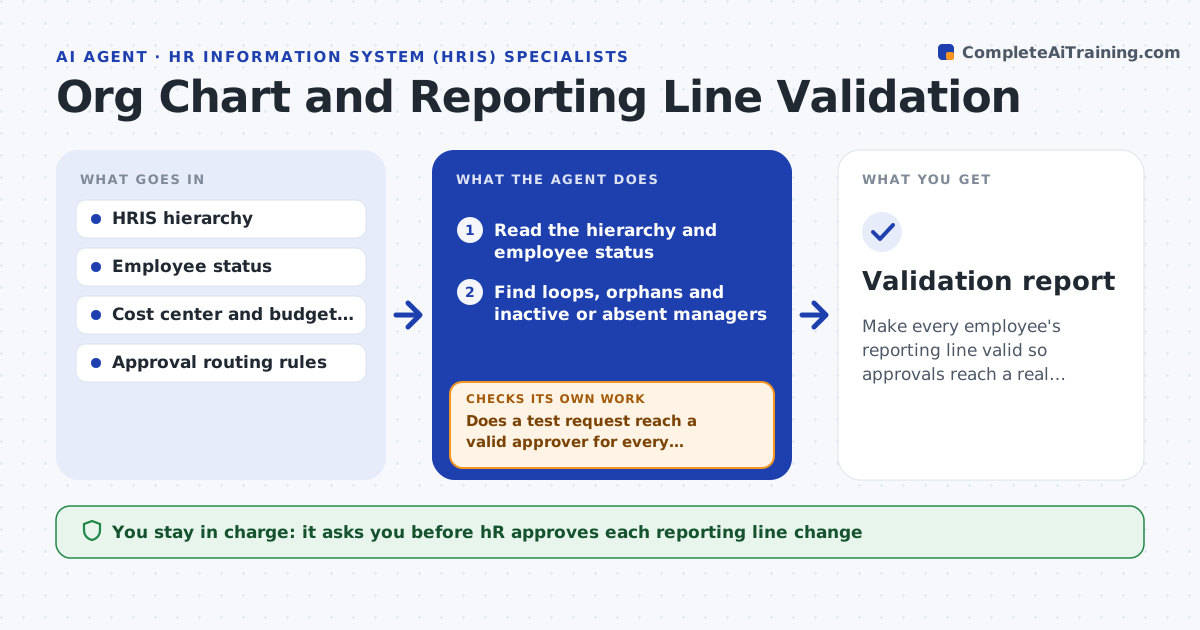
A leave request sits forever because the manager field points to someone who left. This agent scans the whole hierarchy and finds loops, where A reports to B and B to A, employees with no manager, managers who are terminated or on long leave, and differences between the org chart and the cost center or budget structure. It proposes fixes: a likely manager based on the department, the budget owner or the previous holder. Then it tests the approval routing in a test environment for affected employees, to see that a request reaches a valid approver. HR approves the changes. After the corrections, it reruns the scan and the routing tests. Edge case: a temporary manager covers leave, so the agent suggests a delegate and an end date.
How it works
Follow the arrows from top to bottom. The orange dashed arrow is the loop: when a check fails, the agent goes back and tries again.
Read the steps as a list
- Weekly scan or reorganization
- Read the hierarchy and employee status
- Find loops, orphans and inactive or absent managers
- Compare reporting lines with cost centers and budget owners
- Propose a fix for each issue with the reason
- HR approves the changesThe agent waits here for your OK.
- Apply changes in the test environment and test approval routing
- Does a test request reach a valid approver for every affected employee?If not: revise the proposal for the failing cases and test again. Back to step 5.
- Apply to the live system and rerun the scan
- Does the scan show no remaining issues?If not: list the remaining issues with new proposals. Back to step 3.
- Validation report
How it decides
It flags a line as invalid when it forms a loop, ends without a manager or points to an inactive person, and proposes the most likely valid manager from department and budget data.
- Flag a loop of any length
- Flag a manager on leave over 30 days
- Propose the budget owner when the manager is vacant
- Suggest a delegate with an end date for temporary cover
Make it yours
Every agent is a starting point. You choose these settings for your own situation.
- Scan schedule (default weekly)
- Leave length that triggers a flag
- Approval routes to test
- Fallback approver rules
- Cost center source
What keeps you in control
It always asks you first
- HR approves each reporting line change
- Department head approves manager assignments
Hard limits
- Never change reporting lines without HR approval
- Never expose salary or personal data in the report
It stops when
- Done: the scan is clean and routing tests pass
- Stop: the right manager cannot be determined and HR decides
Set it up
We guide you through the set-up, step by step
Members get the full set-up guide for this agent. No technical skills needed: you copy, paste and upload.
- One set of instructions to paste into your AI, with the clicks for ChatGPT, Claude, Microsoft 365 Copilot, Gemini and Grok
- The agent then walks you through connecting your own data, one source at a time
- A downloadable copy with the flow chart, the rules and the full guide