AI agent for database administrators
Orphan Database and Schema Cleanup Agent
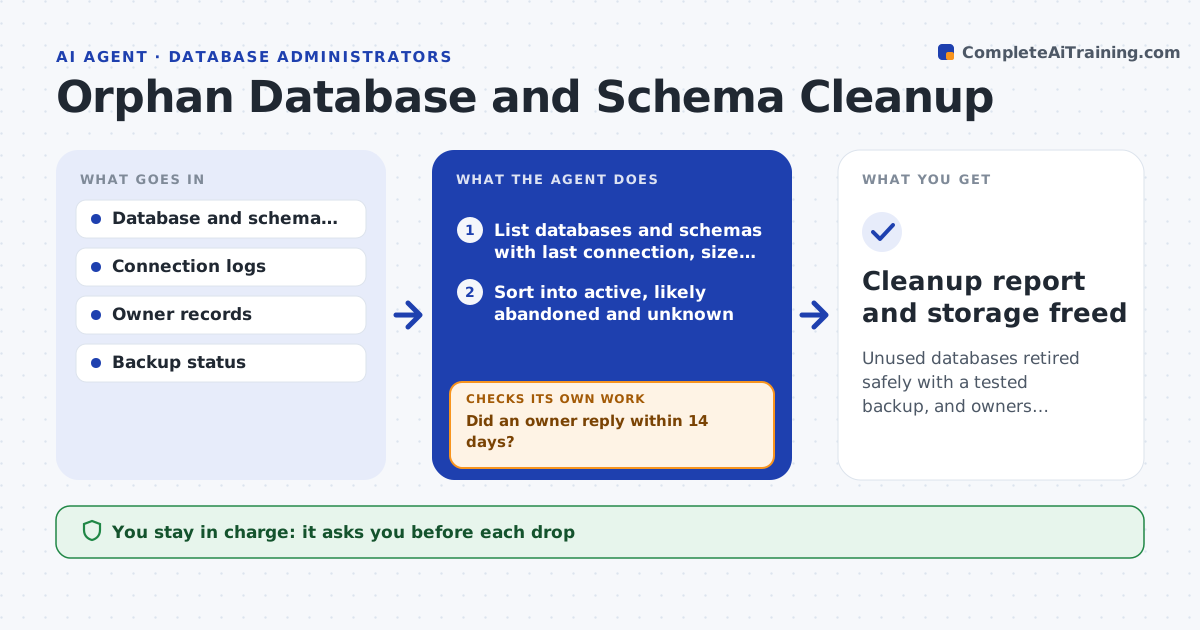
Unused databases retired safely with a tested backup, and owners confirmed for everything that stays
What it does
Over the years, copies of production and test schemas pile up, and nobody dares drop them. This agent lists databases and schemas across environments, then reads the last connection time, owner, size and backup status for each. It sorts them into likely active, likely abandoned and unknown. For the last two groups it asks the likely owners to claim or release them, and tracks replies. For items nobody claims, it drafts a retire plan: final backup, restore test to prove the backup works, and a waiting period before the drop. The DBA approves each drop. Edge case: a schema with no connections for a year but used by a yearly finance close is spotted from last year's log and kept.
How it works
Follow the arrows from top to bottom. The orange dashed arrow is the loop: when a check fails, the agent goes back and tries again.
Read the steps as a list
- Monthly inventory scan
- List databases and schemas with last connection, size and owner
- Sort into active, likely abandoned and unknown
- Check yearly or seasonal use in older logs
- Ask likely owners to claim or release each item
- Did an owner reply within 14 days?If not: ask the owner's manager and add a second reminder. Back to step 4.
- Draft a retire plan with final backup and restore test
- Take the backup and run a restore test
- Did the restore test pass?If not: retake the backup and test again, otherwise keep the database. Back to step 8.
- DBA approves each drop after the waiting periodThe agent waits here for your OK.
- Cleanup report and storage freed
How it decides
A database is a candidate when it has no connections for 180 days and no owner claim. A drop needs a successful restore test first.
- Candidate after 180 days without connections
- Look back 13 months for yearly workloads
- Wait 30 days after owner notice before any drop
- Never drop an item without a passing restore test
Make it yours
Every agent is a starting point. You choose these settings for your own situation.
- Inactivity days (default 180)
- Waiting period after notice (default 30 days)
- Environments in scope
- Owner reply deadline (default 14 days)
What keeps you in control
It always asks you first
- Each drop
- Extending the waiting period
Hard limits
- Never drops anything itself
- Never contacts anyone outside the company
It stops when
- Done: all candidates dropped, kept or owned
- Stop: restore tests fail twice
Set it up
We guide you through the set-up, step by step
Members get the full set-up guide for this agent. No technical skills needed: you copy, paste and upload.
- One set of instructions to paste into your AI, with the clicks for ChatGPT, Claude, Microsoft 365 Copilot, Gemini and Grok
- The agent then walks you through connecting your own data, one source at a time
- A downloadable copy with the flow chart, the rules and the full guide