AI agent for sales development representatives
Outbound Reply Handling Agent
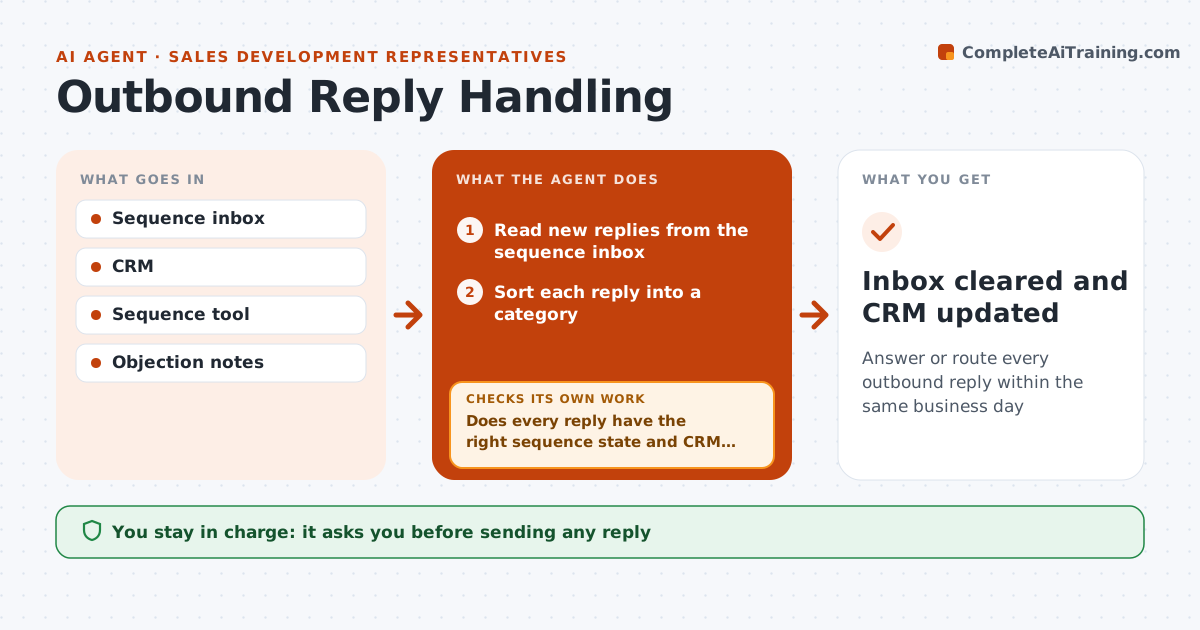
Answer or route every outbound reply within the same business day
What it does
SDRs send hundreds of sequence emails, and replies need fast, correct handling or good leads cool off. Every hour this agent reads new replies and sorts each into interested, not now, wrong person, out of office, unsubscribe or objection, with unsubscribe always winning. It then acts: unsubscribes are applied immediately as a legal requirement, out-of-office replies set a resume date two days after return, sequences are paused, and wrong-person replies trigger a lookup of the named contact and a drafted introduction. For interested and objection replies it drafts a personal answer. It then checks every reply has the right sequence state and CRM status, and fixes mismatches. The SDR approves every drafted answer before it goes. Edge case: unsubscribe requests are applied at once, then reported to the SDR.
How it works
Follow the arrows from top to bottom. The orange dashed arrow is the loop: when a check fails, the agent goes back and tries again.
Read the steps as a list
- Hourly reply check
- Read new replies from the sequence inbox
- Sort each reply into a category
- Apply unsubscribes immediately
- Pause sequences, set return dates and look up named contacts
- Draft answers and introductions
- Does every reply have the right sequence state and CRM status?If not: fix the mismatched records and recheck. Back to step 5.
- SDR approves each drafted answerThe agent waits here for your OK.
- Inbox cleared and CRM updated
How it decides
The reply category comes from the buyer's words. Unsubscribe always wins over other categories.
- Apply unsubscribes immediately
- Out of office sets a resume date two days after return
- Wrong person replies trigger a lookup of the named contact
Make it yours
Every agent is a starting point. You choose these settings for your own situation.
- Check frequency (default hourly)
- Reply categories
- Tone of drafted answers
- Not now follow-up delay (default 90 days)
What keeps you in control
It always asks you first
- Sending any reply
- Booking a meeting on an AE's calendar
Hard limits
- Never ignores an unsubscribe
- Never sends without SDR approval
It stops when
- Done: no unhandled replies
- Stop: inbox connection fails
Set it up
We guide you through the set-up, step by step
Members get the full set-up guide for this agent. No technical skills needed: you copy, paste and upload.
- One set of instructions to paste into your AI, with the clicks for ChatGPT, Claude, Microsoft 365 Copilot, Gemini and Grok
- The agent then walks you through connecting your own data, one source at a time
- A downloadable copy with the flow chart, the rules and the full guide