AI agent for franchise owners
Par-Level Ordering Agent
The right stock on hand for each delivery period without waste
What it does
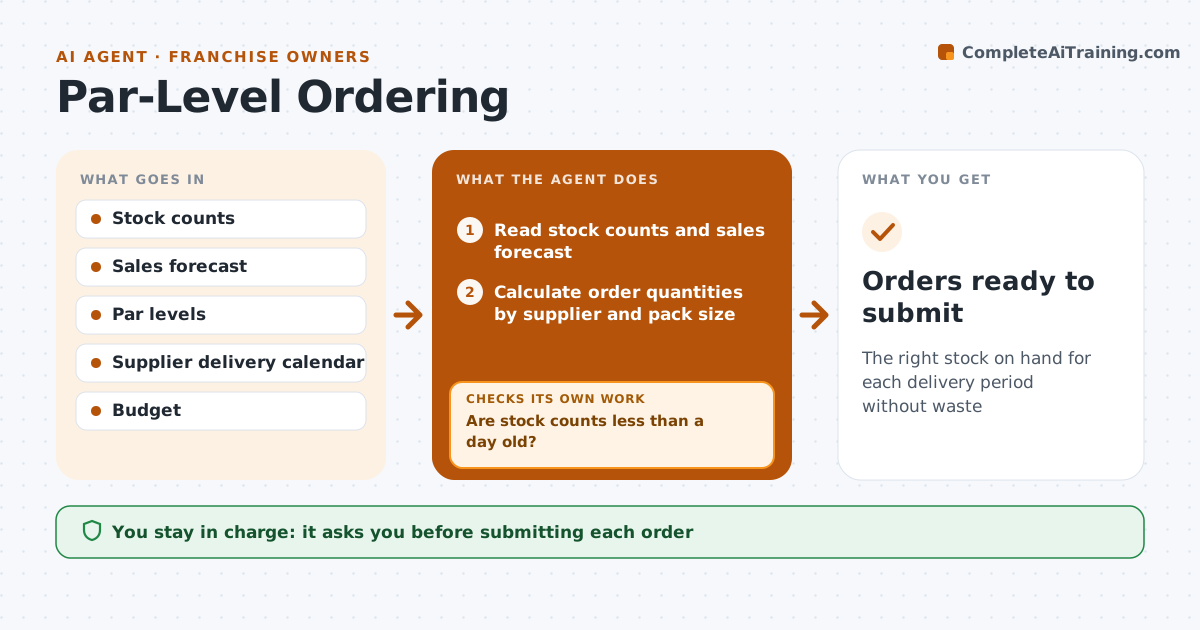
Orders are often based on a quick look in the walk-in, which leads to running out on a busy night or throwing away spoiled stock. Before each supplier cutoff, this agent reads the latest stock counts, the sales forecast until the next delivery and the set par levels. Order quantity is par minus stock plus forecast use, rounded to supplier pack sizes. A public holiday that skips a delivery extends the cover period. It builds order drafts per supplier and checks them against the delivery calendar, storage space and the weekly budget. If a draft is over budget or will not fit, it trims slow-moving items first and recalculates. It also checks that stock counts are less than a day old. The chef or owner approves the orders. Edge case: a holiday that skips a delivery day doubles the cover period for that order.
How it works
Follow the arrows from top to bottom. The orange dashed arrow is the loop: when a check fails, the agent goes back and tries again.
Read the steps as a list
- Supplier order cutoff approaching
- Read stock counts and sales forecast
- Are stock counts less than a day old?If not: ask the kitchen to recount key items before ordering. Back to step 2.
- Calculate order quantities by supplier and pack size
- Check delivery calendar, storage and budget
- Do drafts fit budget, storage and delivery days?If not: trim slow items or adjust for skipped deliveries and recalculate. Back to step 4.
- Prepare order drafts per supplier
- Chef or owner approves ordersThe agent waits here for your OK.
- Orders ready to submit
How it decides
Order quantity is par minus stock plus forecast use until the next delivery, rounded to pack size.
- Round to supplier pack sizes
- Skipped delivery days extend the cover period
- Slow movers are trimmed first
Make it yours
Every agent is a starting point. You choose these settings for your own situation.
- Par levels per item
- Weekly budget
- Suppliers and cutoffs
- Storage limits
What keeps you in control
It always asks you first
- Submitting each order
Hard limits
- Never submits orders
- Never exceeds the budget without approval
It stops when
- Done: orders approved
- Stop: stock counts older than 2 days, ask for a recount
Set it up
We guide you through the set-up, step by step
Members get the full set-up guide for this agent. No technical skills needed: you copy, paste and upload.
- One set of instructions to paste into your AI, with the clicks for ChatGPT, Claude, Microsoft 365 Copilot, Gemini and Grok
- The agent then walks you through connecting your own data, one source at a time
- A downloadable copy with the flow chart, the rules and the full guide