AI agent for billing specialists
Patient Balance Follow-Up Agent
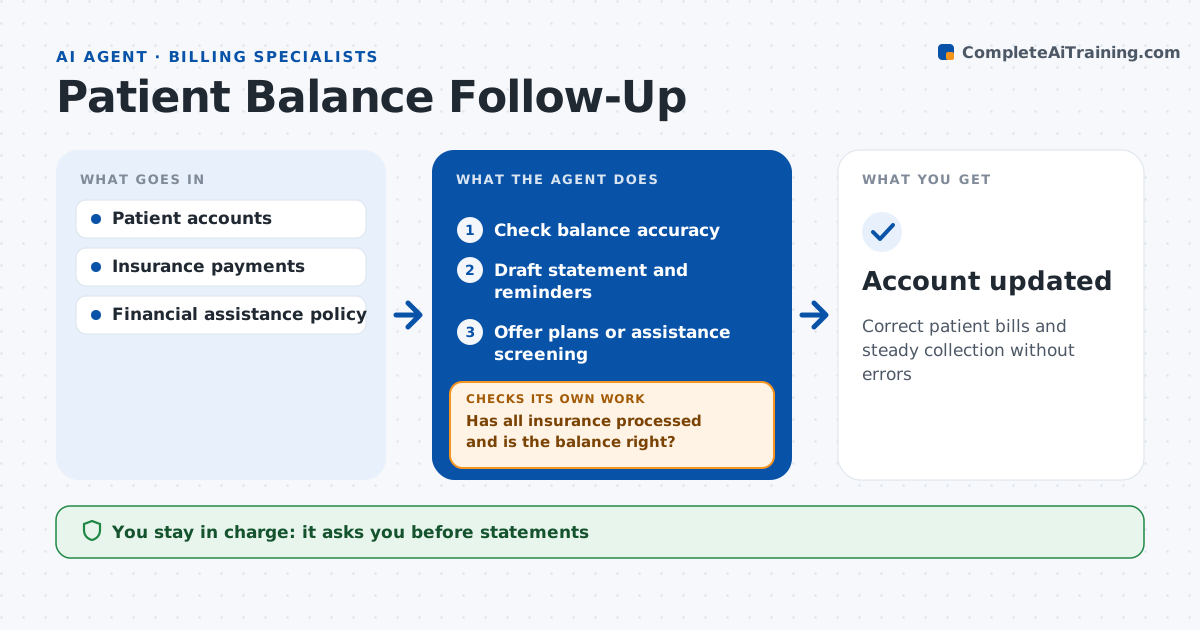
Correct patient bills and steady collection without errors
What it does
Patient bills sent too early or with the wrong amount cause complaints, calls and unpaid balances. After insurance pays, this agent reviews each patient balance. It first checks that all insurance has processed and that the balance is right, such as the correct copay and deductible. If secondary insurance is still pending or the balance looks wrong, it holds the bill and rechecks after the secondary pays or the correction is made. It then drafts a clear statement and reminders in the patient's preferred channel, offers payment plans within policy and answers simple billing questions from the account record. It tracks payments and moves accounts through reminder stages. Accounts with income indicators are offered financial assistance screening. Over 90 days without payment triggers a review for referral. The biller approves statements, plans and any collection referral. Edge case: a balance appears before secondary insurance processed, so the agent holds it.
How it works
Follow the arrows from top to bottom. The orange dashed arrow is the loop: when a check fails, the agent goes back and tries again.
Read the steps as a list
- Insurance processing done
- Check balance accuracy
- Has all insurance processed and is the balance right?If not: hold and recheck after secondary or correction. Back to step 2.
- Draft statement and reminders
- Offer plans or assistance screening
- Biller approves statements and referralsThe agent waits here for your OK.
- Account updated
How it decides
It bills only after all insurance processes and follows reminder stages by days outstanding.
- Secondary insurance pending: hold
- Over 90 days without payment: review for referral
- Income indicators: offer assistance screening
Make it yours
Every agent is a starting point. You choose these settings for your own situation.
- Reminder stages
- Plan terms
- Assistance rules
- Channels
What keeps you in control
It always asks you first
- Statements
- Payment plans
- Collection referrals
Hard limits
- Never refers to collections without approval
- Never shares records
It stops when
- Done: paid or plan set
- Stop: patient disputes, send to biller
Set it up
We guide you through the set-up, step by step
Members get the full set-up guide for this agent. No technical skills needed: you copy, paste and upload.
- One set of instructions to paste into your AI, with the clicks for ChatGPT, Claude, Microsoft 365 Copilot, Gemini and Grok
- The agent then walks you through connecting your own data, one source at a time
- A downloadable copy with the flow chart, the rules and the full guide