AI agent for hospital administrators
Patient Complaint Case Agent
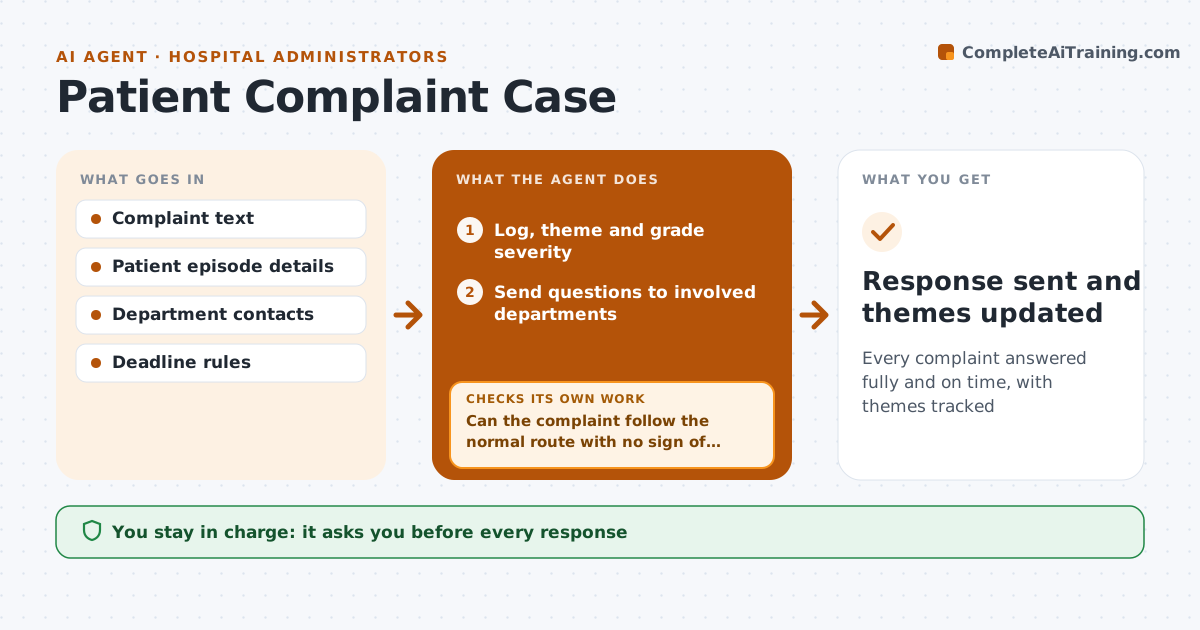
Every complaint answered fully and on time, with themes tracked
What it does
Patient complaints must be acknowledged and answered within set deadlines, with facts from every department involved. When a complaint arrives, this agent logs it, sorts it by theme and grades severity, which sets the deadline and route. A complaint that suggests serious harm goes to the patient safety team at once. It sends questions to the departments named and tracks the deadline. It drafts a response from the answers received, then checks that every point raised has an answer. If a point is missing, it asks the department again. As the deadline nears, it checks that the response can still go out on time and alerts the lead if not. The patient relations lead approves every response, and clinical points are reviewed by a clinician. Themes are reported monthly. Edge case: a complaint made on behalf of a patient needs consent on file first.
How it works
Follow the arrows from top to bottom. The orange dashed arrow is the loop: when a check fails, the agent goes back and tries again.
Read the steps as a list
- Complaint received
- Log, theme and grade severity
- Can the complaint follow the normal route with no sign of serious harm?If not: send it to the patient safety team at once and regrade. Back to step 2.
- Send questions to involved departments
- Draft response from department answers
- Does the draft answer every point raised?If not: ask the department again for the missing point. Back to step 4.
- Patient relations lead and clinician approve the responseThe agent waits here for your OK.
- Update monthly complaint themes
- Response sent and themes updated
How it decides
Severity sets the deadline and route; a response is ready only when each point raised has an answer.
- Serious harm goes to patient safety at once
- Deadlines follow severity
- Themes reported monthly
Make it yours
Every agent is a starting point. You choose these settings for your own situation.
- Deadlines by severity
- Theme categories
- Approval roles
- Response template
What keeps you in control
It always asks you first
- Every response
- Any offer of remedy
Hard limits
- Never admits liability
- Never sends responses itself
It stops when
- Done: response approved
- Stop: legal claim indicated, pass to legal
Set it up
We guide you through the set-up, step by step
Members get the full set-up guide for this agent. No technical skills needed: you copy, paste and upload.
- One set of instructions to paste into your AI, with the clicks for ChatGPT, Claude, Microsoft 365 Copilot, Gemini and Grok
- The agent then walks you through connecting your own data, one source at a time
- A downloadable copy with the flow chart, the rules and the full guide