AI agent for radiographers
Patient Dose Level Agent
Keep doses within reference levels and explain every exceedance
What it does
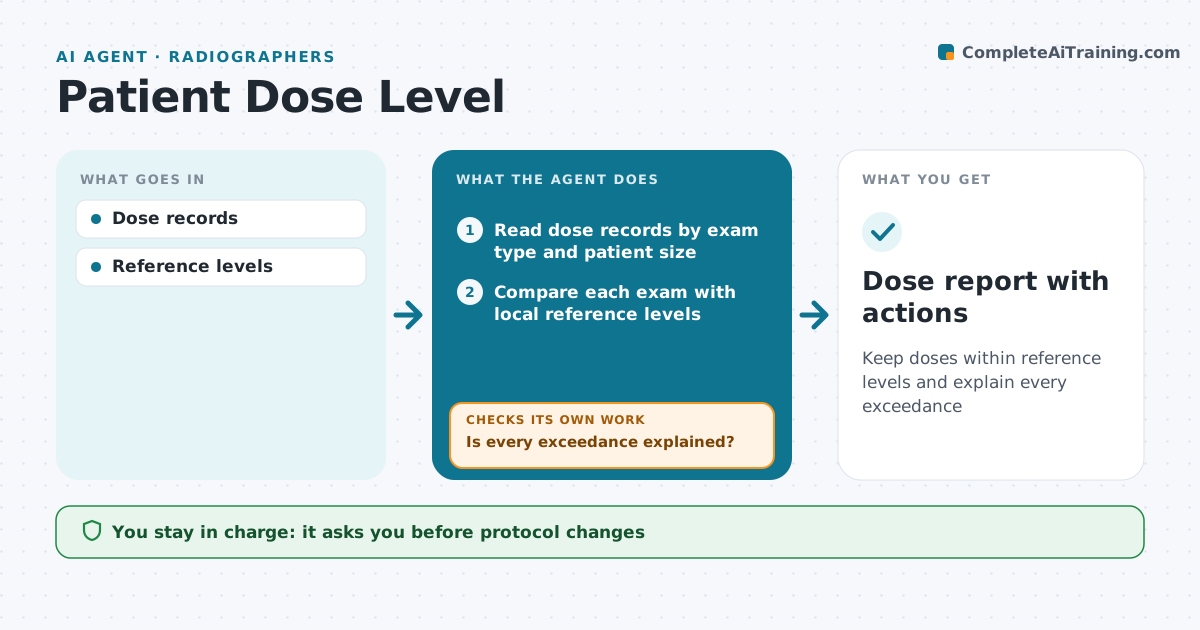
Dose reference levels help keep patient radiation as low as reasonable, but reviewing every exam by hand is impossible. This agent reads dose records from CT and X-ray systems and compares each exam with local reference levels by exam type and patient size. It flags exams above the level and checks whether a reason was documented, such as a large patient or a repeat. For unexplained exams, it asks the performing radiographer for a reason and checks again once it arrives. It lists protocol patterns for the physicist, such as one protocol that often runs high. It also checks monthly averages against the levels. Protocol changes need approval from the physicist and lead. Edge case: exams on very large patients are compared with size-adjusted levels.
How it works
Follow the arrows from top to bottom. The orange dashed arrow is the loop: when a check fails, the agent goes back and tries again.
Read the steps as a list
- Daily dose export from CT and X-ray systems
- Read dose records by exam type and patient size
- Compare each exam with local reference levels
- Flag exceedances and look for repeat or protocol notes
- Is every exceedance explained?If not: ask the performing radiographer for the reason, then re-check. Back to step 4.
- Group exceedances by room, protocol and shift
- Radiation protection lead reviews patternsThe agent waits here for your OK.
- Dose report with actions
How it decides
Each exam compared with its level; exceedances need a reason.
- Exceedance above level needs reason
- Size-adjusted levels for large patients
- Protocol patterns go to physicist
Make it yours
Every agent is a starting point. You choose these settings for your own situation.
- Reference levels
- Exam types
- Report frequency
- Recipients
What keeps you in control
It always asks you first
- Protocol changes
Hard limits
- No protocol changes by agent
It stops when
- Done: all explained
- Stop: system outage
Set it up
We guide you through the set-up, step by step
Members get the full set-up guide for this agent. No technical skills needed: you copy, paste and upload.
- One set of instructions to paste into your AI, with the clicks for ChatGPT, Claude, Microsoft 365 Copilot, Gemini and Grok
- The agent then walks you through connecting your own data, one source at a time
- A downloadable copy with the flow chart, the rules and the full guide