AI agent for hospital administrators
Patient Flow Discharge Bottleneck Agent
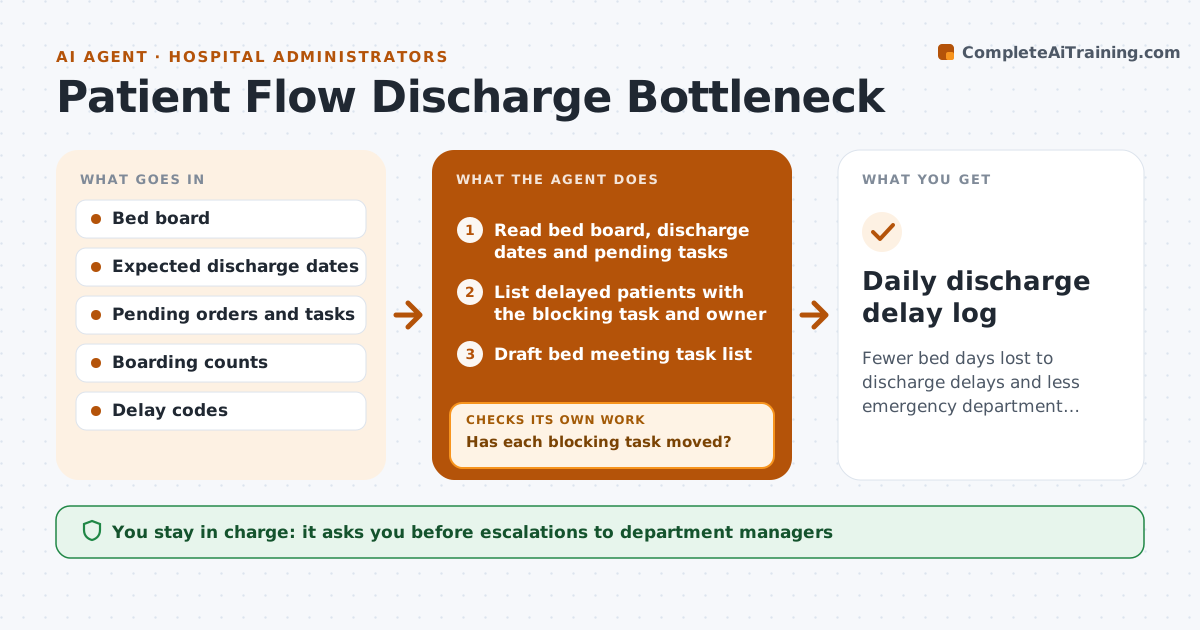
Fewer bed days lost to discharge delays and less emergency department boarding
What it does
Hospitals lose capacity when patients who are medically ready to go home wait for transport, a care home place, medicines or paperwork. Each morning before the bed meeting, this agent reads the bed board, expected discharge dates, pending tasks and emergency department boarding. It lists patients more than 24 hours past their expected date, with the specific task they are waiting for and its owner. It ranks them by days delayed and by how many boarding patients need that bed type. It drafts a task list for the bed meeting grouped by owner, such as pharmacy, social work or transport. In the afternoon it checks whether each task moved. If a delay remains, it drafts an escalation to the owning manager, which an administrator approves. Repeat causes are trended weekly. Edge case: patients waiting for a care home bed are tracked across days with each facility contact logged.
How it works
Follow the arrows from top to bottom. The orange dashed arrow is the loop: when a check fails, the agent goes back and tries again.
Read the steps as a list
- Morning before the bed meeting
- Read bed board, discharge dates and pending tasks
- List delayed patients with the blocking task and owner
- Draft bed meeting task list
- Check task status in the afternoon
- Has each blocking task moved?If not: draft an escalation to the owning manager. Back to step 4.
- Administrator approves escalationsThe agent waits here for your OK.
- Daily discharge delay log
How it decides
It ranks delayed patients by days past expected discharge and by how many boarding patients are waiting for that bed type.
- Patients over 24 hours past expected discharge are listed
- Bed types with boarding patients come first
- Repeat delay causes are trended weekly
Make it yours
Every agent is a starting point. You choose these settings for your own situation.
- Delay threshold (default 24 hours)
- Afternoon check time
- Escalation contacts by department
- Delay code list
What keeps you in control
It always asks you first
- Escalations to department managers
- Changes to bed allocation rules
Hard limits
- Never changes clinical orders
- Shows patient details only to staff with access
It stops when
- Done: all listed tasks moved or escalated
- Stop: bed board data stale, alert the flow manager
Set it up
We guide you through the set-up, step by step
Members get the full set-up guide for this agent. No technical skills needed: you copy, paste and upload.
- One set of instructions to paste into your AI, with the clicks for ChatGPT, Claude, Microsoft 365 Copilot, Gemini and Grok
- The agent then walks you through connecting your own data, one source at a time
- A downloadable copy with the flow chart, the rules and the full guide