AI agent for medical assistants
Patient Portal Message Triage Agent
Every portal message reaches the right person and is answered on time
What it does
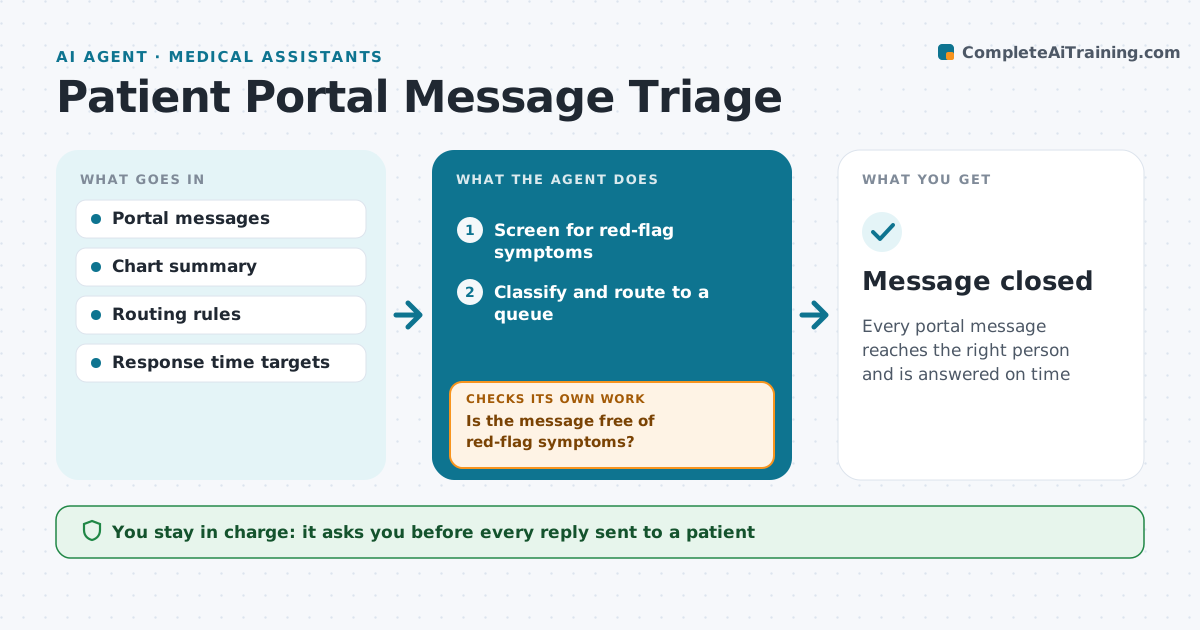
Portal messages range from billing questions to new chest pain, and urgent ones can sit in the wrong queue. This agent reads each incoming message and first screens it for red-flag symptoms, such as chest pain, breathing trouble or suicidal thoughts. Those go straight to a nurse with a call-back prompt. It then sorts the rest into urgent clinical, routine clinical, refill, scheduling, forms or billing, and routes each to the right queue. A message that mixes topics is routed by its most urgent part. For routine items it pulls the facts the responder needs, such as last visit, current medications and pending orders, and drafts a reply for staff to edit. A staff member approves and sends every reply. The agent checks each message is answered within the target time and escalates late ones. Edge case: a refill request that mentions a new symptom is treated as clinical.
How it works
Follow the arrows from top to bottom. The orange dashed arrow is the loop: when a check fails, the agent goes back and tries again.
Read the steps as a list
- Message arrives
- Screen for red-flag symptoms
- Is the message free of red-flag symptoms?If not: send to a nurse at once with a call-back prompt. Back to step 2.
- Classify and route to a queue
- Pull chart facts and draft a reply
- Staff member edits and sends the replyThe agent waits here for your OK.
- Was it answered within the target time?If not: escalate to the queue lead and reroute if needed. Back to step 4.
- Message closed
How it decides
Red-flag words and symptoms override other categories. Otherwise the message type decides the queue and response target.
- Chest pain, breathing trouble or suicidal thoughts go to a nurse immediately
- Mixed messages are routed by the most urgent part
- Targets: urgent same hour, routine 1 business day
Make it yours
Every agent is a starting point. You choose these settings for your own situation.
- Red-flag word list
- Response time targets
- Queue owners
- Draft reply tone
What keeps you in control
It always asks you first
- Every reply sent to a patient
- Refill approvals by the prescriber
Hard limits
- No clinical advice sent without a person
- Red-flag messages are never delayed
It stops when
- Done: message answered
- Stop: patient unreachable on urgent issue, follow clinic protocol
Set it up
We guide you through the set-up, step by step
Members get the full set-up guide for this agent. No technical skills needed: you copy, paste and upload.
- One set of instructions to paste into your AI, with the clicks for ChatGPT, Claude, Microsoft 365 Copilot, Gemini and Grok
- The agent then walks you through connecting your own data, one source at a time
- A downloadable copy with the flow chart, the rules and the full guide