
Learning path
Learning AI as an Optometrist
Learn how AI can support eye care paperwork, patient questions, and daily clinic flow. The path walks you through setup, safe use, and prompts shaped for optometry.
Your path
Everything in the Optometrist AI kit, in the order that makes sense. Members tick off each step and see their progress.
Set up your AI
We guide you through each click.
Let skills do your everyday tasks
Connect your apps and pick your AI apps
Hand whole tasks to AI agents
Build your own tools
Keep growing
Everything for optometrists
All the courses, certifications, AI tools, MCP servers and apps for optometrists, most relevant first. Open any list to see more.
Take the prompt courses
A short framework course to learn how to ask, then 8 lessons with ready-to-use prompts for optometrists.
Start with this framework: how to talk to AI
CARE fits optometry because patient cases need context, action, result, and example, like documenting a glaucoma suspect's pressure, field, and follow-up.
Then your prompt course for optometristsWatch the video courses or add them to your Favorites for later
86 video courses our AI picked for optometrists, most useful first. Save the ones you want to watch later with the heart.
Favorites are saved to your account: sign in or get your AI kit first.
Show all 86 video courses
Get certified, or add certifications to your Favorites
Every course ends in an exam and a certificate you can add to LinkedIn. Save the certifications you are aiming for with the heart.
Favorites are saved to your account: sign in or get your AI kit first.
More certifications for optometristsShow all 24 certifications
Try the AI tools for optometrists
18 AI tools our AI matched to the work of optometrists, best fit first. Each review shows what it does, its alternatives and the jobs it suits.
Favorites are saved to your account: sign in or get your AI kit first.
Show all 18 AI tools
Connect your AI to the apps optometrists use
MCP servers let ChatGPT, Claude or Copilot look things up and get work done in other apps, like your email, calendar or bookkeeping software. These 9 fit the work of optometrists best, well-known apps first.

CallChatSyn MCP server
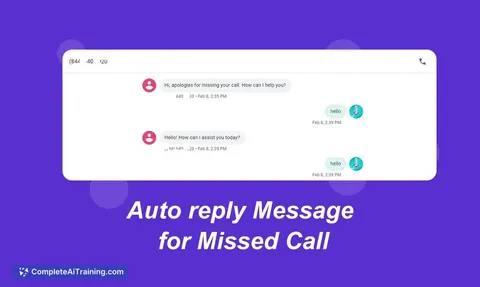
by oneappsworldLet your AI answer customer questions from your business FAQs and book appointments for you.
Customer communication Official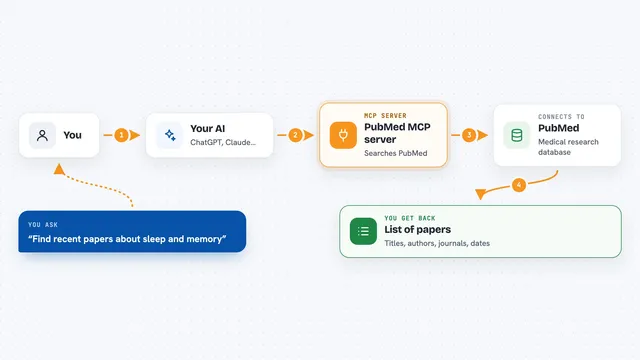
PubMed MCP server
by andybrandtLets your AI search medical and life sciences papers on PubMed and read their abstracts and full text.
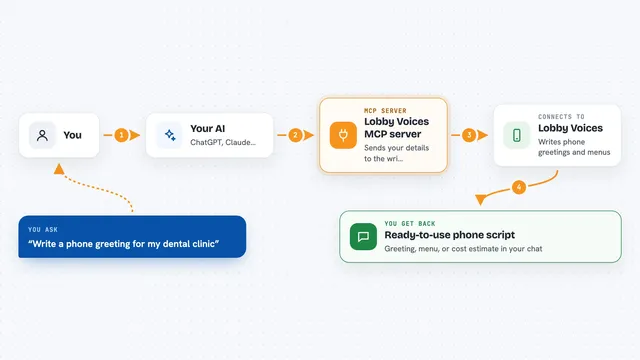
Lobby Voices MCP server
by bodyegyptYour AI writes phone greetings, hold messages and automated phone menus for your business.
Customer communication Official
PubMed Search MCP Server
by pubsproLet your AI search medical research papers on PubMed and give you plain-English summaries.
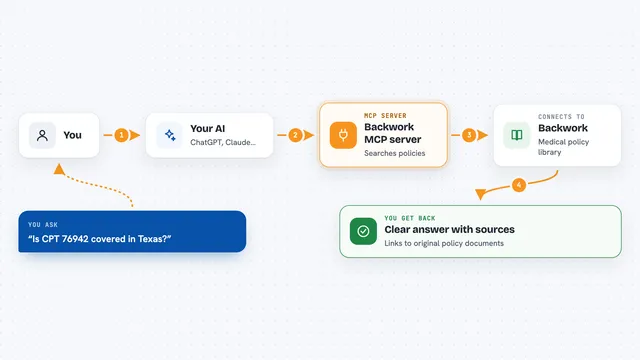
Backwork MCP server
by tylergibbs1Lets your AI look up Medicare and insurance medical policies, check prior authorization, and validate claims with cited sources.
ResearchNo install
Lucairn privacy gateway MCP server
by DecladeLets your AI clean personal data out of your prompts before they reach the model, and hand you a signed proof of what was removed.
Show all 9 MCP servers

ICDwise MCP server
by qinisolabsYour AI can look up real ICD-10-CM medical codes and get the official description instead of a guess.
ResearchNo install
Medical MCP server
by JamesANZLets your AI look up drugs, health stats, and medical studies from trusted public sources.
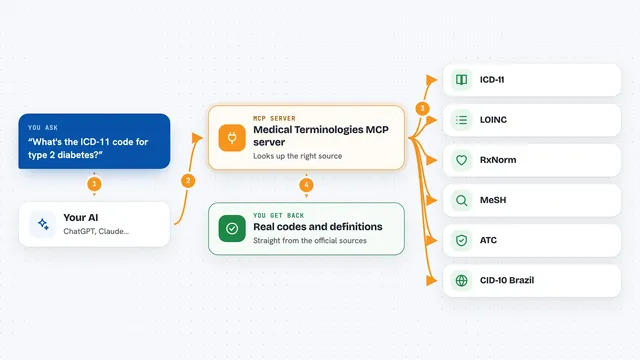
Medical Terminologies MCP server
by SidneyBissoliLook up real medical codes and terms from ICD-11, LOINC, RxNorm, MeSH, ATC and Brazil's CID-10 right inside your AI chat.
ResearchNo install




















































































About this learning path
7 topicsAI for Optometrists: A Practical Learning Path
As an optometrist, your day is part eye care and part communication. You explain findings, write notes, guide patients through lenses or surgery, and keep the practice moving. AI can help with the words and the admin around that care, while you stay in charge of every clinical decision.
This path starts with simple setup questions, then shows you how to connect an AI tool like ChatGPT, Claude, or Gemini. You will practice job-specific skills, complete a prompt course, and watch short video courses chosen for optometry. Each video course includes a certificate you can keep for your records.
Why AI matters for this job now
Eye care is personal, but the work around it takes time. You write exam notes, explain diagnoses in plain words, prepare referrals, answer lens questions, and keep recall lists moving. AI can help you draft that language faster so you can spend more attention on the person in the chair.
The tool does not diagnose or decide. It helps you organize words and details. You review everything before it goes to a patient or another provider.
What the path includes
The path begins with setup questions to help you choose a tool and use it safely. Then it shows you how to connect your AI, whether that is ChatGPT, Claude, or Gemini, and how to keep patient details private.
You will work through skills for the job inside your AI, then take this prompt course. Short video courses picked for optometry follow, and each one comes with a certificate you can keep.
How it saves time
Routine writing often takes the most minutes. A good prompt can turn rough notes into a clear visit summary or a patient-friendly explanation you can edit. It can also prepare recall messages, insurance replies, and optical order details.
Saved time adds up across a day. You can finish charts before you leave, return calls sooner, and give patients more unhurried attention.
How it protects your career
The path teaches safe habits from the start. You learn what not to put into an AI tool, how to check output for errors, and how to keep your clinical judgment in charge.
Using AI well can make you more efficient and more consistent. It can also help you document clearly, which supports good care and reduces avoidable back-and-forth.
Video courses and certificates
The video courses are chosen for the daily work of optometry. They cover practical topics in short lessons you can watch between patients or at the end of the day.
Each course includes a certificate of completion. You can use it for your own records or as part of your continuing education planning.
How to start
Start with the setup questions and pick one AI tool to practice with. Connect it, try one low-risk task like rewriting a patient handout, and review the result carefully.
Then move into the prompt course and use the lessons one at a time. Small daily practice is enough. The goal is a steady habit, not a complete change overnight.
Frequently asked questions
Do I need technical skills to use this path?
No. The setup questions and lessons are made for working optometrists who are not technical. You will learn step by step with plain language and practical examples.Can I use AI with patient information?
You must follow your practice rules and privacy laws. The path teaches safe habits, such as removing identifying details before you ask an AI tool for help.Will AI make clinical decisions for me?
No. AI can help organize words and options, but you remain responsible for diagnosis, treatment, and every clinical choice. Use it as a writing and planning assistant.How long does the path take?
You can move at your own pace. Many people start with one short lesson a day and add the video courses when they have time.