AI agent for accounts payable specialists
Payment Run Review Agent
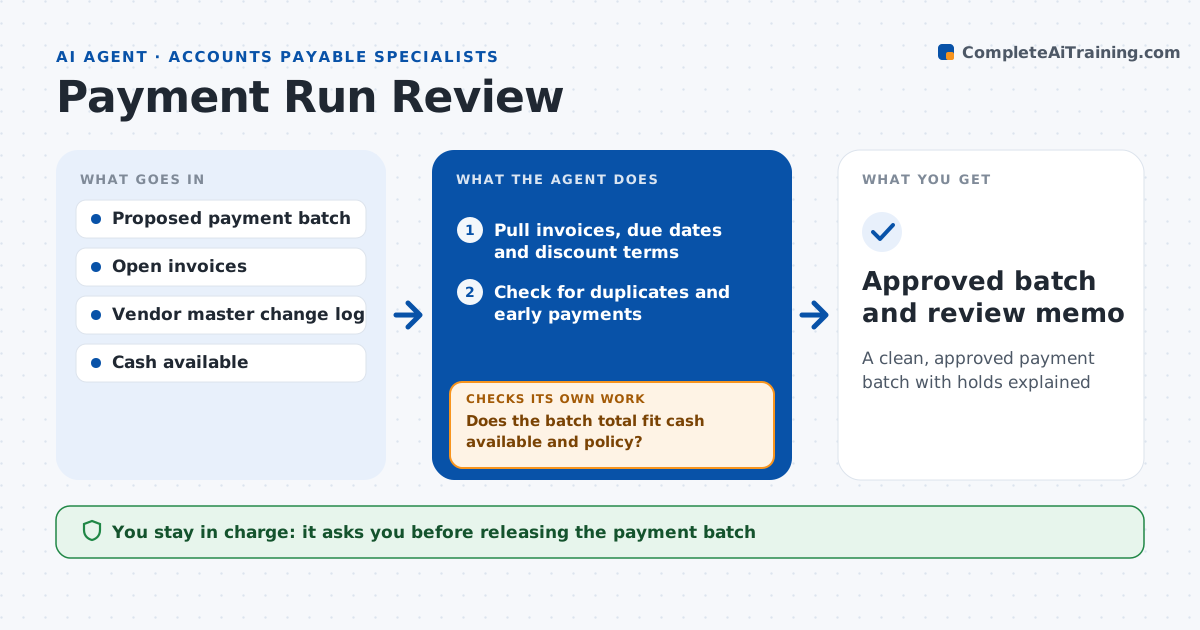
A clean, approved payment batch with holds explained
What it does
A payment run that goes out with a duplicate, a fraudulent bank change or more cash than the company has is hard to undo. Before each run, this agent reviews the proposed batch. It pulls invoices, due dates and discount terms, and checks each payment against them. It looks for duplicates by vendor, amount and invoice date, and compares bank details to the last verified change. It also checks the batch total against the cash the treasury team has posted and the payment policy. It removes or flags problem lines, then re-checks the totals until the batch fits. It produces a short review memo listing what to pay, what to hold and why. The specialist and the approver sign off before anything is released to the bank. Edge case: a vendor changed bank details two days ago, so the agent holds that payment until the change is confirmed by phone.
How it works
Follow the arrows from top to bottom. The orange dashed arrow is the loop: when a check fails, the agent goes back and tries again.
Read the steps as a list
- Proposed payment batch is created
- Pull invoices, due dates and discount terms
- Check for duplicates and early payments
- Compare bank details to the vendor change log
- Flag or remove problem lines
- Does the batch total fit cash available and policy?If not: move lower priority payments to the next run and recompute. Back to step 5.
- Specialist and approver sign the batchThe agent waits here for your OK.
- Approved batch and review memo
How it decides
It pays what is due within the run window, takes discounts worth more than the cost of paying early, and holds anything with recent bank changes or duplicate signs.
- Bank details changed in the last 30 days without callback: hold
- Discount of 2% or more available: pay early if cash allows
- Same vendor, same amount, invoices within 7 days: check for duplicate
Make it yours
Every agent is a starting point. You choose these settings for your own situation.
- Run day and cut-off time
- Minimum discount worth taking early
- Days after a bank change that trigger a hold (default 30)
- Who must approve batches above a set amount
What keeps you in control
It always asks you first
- Releasing the payment batch
- Overriding a hold
Hard limits
- Never releases or edits payments in the bank portal
- Never approves a bank detail change
It stops when
- Done: batch approved with a review memo
- Stop: cash position not posted for the day
Set it up
We guide you through the set-up, step by step
Members get the full set-up guide for this agent. No technical skills needed: you copy, paste and upload.
- One set of instructions to paste into your AI, with the clicks for ChatGPT, Claude, Microsoft 365 Copilot, Gemini and Grok
- The agent then walks you through connecting your own data, one source at a time
- A downloadable copy with the flow chart, the rules and the full guide