AI agent for logistics planners
Peak Season Capacity Plan Agent
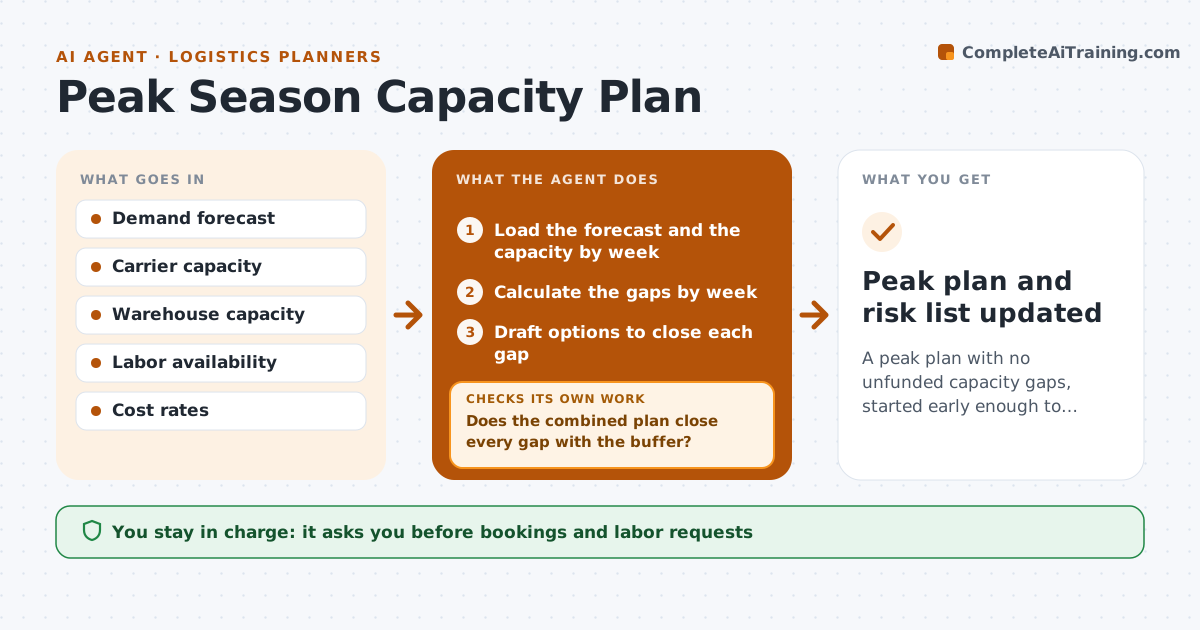
A peak plan with no unfunded capacity gaps, started early enough to book what is needed
What it does
Peak season plans start too late, and by then carriers and labor are booked. This agent combines the demand forecast with carrier, warehouse and labor capacity by week. It finds the gaps and drafts options, such as booking early, shifting orders or adding a shift. When the forecast changes, it reruns the plan and shows what moved. After each option is chosen, it checks the remaining gap by week. The planner approves bookings. Edge case: a carrier's capacity is only confirmed for four weeks, so the agent treats the later weeks as a risk and plans a backup.
How it works
Follow the arrows from top to bottom. The orange dashed arrow is the loop: when a check fails, the agent goes back and tries again.
Read the steps as a list
- Peak planning window opens or forecast changes
- Load the forecast and the capacity by week
- Calculate the gaps by week
- Draft options to close each gap
- Does the combined plan close every gap with the buffer?If not: add or change options for the remaining weeks and recompute. Back to step 3.
- Planner approves bookingsThe agent waits here for your OK.
- Place the confirmed bookings and update capacity
- Reload the forecast each week
- Did the forecast change enough to open a gap?If not: redraft options for the new gaps. Back to step 3.
- Peak plan and risk list updated
How it decides
A gap is closed when capacity meets forecast plus a buffer in that week. Options are ranked by cost and risk.
- Keep a 10 percent buffer over forecast
- Book carriers first for lanes with the fewest options
- Treat unconfirmed capacity as at risk
- Rerun when the forecast moves by over 5 percent
Make it yours
Every agent is a starting point. You choose these settings for your own situation.
- Planning start (default 12 weeks)
- Buffer (default 10 percent)
- Carriers and sites included
- Forecast change trigger
What keeps you in control
It always asks you first
- Bookings and labor requests
Hard limits
- Never place bookings without approval
- Never assume capacity that is not confirmed
It stops when
- Done: peak plan closed with buffer
- Stop: forecast is unavailable
Set it up
We guide you through the set-up, step by step
Members get the full set-up guide for this agent. No technical skills needed: you copy, paste and upload.
- One set of instructions to paste into your AI, with the clicks for ChatGPT, Claude, Microsoft 365 Copilot, Gemini and Grok
- The agent then walks you through connecting your own data, one source at a time
- A downloadable copy with the flow chart, the rules and the full guide