AI agent for penetration testers
Pentest Report Drafting Agent
A clear, consistent, evidence-backed report ready for the client
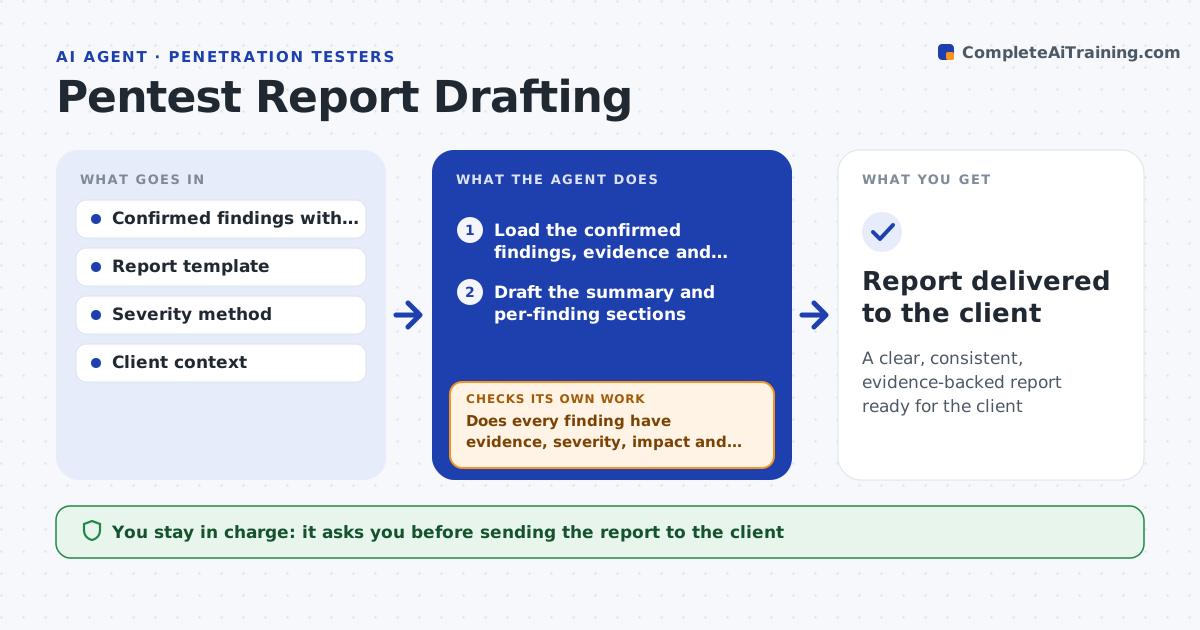
What it does
A penetration test is only as useful as its report, and writing clear, consistent findings eats testing time. This agent takes the confirmed findings and drafts the report in your template: an executive summary for leaders, and for each finding the description, affected assets, severity, business impact and a concrete fix. It checks that every finding has evidence, severity and a remediation. Where impact or remediation is missing, it flags the gap for the tester instead of leaving it blank. It groups findings with the same root cause under one fix. Then it checks that severities are consistent across similar findings. It keeps the summary plain for non-technical readers and the detail precise. You approve the report before it goes to the client. Edge case: the client is never told to fix the same thing twice.
How it works
Follow the arrows from top to bottom. The orange dashed arrow is the loop: when a check fails, the agent goes back and tries again.
Read the steps as a list
- Findings confirmed
- Load the confirmed findings, evidence and report template
- Draft the summary and per-finding sections
- Does every finding have evidence, severity, impact and remediation?If not: flag the gaps for the tester to complete. Back to step 3.
- Group findings that share a root cause
- Are severities consistent across similar findings?If not: correct the outlier rating and note the reason. Back to step 5.
- Prepare the final draft for review
- Tester approves the report for the clientThe agent waits here for your OK.
- Report delivered to the client
How it decides
It includes a finding only when it has evidence, severity and remediation, and keeps ratings consistent across the report.
- Require evidence, severity and remediation per finding
- Group findings with a shared root cause
- Keep severities consistent across the report
Make it yours
Every agent is a starting point. You choose these settings for your own situation.
- Report template
- Severity method
- Summary reading level
- Grouping rules
What keeps you in control
It always asks you first
- Sending the report to the client
Hard limits
- Does not send the report without approval
- Does not invent impact or remediation
It stops when
- Done: report complete and approved
- Stop: findings lack evidence
Set it up
We guide you through the set-up, step by step
Members get the full set-up guide for this agent. No technical skills needed: you copy, paste and upload.
- One set of instructions to paste into your AI, with the clicks for ChatGPT, Claude, Microsoft 365 Copilot, Gemini and Grok
- The agent then walks you through connecting your own data, one source at a time
- A downloadable copy with the flow chart, the rules and the full guide