AI agent for safety engineers
Permit-to-Work Audit Agent
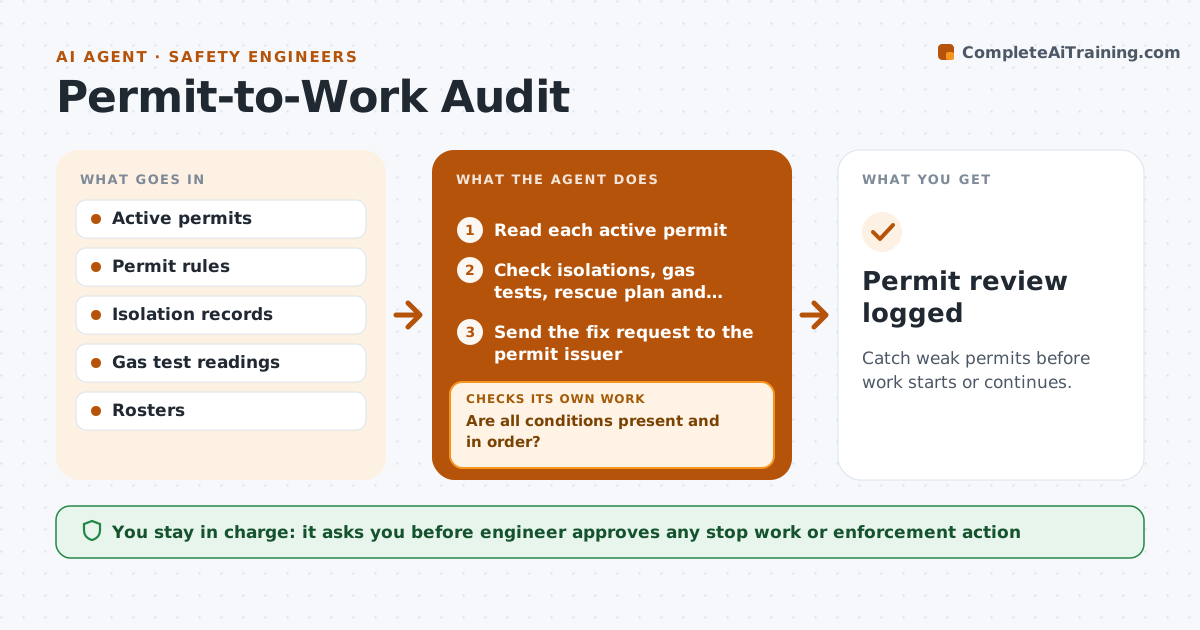
Catch weak permits before work starts or continues.
What it does
A permit to work is only as safe as the checks behind its signature. This agent reviews permits against the requirements: isolations done, gas tests in range, rescue plans, correct signatures and times. It flags gaps and requests fixes. It re-reviews the permit before the next shift. The engineer approves actions on serious gaps. The agent also looks for patterns, such as the same missing item on the same job type. It keeps the review short and specific, naming the permit, the missing item and the person who can fix it. The engineer sees only the permits that need a decision, not every permit that passed. Edge case: a gas test recorded before the isolation was signed is flagged as out of sequence.
How it works
Follow the arrows from top to bottom. The orange dashed arrow is the loop: when a check fails, the agent goes back and tries again.
Read the steps as a list
- Shift begins with active permits
- Read each active permit
- Check isolations, gas tests, rescue plan and signatures
- Are all conditions present and in order?If not: List the gaps on the permit. Back to step 2.
- Send the fix request to the permit issuer
- Wait for the response
- Re-review the permit
- Are the gaps closed before the next shift?If not: Escalate to the engineer and recommend stopping the work. Back to step 7.
- Engineer approves actions on serious gapsThe agent waits here for your OK.
- Permit review logged
How it decides
It flags a permit when any required check is missing, out of order or out of range.
- Check that gas tests follow isolation
- Flag readings outside limits
- Flag unsigned or expired permits
- Recommend stop work for open critical items
Make it yours
Every agent is a starting point. You choose these settings for your own situation.
- Required checks per permit type
- Gas limits
- Review timing
- Stop work rule
What keeps you in control
It always asks you first
- Engineer approves any stop work or enforcement action
Hard limits
- Never close a permit itself
- Never ignore a critical gap
It stops when
- Done: permits pass or work is stopped
- Stop: a critical gap is found and the engineer is called at once
Set it up
We guide you through the set-up, step by step
Members get the full set-up guide for this agent. No technical skills needed: you copy, paste and upload.
- One set of instructions to paste into your AI, with the clicks for ChatGPT, Claude, Microsoft 365 Copilot, Gemini and Grok
- The agent then walks you through connecting your own data, one source at a time
- A downloadable copy with the flow chart, the rules and the full guide