AI agent for property managers
Pest Treatment Tracking Agent
Track every pest report, check if it returns, and escalate to a building-wide plan when a pattern appears
What it does
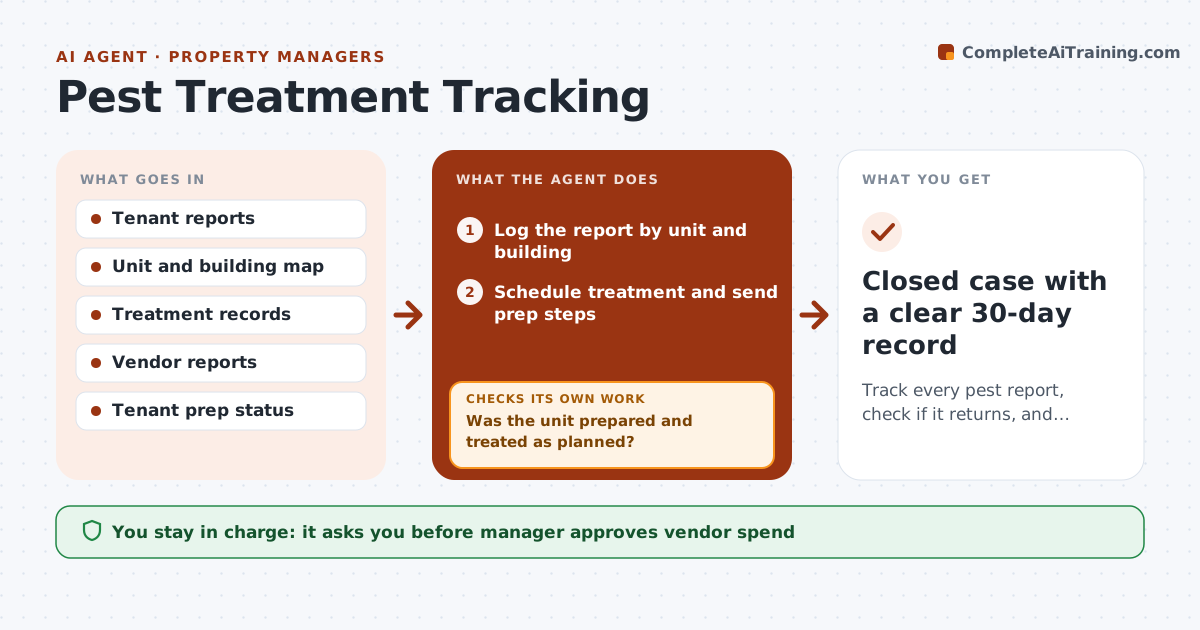
Pest treatments are scheduled one unit at a time, so recurring problems and their root causes stay hidden. The agent logs each report by unit and building, schedules the treatment and tracks whether the tenant has done the required prep. After treatment it waits and checks whether a new report arrives within 30 days. If so, it looks at neighboring units, shared walls and floors and traces a likely spread. When three or more units are involved, it drafts a building-wide plan with vendor options and cost. The manager approves vendor spend. Edge case: two reports in separate wings share a trash room, so the agent suggests starting there.
How it works
Follow the arrows from top to bottom. The orange dashed arrow is the loop: when a check fails, the agent goes back and tries again.
Read the steps as a list
- Pest report received
- Log the report by unit and building
- Schedule treatment and send prep steps
- Track tenant prep and treatment completion
- Was the unit prepared and treated as planned?If not: Reschedule and contact the tenant, then reconfirm prep. Back to step 3.
- Wait 30 days and watch for new reports
- Did any report return in the unit or neighbors?If not: Trace nearby units and shared spaces, then add them to the case and retreat. Back to step 2.
- Draft a building-wide plan when three or more units are involved
- Manager approves the vendor and spendThe agent waits here for your OK.
- Closed case with a clear 30-day record
How it decides
A return within 30 days or a spread to neighboring units triggers a wider plan; a case closes only after 30 clear days.
- Escalate to a building plan at three or more affected units
- Count a neighbor above, below or beside as connected
- Reschedule if prep is incomplete
- Close a case only after 30 clear days
Make it yours
Every agent is a starting point. You choose these settings for your own situation.
- Clear period before closing (default 30 days)
- Units that trigger a building plan (default 3)
- Vendor list
- Prep instructions per pest type
What keeps you in control
It always asks you first
- Manager approves vendor spend
- Manager approves notices to all tenants
Hard limits
- Never contact tenants about a building plan without approval
- Never close a case without 30 clear days
It stops when
- Done: 30 clear days after the last treatment
- Stop: a tenant refuses access and the manager must act
Set it up
We guide you through the set-up, step by step
Members get the full set-up guide for this agent. No technical skills needed: you copy, paste and upload.
- One set of instructions to paste into your AI, with the clicks for ChatGPT, Claude, Microsoft 365 Copilot, Gemini and Grok
- The agent then walks you through connecting your own data, one source at a time
- A downloadable copy with the flow chart, the rules and the full guide