AI agent for photographers
Photo Cull and Delivery Prep Agent
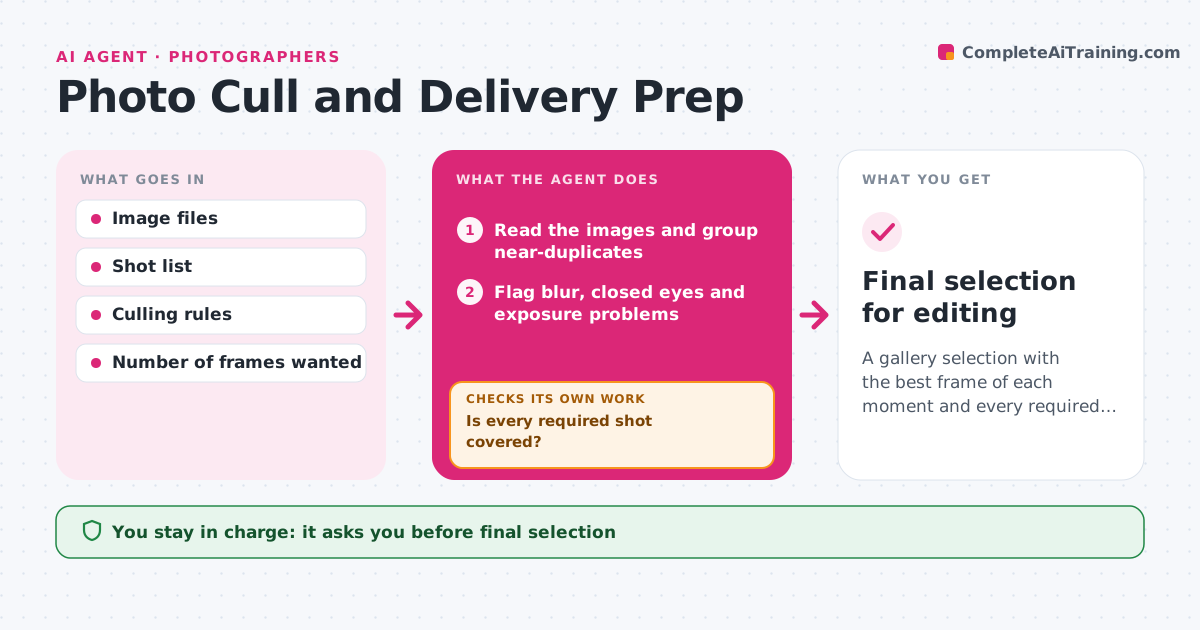
A gallery selection with the best frame of each moment and every required shot covered
What it does
Culling and sorting takes days, and near-duplicate or blinking shots slip into the gallery. This agent reads the images and groups near-duplicates. It flags blur, closed eyes and exposure problems, and picks the best of each group against the shot list. It then checks that every required shot is covered, such as the family group or the ring exchange. If coverage is missing, it lists the missing shots and looks for alternates in the rejects. It checks again after the photographer's changes. The photographer approves the final selection before editing. Edge case: a shot with closed eyes that captures a real moment is kept in a separate pile for the photographer to review.
How it works
Follow the arrows from top to bottom. The orange dashed arrow is the loop: when a check fails, the agent goes back and tries again.
Read the steps as a list
- Images imported
- Read the images and group near-duplicates
- Flag blur, closed eyes and exposure problems
- Pick the best frame of each group
- Compare the picks with the shot list
- Is every required shot covered?If not: search the rejects for alternates and list what is still missing. Back to step 4.
- Create a moments pile for flagged frames that matter
- Photographer reviews and approves the selectionThe agent waits here for your OK.
- Did the photographer's changes leave any required shot uncovered?If not: list the gap and suggest the best alternate. Back to step 4.
- Final selection for editing
How it decides
Best frames are picked by sharpness, open eyes and exposure. The selection passes when each required shot has at least one chosen frame.
- Prefer sharp frames with open eyes
- Group frames taken within 3 seconds
- Require every shot on the list to have a pick
- Keep emotional frames in a separate pile
Make it yours
Every agent is a starting point. You choose these settings for your own situation.
- Number of frames to pick
- Grouping time window (default 3 seconds)
- Shot list
- Culling rules
What keeps you in control
It always asks you first
- Final selection
- Deleting any rejected image
Hard limits
- Never deletes images
- Never edits the photos
It stops when
- Done: selection approved with all shots covered
- Stop: no images can be read
Set it up
We guide you through the set-up, step by step
Members get the full set-up guide for this agent. No technical skills needed: you copy, paste and upload.
- One set of instructions to paste into your AI, with the clicks for ChatGPT, Claude, Microsoft 365 Copilot, Gemini and Grok
- The agent then walks you through connecting your own data, one source at a time
- A downloadable copy with the flow chart, the rules and the full guide