AI agent for photographers
Photo Print Order Proofing Agent
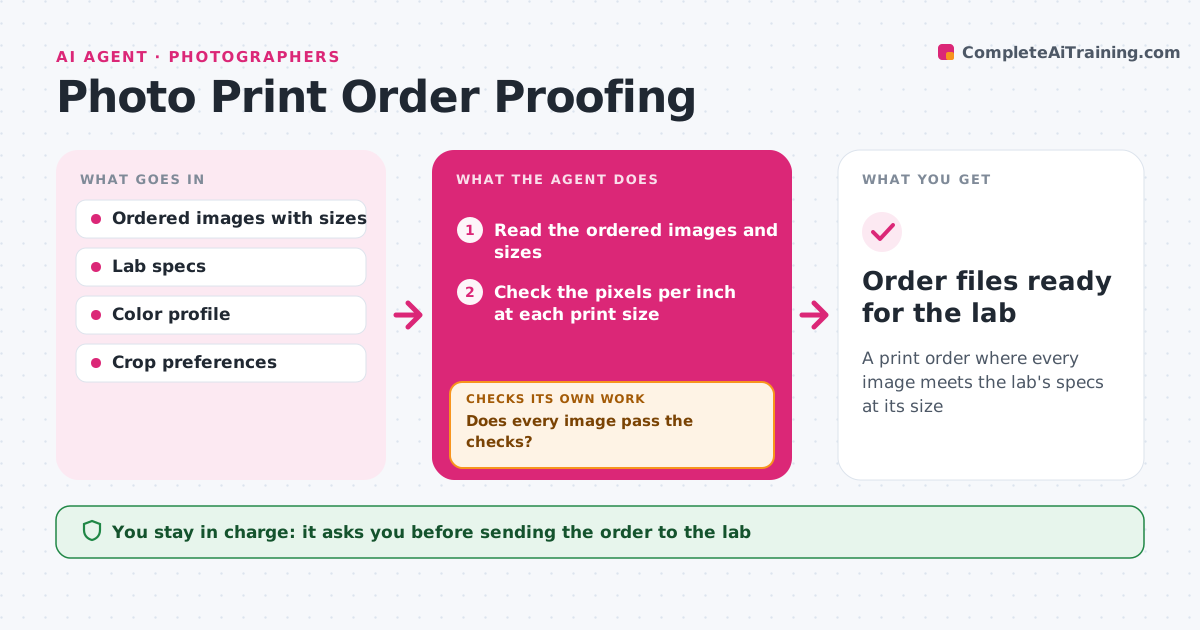
A print order where every image meets the lab's specs at its size
What it does
Print orders go out with wrong crops, sizes or color, and reprints cost money. This agent checks each ordered image for resolution at the print size, aspect ratio crop, color profile and edge safety. It proposes fixes such as a different crop, a lower size or a profile conversion. It re-renders proofs for each fix and checks them again, because a new crop can cut a face or text. It repeats until each print passes or flags the image as not suitable at that size. The photographer approves the order before it goes to the lab. Edge case: a panorama ordered at a standard ratio is flagged with a crop preview rather than cropped automatically.
How it works
Follow the arrows from top to bottom. The orange dashed arrow is the loop: when a check fails, the agent goes back and tries again.
Read the steps as a list
- Print order built
- Read the ordered images and sizes
- Check the pixels per inch at each print size
- Check the aspect ratio crop and the edge safety
- Check the color profile against the lab
- Does every image pass the checks?If not: propose a new crop, a smaller size or a profile conversion. Back to step 3.
- Re-render the proofs
- Do the new proofs keep faces and text inside the crop?If not: adjust the crop again. Back to step 3.
- Photographer approves the orderThe agent waits here for your OK.
- Order files ready for the lab
How it decides
An image passes when its pixels per inch at the print size meet the minimum, the crop keeps the subject and the profile matches the lab.
- Require 200 pixels per inch at the print size
- Keep faces and text inside a 5% safe margin
- Convert to the lab's profile
- Flag a size that cannot be reached
Make it yours
Every agent is a starting point. You choose these settings for your own situation.
- Minimum pixels per inch (default 200)
- Lab specs
- Safe margin
- Color profile
What keeps you in control
It always asks you first
- Sending the order to the lab
- Changing the size of a print
Hard limits
- Never sends the order to the lab
- Never uses upscaling without a note
It stops when
- Done: every image passes and the photographer approved
- Stop: lab specs are not available
Set it up
We guide you through the set-up, step by step
Members get the full set-up guide for this agent. No technical skills needed: you copy, paste and upload.
- One set of instructions to paste into your AI, with the clicks for ChatGPT, Claude, Microsoft 365 Copilot, Gemini and Grok
- The agent then walks you through connecting your own data, one source at a time
- A downloadable copy with the flow chart, the rules and the full guide