AI agent for laboratory technicians
Plate Assay QC Agent
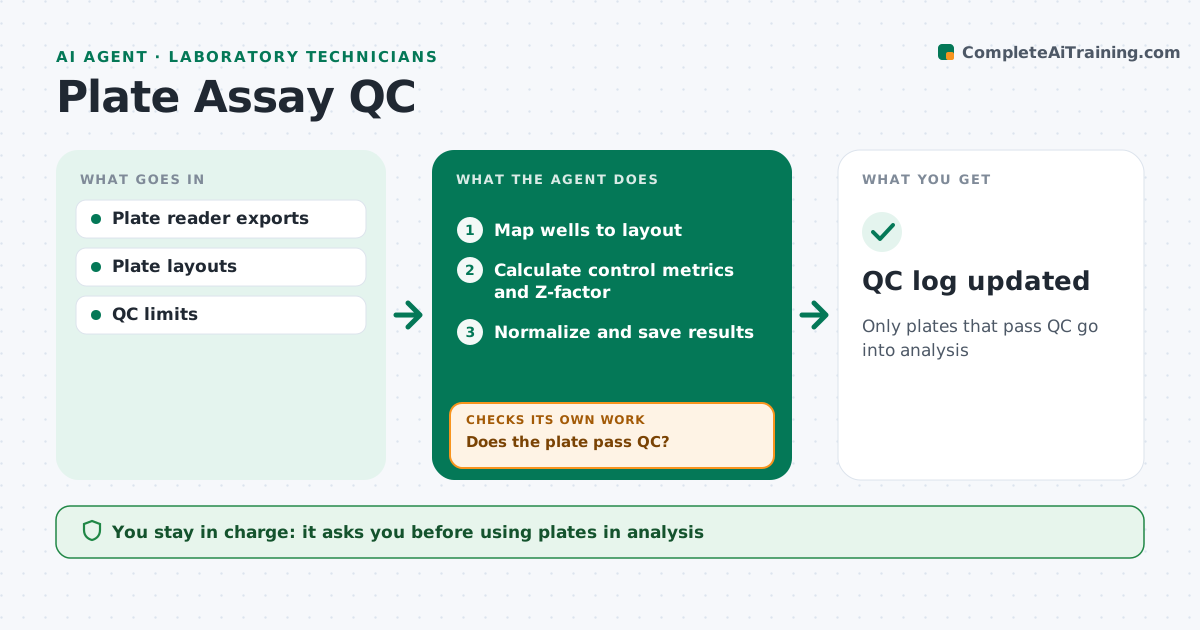
Only plates that pass QC go into analysis
What it does
Plate assays are only as good as their controls, and a failed plate that slips through can waste weeks of follow-up. After each plate is read, this agent maps wells to the plate layout and calculates control metrics, the Z-factor, the signal window and edge effects. Plates that fail QC are marked for rerun with the reason. Passing plates are normalized and saved. Over time, it tracks control values to catch slow reagent drift before plates start failing. The scientist approves which plates are used in analysis, and every decision goes into the QC log. Edge case: when a plate has one failed control well, the agent checks whether it is a single bad well, which can be excluded with a note, or a plate-wide problem that means the whole plate must be rerun.
How it works
Follow the arrows from top to bottom. The orange dashed arrow is the loop: when a check fails, the agent goes back and tries again.
Read the steps as a list
- Plate read
- Map wells to layout
- Calculate control metrics and Z-factor
- Does the plate pass QC?If not: mark for rerun with reason. Back to step 3.
- Normalize and save results
- Scientist approves plates for analysisThe agent waits here for your OK.
- QC log updated
How it decides
It passes plates when controls and Z-factor meet limits and no edge pattern is found.
- Fail plates below Z-factor limit
- Flag edge effects
- Track control drift over time
Make it yours
Every agent is a starting point. You choose these settings for your own situation.
- Z-factor limit (default 0.5)
- Control limits
- Edge effect rule
- Report format
What keeps you in control
It always asks you first
- Using plates in analysis
Hard limits
- Never deletes data
It stops when
- Done: plates logged
- Stop: layout missing
Set it up
We guide you through the set-up, step by step
Members get the full set-up guide for this agent. No technical skills needed: you copy, paste and upload.
- One set of instructions to paste into your AI, with the clicks for ChatGPT, Claude, Microsoft 365 Copilot, Gemini and Grok
- The agent then walks you through connecting your own data, one source at a time
- A downloadable copy with the flow chart, the rules and the full guide