AI agent for podcasters
Podcast Directory Submission and Feed Health Agent
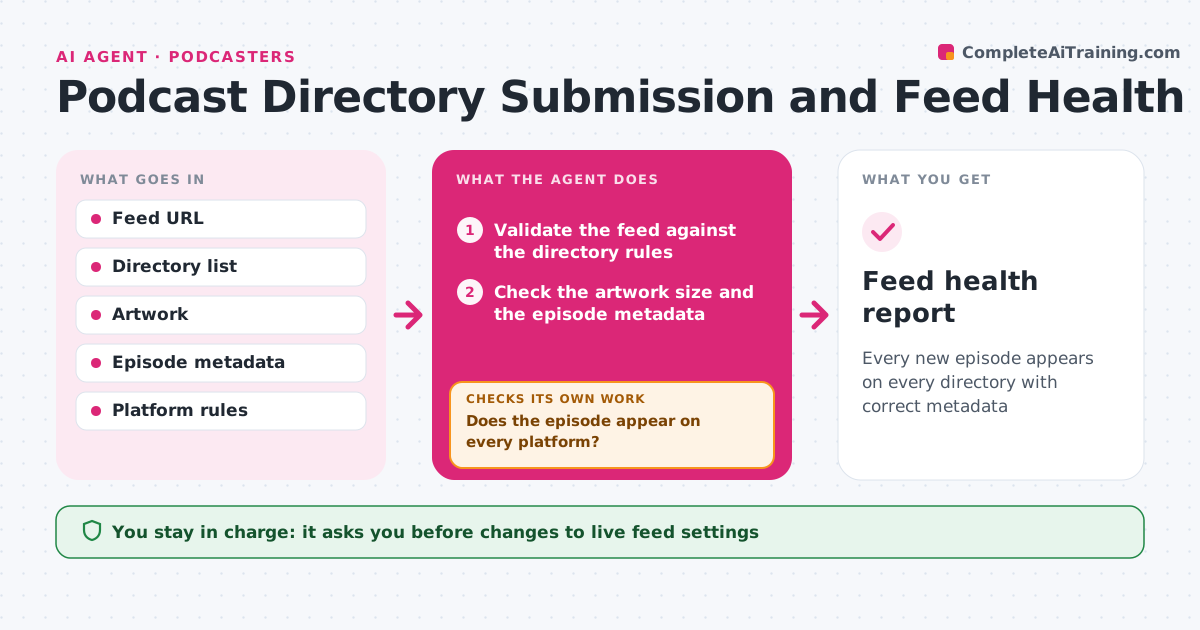
Every new episode appears on every directory with correct metadata
What it does
Feed errors and missing artwork cause an episode to not appear on a platform. This agent checks the feed against the directory rules for each platform. After a new episode, it tests whether the episode shows up on each directory, and checks artwork size and metadata such as title, description and explicit tag. It fixes feed errors, for example a wrong date format or a missing enclosure length, and checks again, waiting a reasonable time between checks. It repeats until each platform shows the episode, or reports the directory that is delayed. The host approves any change to live feed settings. Edge case: an episode that shows on one platform but not another is traced to the platform's own cache, not the feed.
How it works
Follow the arrows from top to bottom. The orange dashed arrow is the loop: when a check fails, the agent goes back and tries again.
Read the steps as a list
- New episode published
- Validate the feed against the directory rules
- Check the artwork size and the episode metadata
- Fix feed errors on a draft of the settings
- Host approves the change to live feed settingsThe agent waits here for your OK.
- Apply the fix
- Check that the episode appears on each platform
- Does the episode appear on every platform?If not: re-check the feed, wait for the platform's refresh time and test again. Back to step 4.
- Trace a delayed platform to the feed or to its cache
- Is the delay in the feed or at the platform?If not: fix the feed if it is the cause or report the platform delay. Back to step 4.
- Feed health report
How it decides
A feed passes when it validates, the artwork meets the size rule and the new episode appears on each directory within the expected time.
- Require artwork of at least 3000 by 3000 pixels
- Require valid dates and enclosure lengths
- Wait 60 minutes before the first platform check
- Re-check up to three times
Make it yours
Every agent is a starting point. You choose these settings for your own situation.
- Platforms to check
- Artwork size
- Wait time before a check (default 60 minutes)
- Feed URL
What keeps you in control
It always asks you first
- Changes to live feed settings
- Resubmitting to a directory
Hard limits
- Never changes the live feed without approval
- Never claims a platform error without testing the feed
It stops when
- Done: the episode appears everywhere
- Stop: the delay is at the platform after 48 hours
Set it up
We guide you through the set-up, step by step
Members get the full set-up guide for this agent. No technical skills needed: you copy, paste and upload.
- One set of instructions to paste into your AI, with the clicks for ChatGPT, Claude, Microsoft 365 Copilot, Gemini and Grok
- The agent then walks you through connecting your own data, one source at a time
- A downloadable copy with the flow chart, the rules and the full guide