AI agent for audio engineers
Noise Source Diagnosis Agent
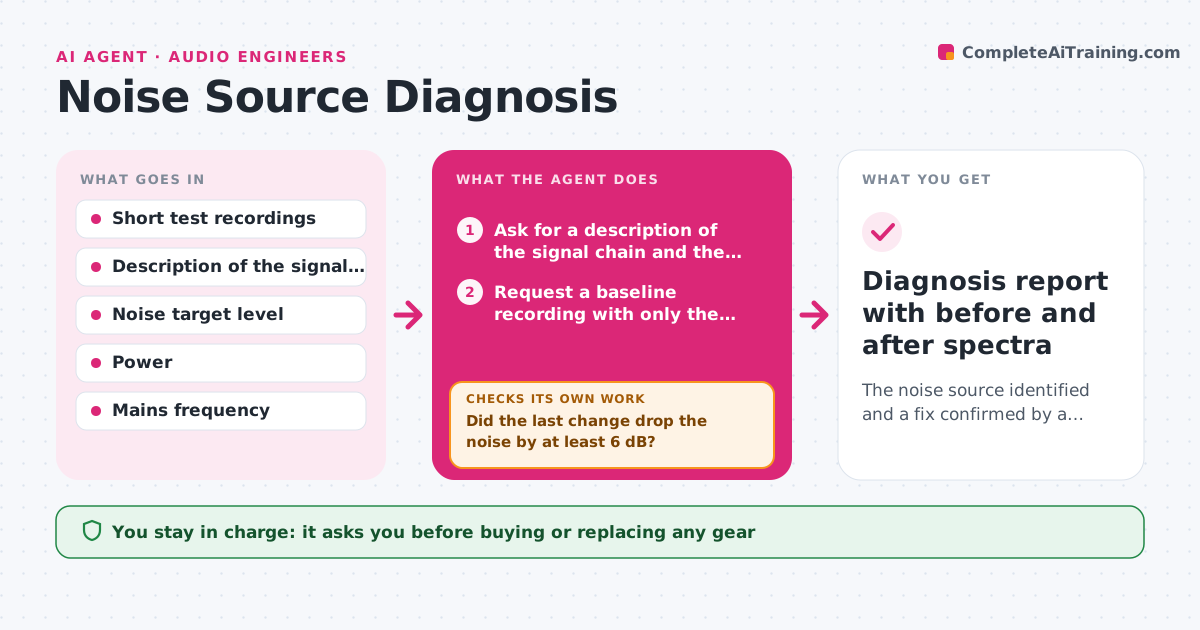
The noise source identified and a fix confirmed by a clean test recording
What it does
Finding the source of a noise takes hours of trial and error through the signal chain. This agent works like a careful technician. It asks for short test recordings with each element isolated, such as the interface alone, then the preamp, then the cable and each device. It analyzes the spectrum for hum harmonics at 50 or 60 Hz, hiss or room reflections, and proposes the next test. After each change it compares the new recording with the previous one and narrows the suspects. It stops when the noise falls under the target level or only gear changes remain. Edge case: a hum that appears only when the lights are on points to a dimmer, so the agent asks for a test with the lights off. The user approves any gear purchase or wiring change.
How it works
Follow the arrows from top to bottom. The orange dashed arrow is the loop: when a check fails, the agent goes back and tries again.
Read the steps as a list
- User reports a noise
- Ask for a description of the signal chain and the mains frequency
- Request a baseline recording with only the interface
- Analyze the spectrum for hum harmonics, hiss and reflections
- Propose the next isolated test
- Did the last change drop the noise by at least 6 dB?If not: record the result, rule out that element and choose the next suspect. Back to step 3.
- Name the likely source and a fix
- Does a recording with the fix applied meet the target level?If not: narrow the cause further and plan another isolating test. Back to step 3.
- User approves any gear purchase or wiring changeThe agent waits here for your OK.
- Diagnosis report with before and after spectra
How it decides
It picks the next test that rules out the largest group of suspects. A cause is confirmed when removing or changing one element drops the noise by at least 6 dB.
- Test one element at a time
- Treat peaks at multiples of 50 or 60 Hz as hum
- Confirm a cause only with a 6 dB or larger drop
- Suggest free fixes first, such as cables and power
Make it yours
Every agent is a starting point. You choose these settings for your own situation.
- Noise target level (default -60 dB)
- Mains frequency
- Recording length per test
- Gear the user can swap
What keeps you in control
It always asks you first
- Buying or replacing any gear
- Wiring or grounding changes
Hard limits
- Never advises opening mains-powered equipment
- Never recommends purchases before free tests are done
It stops when
- Done: noise is under target in a test recording
- Stop: all elements tested and the noise remains
Set it up
We guide you through the set-up, step by step
Members get the full set-up guide for this agent. No technical skills needed: you copy, paste and upload.
- One set of instructions to paste into your AI, with the clicks for ChatGPT, Claude, Microsoft 365 Copilot, Gemini and Grok
- The agent then walks you through connecting your own data, one source at a time
- A downloadable copy with the flow chart, the rules and the full guide