AI agent for policy analysts
Policy Cost-Benefit Analysis Agent
A sourced cost-benefit comparison of policy options with sensitivity results
What it does
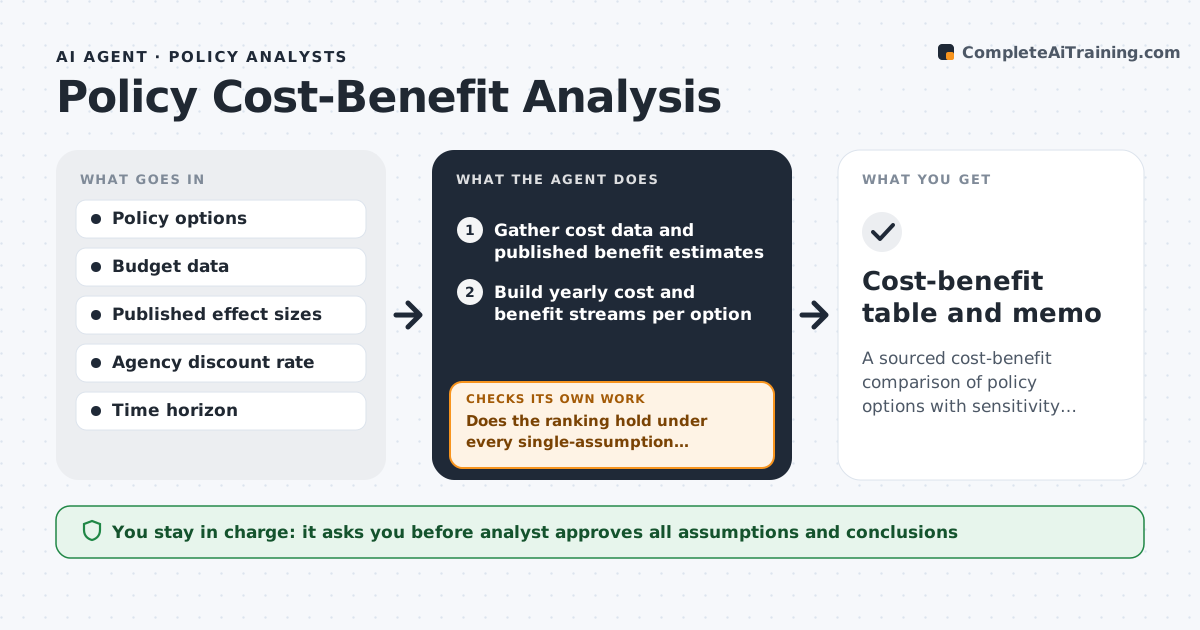
When officials compare policy options, analysts must estimate costs and benefits over many years, and a single shaky assumption can decide the answer. This agent sets up the options the analyst defines, gathers cost data and published benefit estimates, and builds yearly cost and benefit streams. It calculates net present value with the agency's required discount rate. Then it varies each key assumption across its plausible range. If one change flips the ranking, it labels the result not robust, names the deciding assumption and asks the analyst for a better estimate. Every number links to its source. The analyst chooses the assumptions and the recommendation. Edge case: benefits that cannot be fairly priced, such as dignity or equity effects, are listed separately and not forced into dollars.
How it works
Follow the arrows from top to bottom. The orange dashed arrow is the loop: when a check fails, the agent goes back and tries again.
Read the steps as a list
- Analyst defines the policy options
- Gather cost data and published benefit estimates
- Build yearly cost and benefit streams per option
- Calculate net present value with the agency discount rate
- Vary each key assumption across its plausible range
- Does the ranking hold under every single-assumption change?If not: label the result not robust, list the deciding assumption and ask the analyst for a better estimate. Back to step 3.
- Analyst approves assumptions and the write-upThe agent waits here for your OK.
- Cost-benefit table and memo
How it decides
Options are ranked by net present value. If any single assumption changed within its range flips the ranking, the result is labeled not robust.
- Use the agency's required discount rate
- Unpriceable effects are listed, not monetized
- Ranking flips under one assumption mean 'not robust'
Make it yours
Every agent is a starting point. You choose these settings for your own situation.
- Discount rate (default agency rate)
- Time horizon (default 10 years)
- Which assumptions to test
- Output format (memo, slide, table)
What keeps you in control
It always asks you first
- Analyst approves all assumptions and conclusions
Hard limits
- Does not recommend a policy
- Every figure must show its source
It stops when
- Done: robust ranking or clear statement of what it depends on
- Stop: no cost data for an option
Set it up
We guide you through the set-up, step by step
Members get the full set-up guide for this agent. No technical skills needed: you copy, paste and upload.
- One set of instructions to paste into your AI, with the clicks for ChatGPT, Claude, Microsoft 365 Copilot, Gemini and Grok
- The agent then walks you through connecting your own data, one source at a time
- A downloadable copy with the flow chart, the rules and the full guide