AI agent for job seekers
Portfolio and Work Sample Curator Agent
Every application includes the best samples, all links work and nothing confidential is shared.
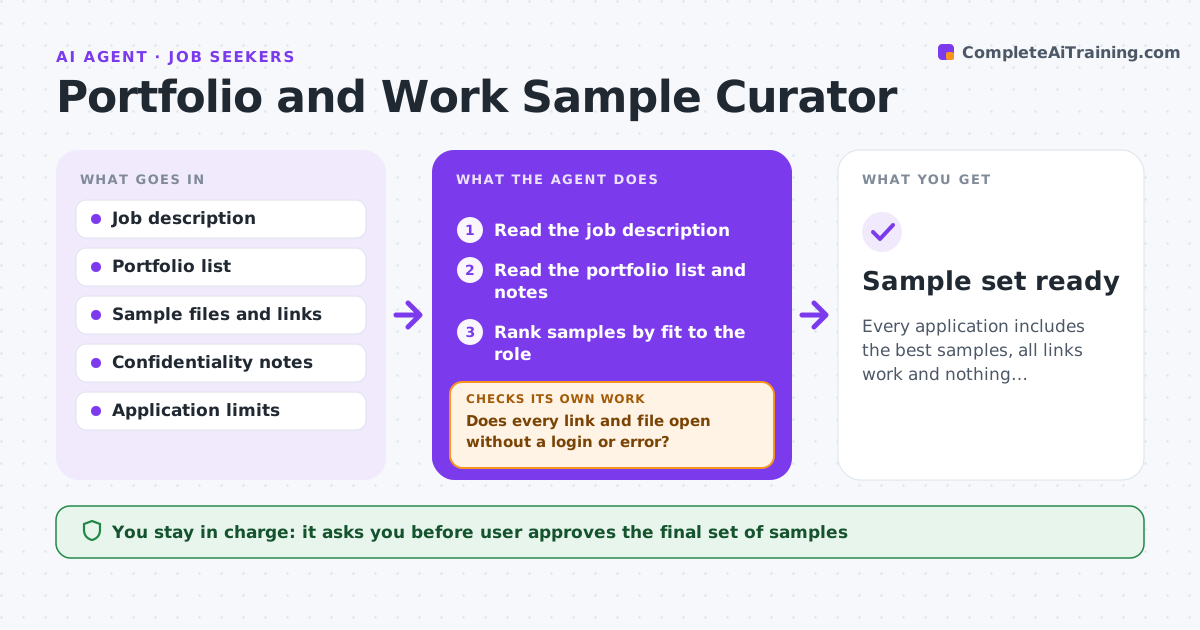
What it does
Candidates send the wrong samples or old links that no longer work, and miss the chance. For each application, the agent reads the job and picks the work samples that best fit the role. It checks every link, the permissions, any confidentiality limits and whether files open on a clean device. If a link fails, it fixes it or replaces it with another sample. It also checks the sample set against the page limit and the role. The user approves the final set. Edge case: a sample made for a past employer that is under a confidentiality limit, which the agent replaces with a personal project.
How it works
Follow the arrows from top to bottom. The orange dashed arrow is the loop: when a check fails, the agent goes back and tries again.
Read the steps as a list
- Application started
- Read the job description
- Read the portfolio list and notes
- Rank samples by fit to the role
- Select the best set within the application limits
- Open every link and file on a clean session
- Does every link and file open without a login or error?If not: Fix the link or replace the sample. Back to step 6.
- Check confidentiality and permissions
- Is every sample cleared to share?If not: Replace it with another sample. Back to step 7.
- User approves the final setThe agent waits here for your OK.
- Sample set ready
How it decides
It ranks samples by how closely they show the skills the job asks for and excludes any with a confidentiality or permission problem.
- Pick 3 samples unless the job says otherwise
- Exclude work under a confidentiality limit
- Links must open without a login
- Check files under 10 MB and in common formats
Make it yours
Every agent is a starting point. You choose these settings for your own situation.
- Number of samples (default 3)
- File size limit
- Which projects are confidential
- Formats allowed
What keeps you in control
It always asks you first
- User approves the final set of samples
Hard limits
- Never share confidential work
- Do not alter samples without the user
It stops when
- Done: samples tested and approved
- Stop: no suitable sample is cleared for sharing
Set it up
We guide you through the set-up, step by step
Members get the full set-up guide for this agent. No technical skills needed: you copy, paste and upload.
- One set of instructions to paste into your AI, with the clicks for ChatGPT, Claude, Microsoft 365 Copilot, Gemini and Grok
- The agent then walks you through connecting your own data, one source at a time
- A downloadable copy with the flow chart, the rules and the full guide