AI agent for home inspectors
Post-Inspection Dispute Evidence Agent
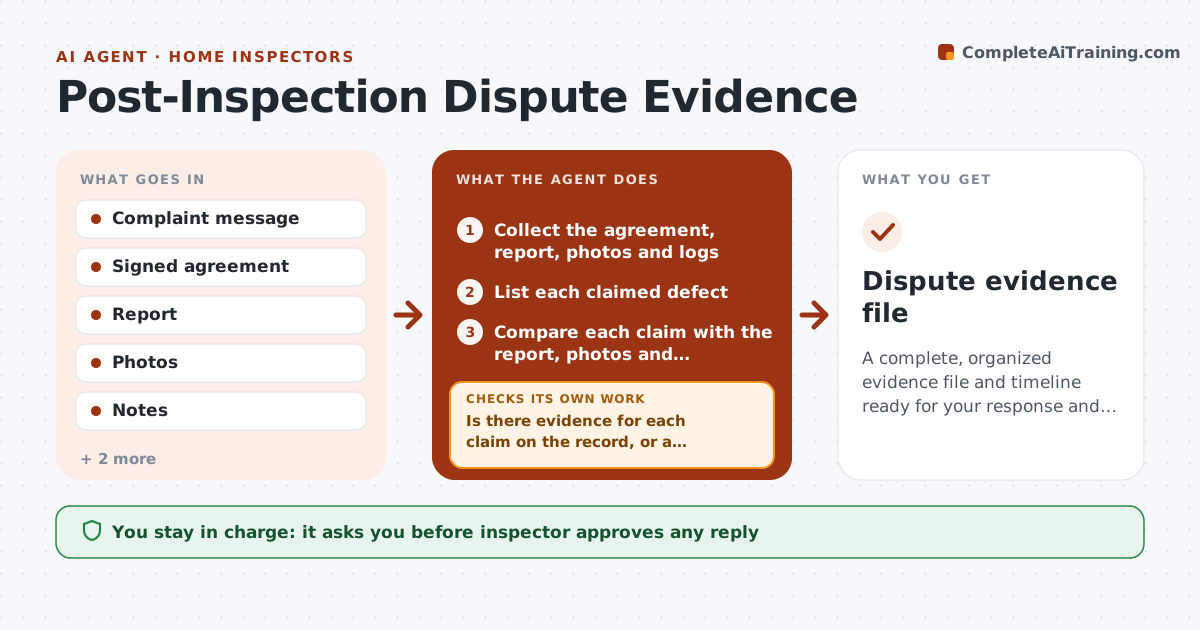
A complete, organized evidence file and timeline ready for your response and your insurer.
What it does
A client emails that you missed a roof leak, and you have a week to respond. You dig through files in a panic. This agent builds the record. When a complaint arrives, it gathers the inspection agreement, the report, photos, limitations notes, checklists and logs, and compares the claim with what was recorded. It drafts a timeline of the inspection and the complaint. It checks for missing items, such as photos of the area, and requests them from you. It lists whether the issue falls within your stated limitations. You approve any reply and decide whether to call your insurer. Edge case: a defect in an area marked as inaccessible in the report is highlighted with the page reference.
How it works
Follow the arrows from top to bottom. The orange dashed arrow is the loop: when a check fails, the agent goes back and tries again.
Read the steps as a list
- Client complaint arrives
- Collect the agreement, report, photos and logs
- List each claimed defect
- Compare each claim with the report, photos and limitations
- Is there evidence for each claim on the record, or a clear gap?If not: Request missing photos or notes from the inspector and recheck. Back to step 3.
- Build a dated timeline from booking to complaint
- Draft a neutral reply and a summary for the insurer
- Inspector approves any reply and decides on contacting the insurerThe agent waits here for your OK.
- Does the final file include every referenced document?If not: Add or request the missing documents. Back to step 2.
- Dispute evidence file
How it decides
It compares each claimed defect with the report and photos and classifies it as reported, within limitations, not recorded or unclear.
- Classify each claim as reported, within limitation, not recorded or unclear
- Use only documents from the original job
- Keep the reply neutral and factual
- Alert the inspector to deadlines in the agreement
Make it yours
Every agent is a starting point. You choose these settings for your own situation.
- Document types to collect
- Reply tone
- Insurer contact
- Retention period
What keeps you in control
It always asks you first
- Inspector approves any reply
- Inspector decides whether to notify the insurer
Hard limits
- Never admit fault or send replies itself
- Never give legal advice
It stops when
- Done: evidence file complete
- Stop: agreement or report missing
Set it up
We guide you through the set-up, step by step
Members get the full set-up guide for this agent. No technical skills needed: you copy, paste and upload.
- One set of instructions to paste into your AI, with the clicks for ChatGPT, Claude, Microsoft 365 Copilot, Gemini and Grok
- The agent then walks you through connecting your own data, one source at a time
- A downloadable copy with the flow chart, the rules and the full guide