AI agent for insurance data analysts
Post-Rate-Change Monitoring Agent
A monthly view of whether each rate change is performing as filed, with causes and recommended action
What it does
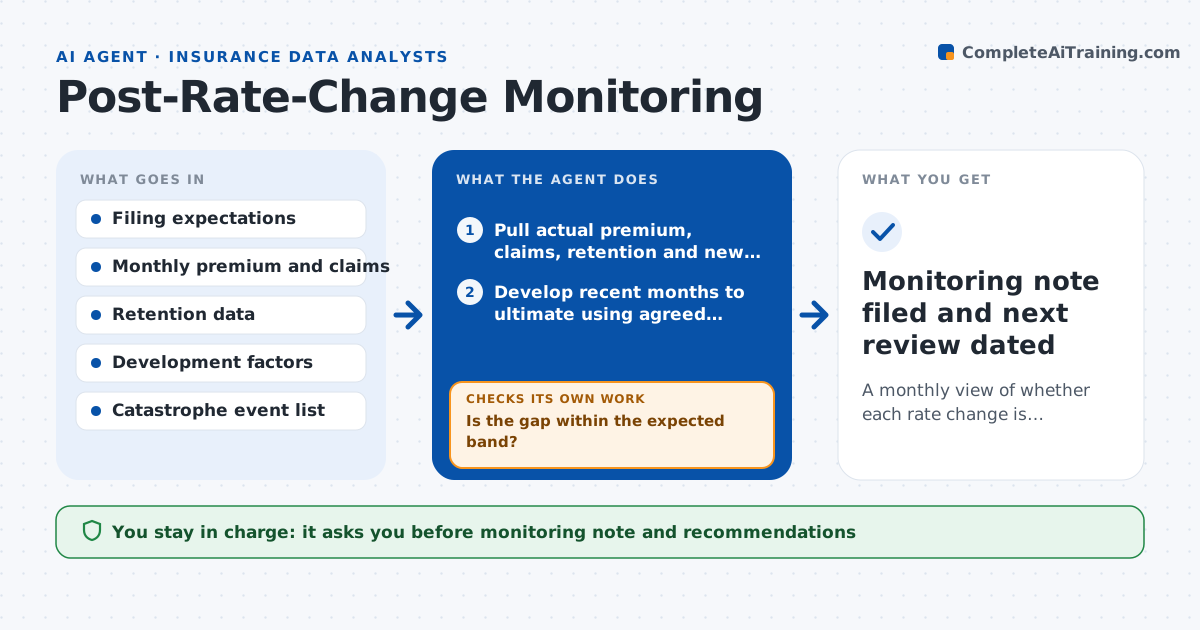
A rate change is filed with expected loss ratios, retention and volume effects. Months later, nobody compares the actual outcome with that promise. This agent holds the expectations from the filing and each month pulls the actual loss ratio, new business, renewal retention and average premium. It compares them with what was expected, adjusting for how immature the recent months are. It then tests segments such as territory, class and agent channel to find where the gap sits. If a segment misses, it checks whether the cause is data lag, mix change or a real pricing problem, and reruns the comparison with the right adjustment. It writes a monthly monitoring note with recommendations. The actuary approves the note and any follow-up action. Edge case: a storm month inflates one territory, so the agent separates catastrophe losses before judging.
How it works
Follow the arrows from top to bottom. The orange dashed arrow is the loop: when a check fails, the agent goes back and tries again.
Read the steps as a list
- Month closes after a rate change
- Pull actual premium, claims, retention and new business
- Develop recent months to ultimate using agreed factors
- Compare loss ratio, retention and volume with the filing
- Is the gap within the expected band?If not: split the data by territory, class and channel to locate the gap. Back to step 3.
- Remove catastrophe events and large losses from the segments
- Does the gap remain after adjusting for development and catastrophes?If not: rerun the comparison with the adjustments and update the segment table. Back to step 3.
- Write the findings with likely cause per segment
- Recommend actions such as rate review, underwriting guidance or wait another month
- Actuary approves the monitoring note and recommendationsThe agent waits here for your OK.
- Monitoring note filed and next review dated
How it decides
It judges a miss only after adjusting for claim development and excluding catastrophe events, and acts on segments whose gap exceeds a set band for two months running.
- Treat a loss ratio gap of more than 3 points as a miss
- Act only on segments that miss two months running
- Exclude events on the catastrophe list from the comparison
- Recommend waiting when fewer than six months of data exist
Make it yours
Every agent is a starting point. You choose these settings for your own situation.
- Loss ratio gap that counts as a miss (default 3 points)
- Segments to test
- Months of data needed before recommending action (default six)
- Catastrophe event list source
What keeps you in control
It always asks you first
- Monitoring note and recommendations
- Any proposal to refile or change rates
Hard limits
- Never changes rates or files anything
- States how confident the result is given data age
- Keeps the filing expectations unchanged for comparison
It stops when
- Done: monthly note is approved
- Stop: data for the month is incomplete or filing expectations are missing
Set it up
We guide you through the set-up, step by step
Members get the full set-up guide for this agent. No technical skills needed: you copy, paste and upload.
- One set of instructions to paste into your AI, with the clicks for ChatGPT, Claude, Microsoft 365 Copilot, Gemini and Grok
- The agent then walks you through connecting your own data, one source at a time
- A downloadable copy with the flow chart, the rules and the full guide