AI agent for dentists
Pre-Visit Health History Agent
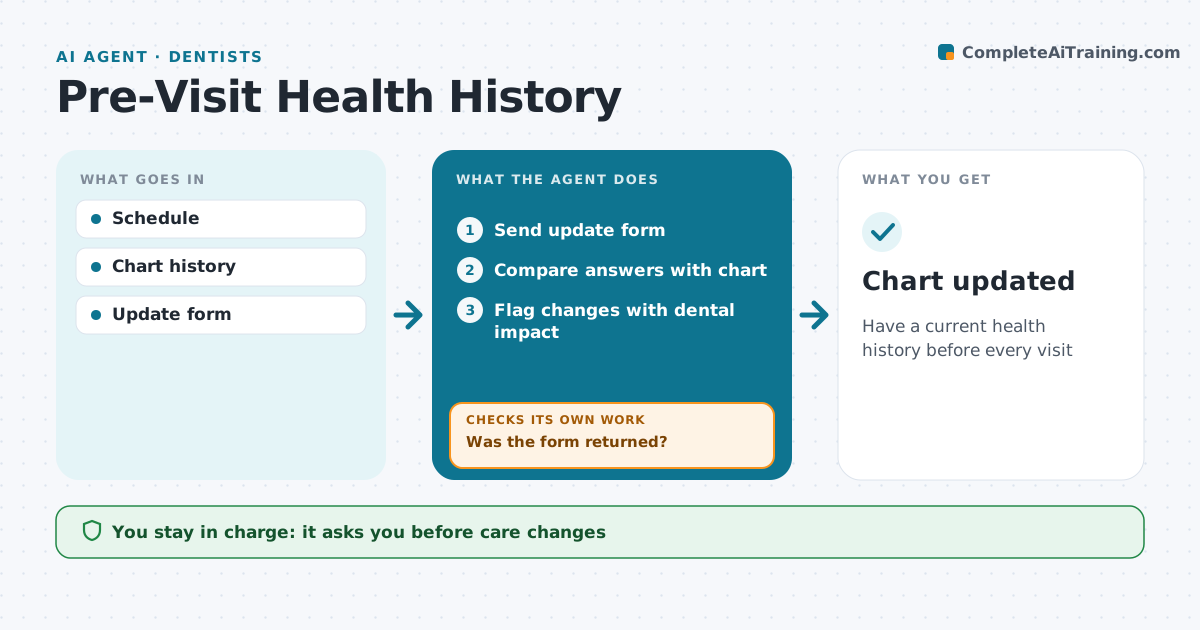
Have a current health history before every visit
What it does
A patient's health history must be current before treatment, especially for blood thinners, joint replacements, heart conditions and allergies. Outdated forms can lead to unsafe care. This agent sends an update form before each visit, compares the answers with the chart, and highlights what changed. It flags items that may need action, like a new anticoagulant, a recent joint replacement that may need premedication review, or a drug allergy that affects anesthetic choice. If the form is not returned, it reminds the patient and marks the chart for a chairside update. It prepares a short summary of changes for the dentist. The dentist decides any change in care and any premedication. Edge case: a new medication name it cannot identify is listed for staff to check rather than guessed.
How it works
Follow the arrows from top to bottom. The orange dashed arrow is the loop: when a check fails, the agent goes back and tries again.
Read the steps as a list
- Appointment in 3 days
- Send update form
- Was the form returned?If not: send reminder and mark for chairside update. Back to step 2.
- Compare answers with chart
- Flag changes with dental impact
- Dentist reviews flagsThe agent waits here for your OK.
- Chart updated
How it decides
Answers are compared with the chart. Changes with dental impact are flagged.
- New anticoagulants flag
- Joint replacement under 2 years flags
- Unknown drugs go to staff
Make it yours
Every agent is a starting point. You choose these settings for your own situation.
- Days before visit
- Flag list
- Form version
- Reminder timing
What keeps you in control
It always asks you first
- Care changes
- Premedication decisions
Hard limits
- No medical advice to patients
- Chart not changed without staff
It stops when
- Done: history updated
- Stop: patient declines to update, note
Set it up
We guide you through the set-up, step by step
Members get the full set-up guide for this agent. No technical skills needed: you copy, paste and upload.
- One set of instructions to paste into your AI, with the clicks for ChatGPT, Claude, Microsoft 365 Copilot, Gemini and Grok
- The agent then walks you through connecting your own data, one source at a time
- A downloadable copy with the flow chart, the rules and the full guide