AI agent for process development scientists
Process Capability Monitoring Agent
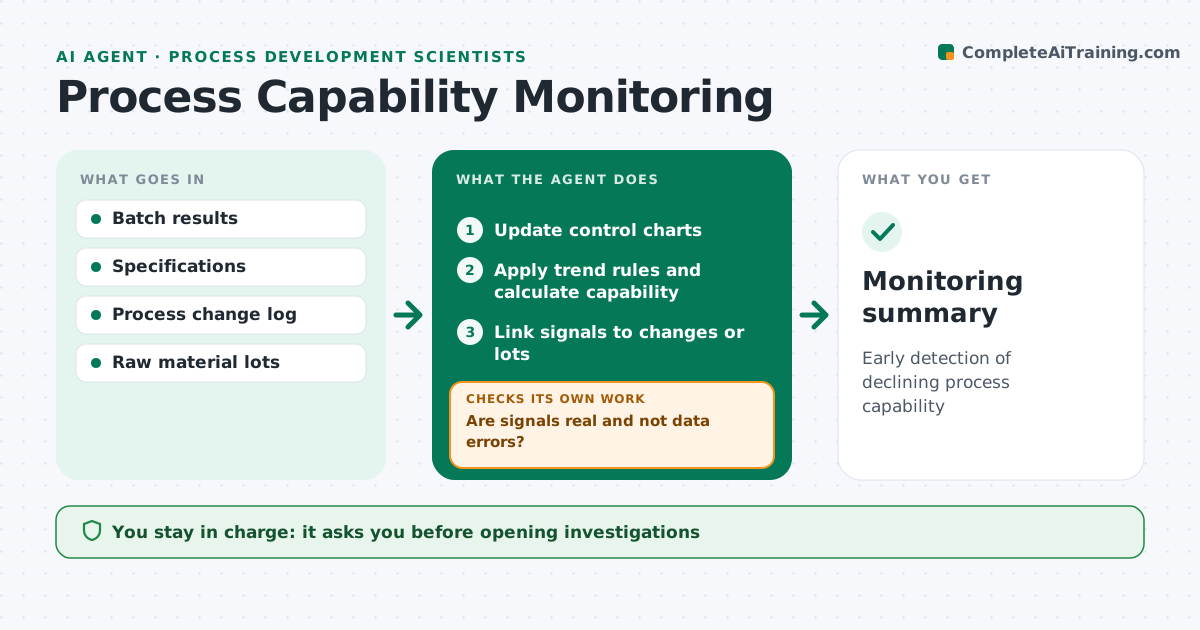
Early detection of declining process capability
What it does
Critical quality attributes should stay well within specification, and slow drifts are easy to miss batch by batch. After each batch, this agent adds results to control charts, calculates process capability, and applies trend rules such as several points in a row on one side of the mean. It flags shifts, trends and low capability. Before raising an alert, it checks for data entry errors, like a misplaced decimal. If it finds one, it asks for a correction and checks the chart again. For real signals, it links them to process changes, equipment work or raw material lots from the same period. It drafts a monitoring summary that also feeds the annual product review. You decide whether to open an investigation. Edge case: a shift that lines up with a new raw material lot is linked to that lot.
How it works
Follow the arrows from top to bottom. The orange dashed arrow is the loop: when a check fails, the agent goes back and tries again.
Read the steps as a list
- Batch results in
- Update control charts
- Apply trend rules and calculate capability
- Are signals real and not data errors?If not: correct data and recheck. Back to step 2.
- Link signals to changes or lots
- Scientist decides on investigationThe agent waits here for your OK.
- Monitoring summary
How it decides
It applies control chart rules and flags capability below the target.
- Use standard trend rules
- Flag capability below target
- Link to raw material lots
Make it yours
Every agent is a starting point. You choose these settings for your own situation.
- Capability target (default 1.33)
- Trend rules
- Attributes
- Report frequency
What keeps you in control
It always asks you first
- Opening investigations
Hard limits
- Never changes specifications
It stops when
- Done: summary filed
- Stop: results missing
Set it up
We guide you through the set-up, step by step
Members get the full set-up guide for this agent. No technical skills needed: you copy, paste and upload.
- One set of instructions to paste into your AI, with the clicks for ChatGPT, Claude, Microsoft 365 Copilot, Gemini and Grok
- The agent then walks you through connecting your own data, one source at a time
- A downloadable copy with the flow chart, the rules and the full guide