AI agent for independent consultants
Process Cycle Time Baseline Agent
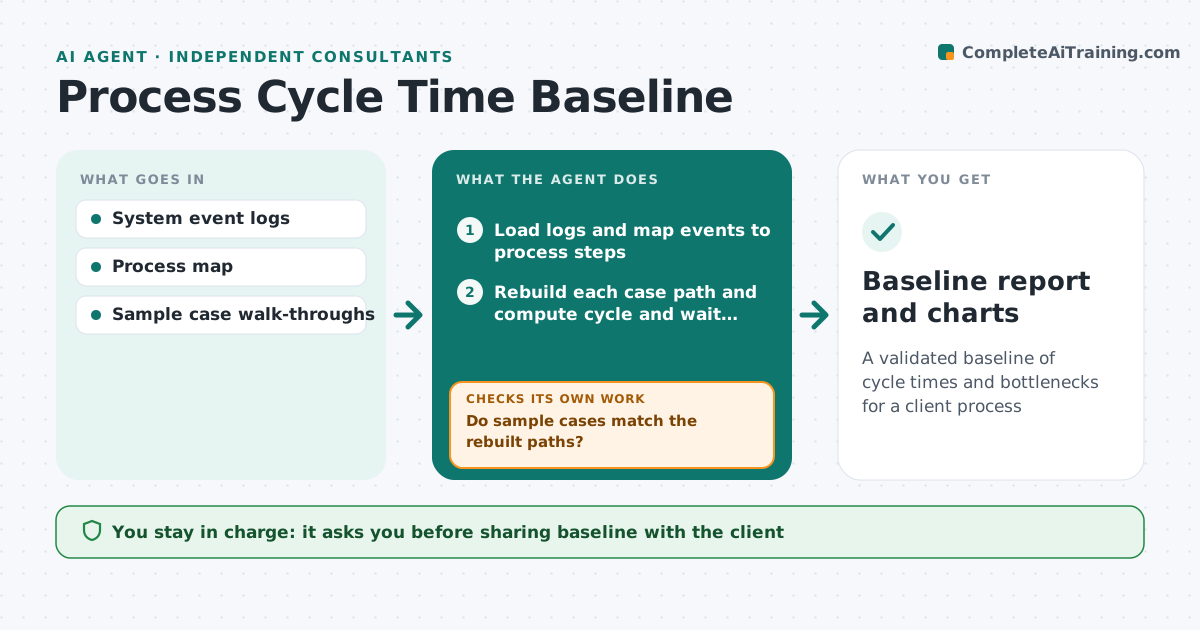
A validated baseline of cycle times and bottlenecks for a client process
What it does
Before improving a process, consultants need a baseline of how long each step takes and where work waits, but it often comes from interviews and guesses. This agent reads event logs from the client's systems, such as order or ticket timestamps, and rebuilds each case's path. It calculates cycle time, waiting time and rework loops by step and team. Cases with missing end events are reported separately, not counted as finished. It checks the log against a sample of real cases the client walks through. If the sample does not match, it fixes how events map to steps and recalculates. The consultant reviews the baseline and chooses which bottlenecks to present.
How it works
Follow the arrows from top to bottom. The orange dashed arrow is the loop: when a check fails, the agent goes back and tries again.
Read the steps as a list
- Event logs received
- Load logs and map events to process steps
- Rebuild each case path and compute cycle and wait times
- Compare five sample cases with client walk-throughs
- Do sample cases match the rebuilt paths?If not: fix the event to step mapping and rerun. Back to step 2.
- Rank bottlenecks by total waiting time
- Consultant approves baseline for client presentationThe agent waits here for your OK.
- Baseline report and charts
How it decides
It maps events to process steps, measures time between steps, and accepts the baseline only when sample cases match the log.
- Cases without end events are reported separately
- Bottlenecks ranked by total wait, not average
- Mapping must match at least 4 of 5 sample cases
Make it yours
Every agent is a starting point. You choose these settings for your own situation.
- Process steps and event mapping
- Sample size for validation
- Time unit and working calendar
- Chart style
What keeps you in control
It always asks you first
- Sharing baseline with the client
Hard limits
- No personal data in outputs
- Client logs stay in the engagement workspace
It stops when
- Done: baseline approved
- Stop: logs lack timestamps for key steps
Set it up
We guide you through the set-up, step by step
Members get the full set-up guide for this agent. No technical skills needed: you copy, paste and upload.
- One set of instructions to paste into your AI, with the clicks for ChatGPT, Claude, Microsoft 365 Copilot, Gemini and Grok
- The agent then walks you through connecting your own data, one source at a time
- A downloadable copy with the flow chart, the rules and the full guide